

Hidden characters Photoshop
I have created a script to extract all texts from a huge photoshop file with several layers and layersets and put it into a csv file.
This csv file will be sent to a translator who will return me the translations which with another script (that I also coded) I am going to replace to the original ones.
Now I have a problem.
SOME text layers are composed of several lines, SOME of which, during the export get broken into two lines.
The crazy thing is that some new lines are not broken and some are.
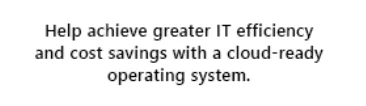
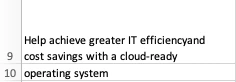
Take the shown example (see attachments): the string is written in a single text box /text layer.
When I export it with my script I find it split in ONE of the two new lines.
Obviously the first "carriage return" is different from the second, resulting different in the exported file.
I guess this is due to hidden characters in the text layer, but the problem is that I cannot show hidden characters. This is something very easy in Indesign , but I can't find a way to do that in Photoshop.
The question is: how do I show hidden characters in photoshop??
Thanks for your help.
Nicola
 AdChoices