
Participant
February 20, 2018
Answered

How am I accidentally rasterizing text, vector, smart objects?

  • February 20, 2018
  • 1 reply
  • 416 views

Hi,

I've been accidentally rasterizing text, vector or smart objects.

I looked into my keyboard shortcut settings and I haven't assigned anything for rasterizing.

I started happening around CC 2017.

What am I missing? any ideas or is this a bug?

Thank you so much.

Mac.

D
This topic has been closed for replies.
Correct answer

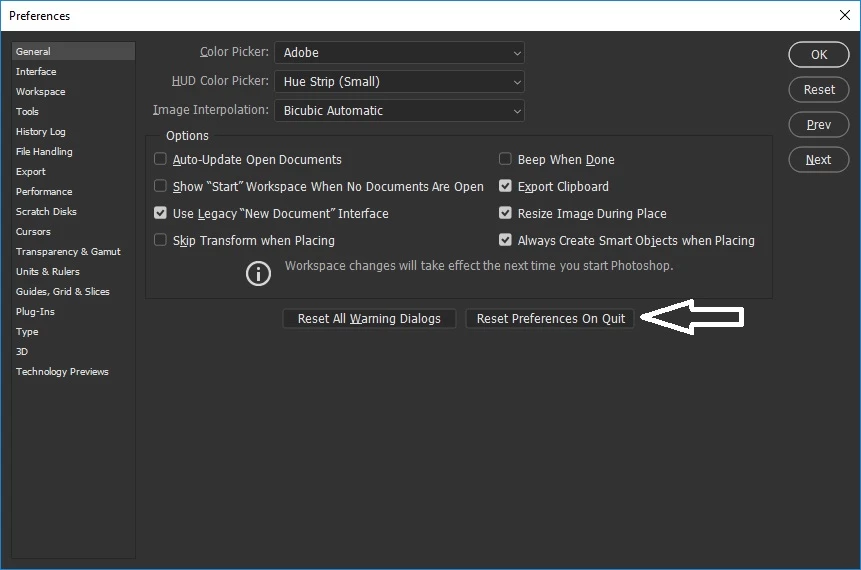
Have you tried resetting PS preferences

1 reply

Correct answer
February 20, 2018

Have you tried resetting PS preferences

Participant
February 20, 2018

Thanks, I'll give that a try...  but what does that exactly reset?

it's probably something really silly that I'm missing or it's a bug??... it's not an every day occurrence.

February 20, 2018

It will reset Photoshop to the default settings, so it's just like it's been freshly installed.

Don't think it's a bug as I haven't seeing anybody else having the issue, one other thing you could check is that the keyboard shortcuts are set to Photoshop Defaults