
Inspiring
January 9, 2017
Answered

How avoid the hyphen in filename when saving ?

  • January 9, 2017
  • 3 replies
  • 14865 views

I am working on mac, I have lots of photoshop files, I want to create output of those files as web jpeg my file naming is "xxxx xxx x" but when I save it or try to replace it the naming converts in to "xxxx-xxx-x" ie hyphen is added, so every time I have to rename files after saving as jpeg... I can't go for save as option becaz save for web is mandatory...

please help its is quite urgent...

Thanks in advance...
    Correct answer Jeff Arola

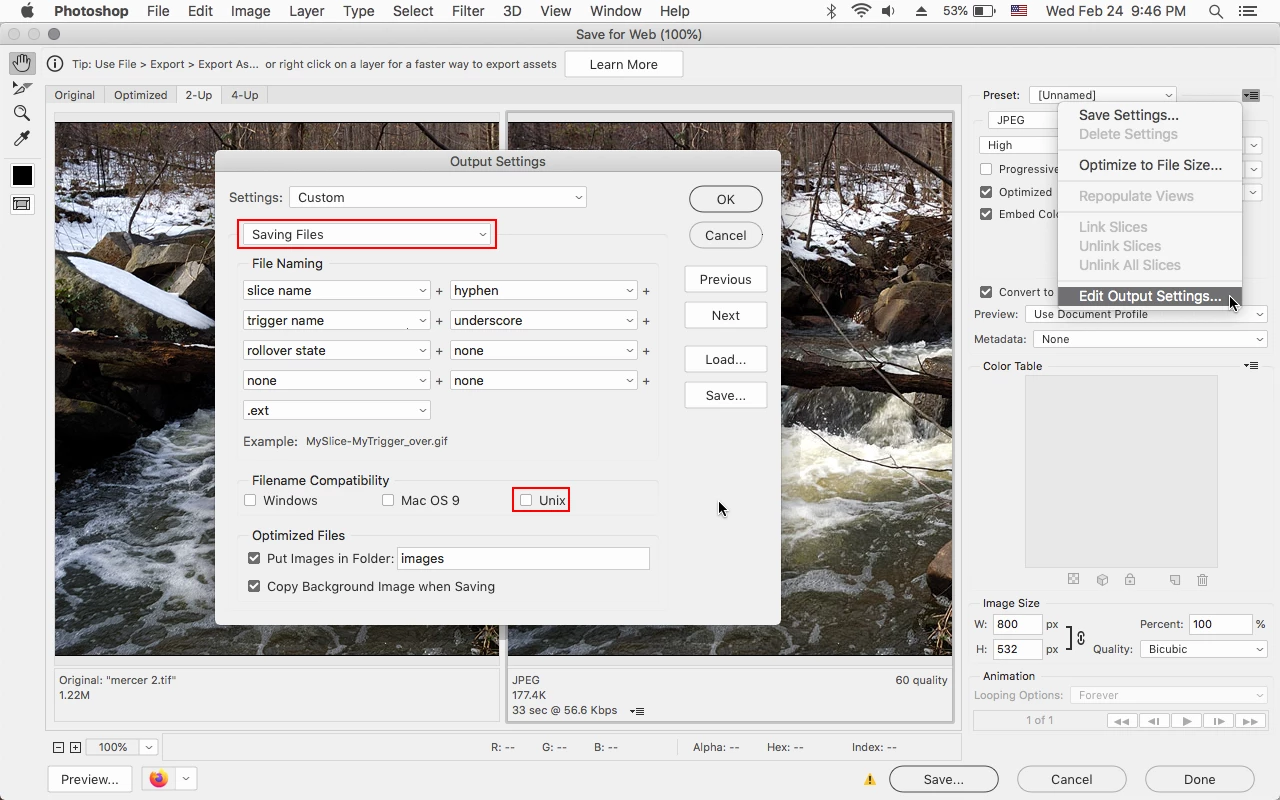
    In Save for Web go to Output Settings>Saving Files and uncheck Unix.


    3 replies

    italosan
    Community Expert
    Community Expert
    January 9, 2017

    In any case, if you really want to avoid the web taxonomy rule there is a way.
    Choose "Save for web..." and then choose "Save"

    now from the following window choose "Other" from the "Settings" dropdown menù

    and now in the following window "Output Settings" just choose "Space" instead of "hyphen"from the file naming option dropdown menu


    Hope this can solve your issue

    Pocket Clouds
    Participant
    February 24, 2021

    It doesn't work permanently. You need to redo any time you made a new document and it is boring...
    So "Quick Export As PNG" from drop menu on layers works well with spaces all the times, and "Save For Web" just not.

    Participant
    October 9, 2024

    In Save for Web go to Output Settings>Saving Files and uncheck Unix.


    Yes!

    italosan
    Community Expert
    Community Expert
    January 9, 2017

    the web taxonomy rules also do not accept spaces in filenames

    Derek Cross
    Community Expert
    Community Expert
    January 9, 2017

    You can use underlines instead: xxx_xxx.

    You do appreciate that you can't have word spaces in web file names?

    Also Save for Web has been deprecated, use Save As or Export As.

    Inspiring
    January 9, 2017

    I need spaces, no hyphen or underlines

    italosan
    Community Expert
    Community Expert
    January 9, 2017

    hello abhijeett89122812 
    In which way are you saving your jpg files? Since if you save it via the "file/save as..." your file name are not forced to use the hyphen, if you are saving  instead via "export as..." or "Save for web..."  this way is intended for exporting files for the web were, because of the taxonomy web rules, you cannot use spaces.

    So if you are saving a single file or small group of files just go via "Save as...", if you are saving a large group of files/levels or parts of a sliced image you are bound to the web taxonomy rules who don't use spaces.

    Hope this can help.