
Participant
February 10, 2018
Answered

How can I change black and white vector to a specific RGB colour?

  • February 10, 2018
  • 2 replies
  • 14140 views

Hi All,

Once again, I need some of your photoshop expertise.

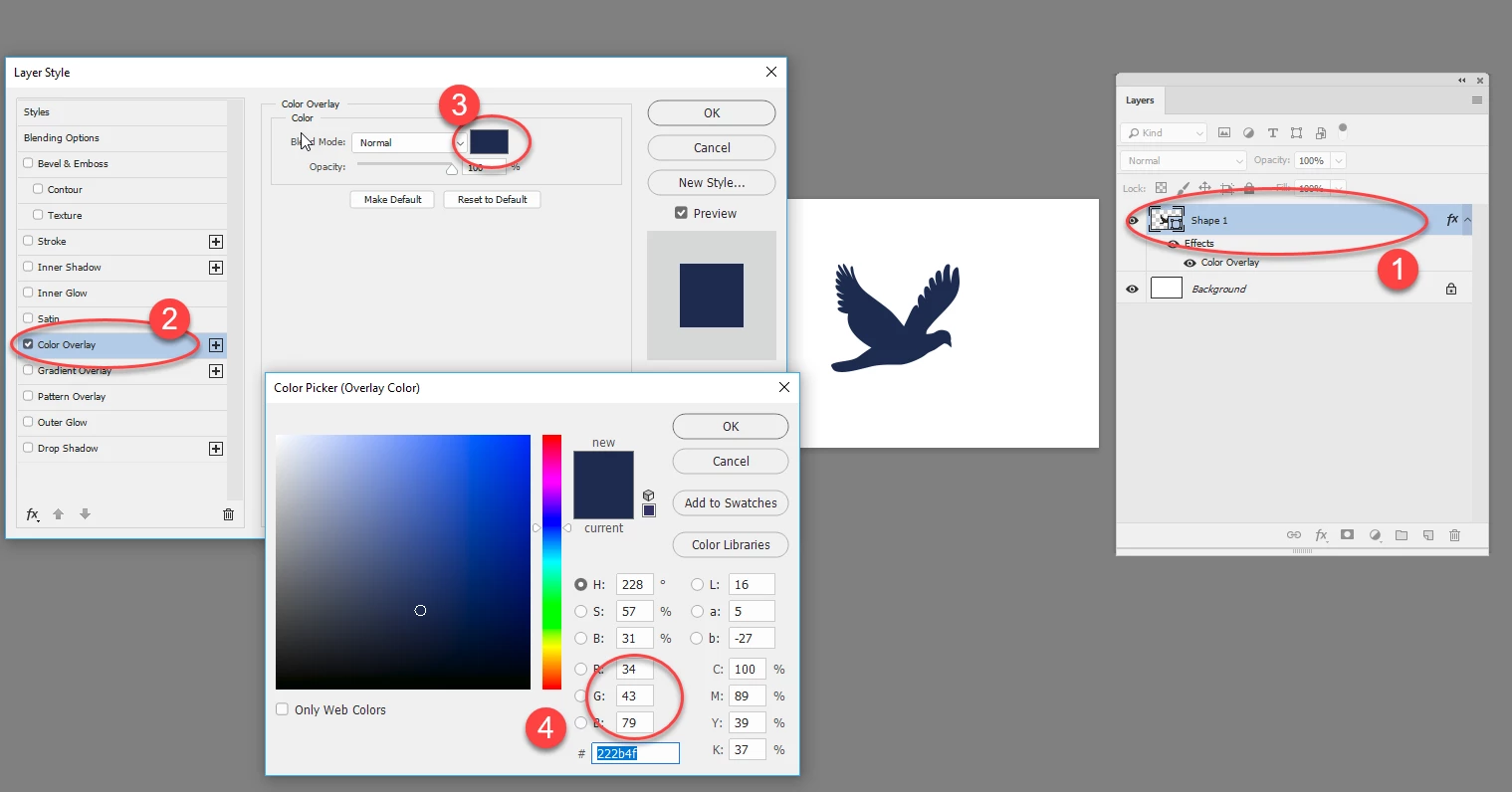
I've bought a black and white vector image from Adobe Stock. It's black. I now need to change it to a specific RGB colour (R: 34, G: 43, B: 79). How would you go about doing this? I've tried using 'colour range' to select the image, then a hue/saturation adjustment layer to alter colour, which means I get get pretty close to the colour I need by moving the slidErs and judging by eye. But I need it to be an exact match. Any ideas?

Thanks in advance!
    This topic has been closed for replies.
    Correct answer davescm

    Is the black vector shape on it's own layer with just transparency?

    If so, right click on the layer and in Blending options choose color overlay

    As an aside, you do realise that color (R: 34, G: 43, B: 79) means absolutely nothing without the context of a color profile? The same numbers in different color profiles represent different colors.

    Dave

    2 replies

    davescm
    Community Expert
    davescmCommunity ExpertCorrect answer
    Community Expert
    February 10, 2018

    Is the black vector shape on it's own layer with just transparency?

    If so, right click on the layer and in Blending options choose color overlay

    As an aside, you do realise that color (R: 34, G: 43, B: 79) means absolutely nothing without the context of a color profile? The same numbers in different color profiles represent different colors.

    Dave

    JM88Author
    Participant
    February 11, 2018

    davescm -  you've cracked it. Thank you, and may all your enemies have itchy a**es.

    Much appreciated.

    JJMack
    Community Expert
    Community Expert
    February 11, 2018

    You have to remember .AI are not supported well with Photoshop.  If you you use File>Place to place in you vector .AI file you will have a Vector smart Object layer and the layer will resize well.  However if you open the .AI file you can  specify the size you want the document canvas to be,  When that document the layer will not be a vector layer.  If it is a multi colored  layered ai file it will be a single multi colored Photoshop raster layer not several raster layers.  Illustrator is the right tool to work on .AI files.

    JJMack
    JJMack
    Community Expert
    Community Expert
    February 10, 2018

    What kind of file did you buy?  Photoshop does not support vector files like .SVG and .AI files well you should use Illustrator its Adobe vector editing application.

    JJMack
    JM88Author
    Participant
    February 11, 2018

    Hi JJMack - it's an .ai file. Seems to have opened in photoshop on a transparent layer. Never used Illustrator, but maybe now's the day to start!