joeh87907460
Inspiring
August 28, 2018
Answered

How can I create 3d pentagon in photoshop, like the cube preset, but with 5 sides?

  • August 28, 2018
  • 2 replies
  • 6853 views

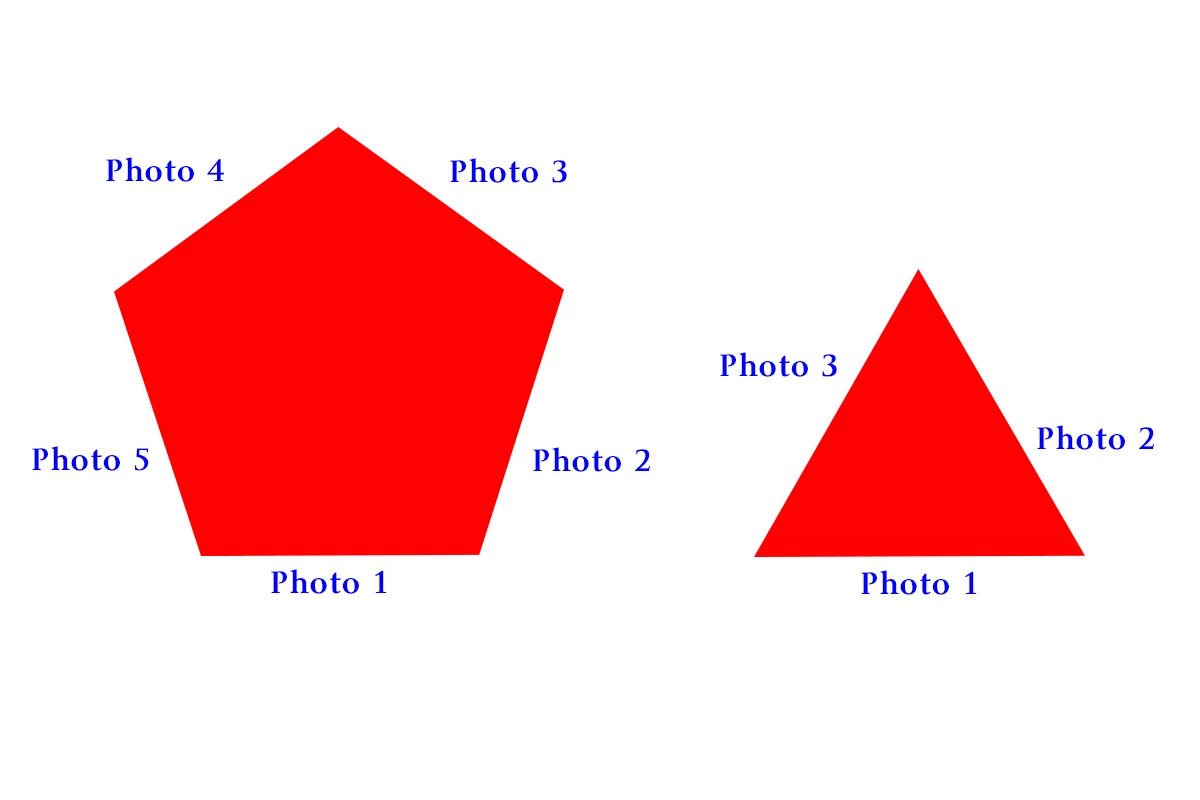
How can I create a 3d pentagon in photoshop that is like the cube mesh preset but with 5 sides? Or create a 3d triangle that is like the cube or cube wrap presets? I can draw either the pentagon  or triangle, and extrude them. But, I can find no way to change the 'material' on each side like you can with the cube mesh preset. What I'd like to be able to do is create the shape then change the material on each side to be a different picture, not the same picture wrapped around the object, which is what happens when you extrude the object from a drawing. Below is something like what I'd want.

Since there is no mesh preset to create such objects as this, is there a way to create my own? Or is there is one for download somewhere? I have searched for this and can't find one.

Thanks,

Joe

This topic has been closed for replies.
Correct answer JJMack

I do not do 3D stuff I saw the Photoshop Meshes are DAE files.  All DAE files are not equal the are XML file and can contain different information about 3d object surfaces and materials even Photoshop animations.  So I not sure the dodecahedron.dae file I downloaded from linearchaos/Dodecahedron.dae at master · t3kt/linearchaos · GitHub is one that has the proper information that should be in Photoshop Presets\Meshes. It is a dodecahedron 3d object that has single surface texture for the dodecahedron 12 sides. Not 12 surface materials one for each of the 12 side. Adobe has two Cube DAE file in meshes one has materials for the cube 6 sides the other Cube Wrap has one surface material that is user on all 6 sides.   The  dodecahedron texture seems to be a single file the has geometry for all 12 sides that are wrapped around the dodecahedron. The dodecahedron.dae file created in blender does not have the material information found in Adobe .dae meshes files.


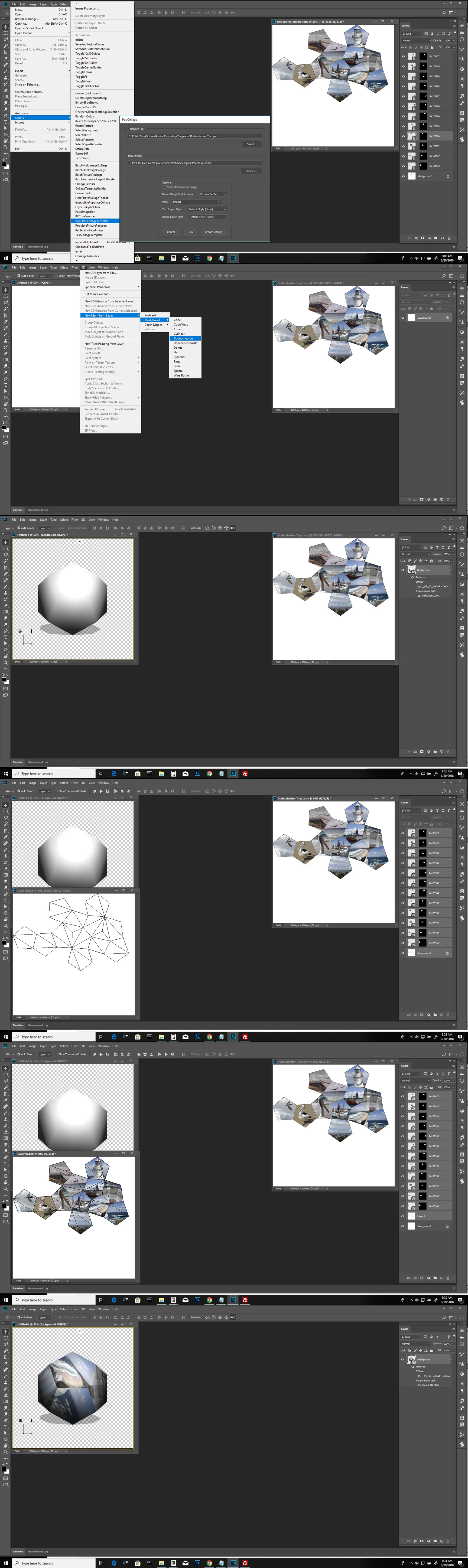
I found a Dodecahedron .obj model on the web and opened it in Photoshop and save out a  new Dodecahedron.dae file with an infinite light and added the Dodecahedron .dae file into Photoshop Presets\Meshes,  I opened a new 1000px x 100px document and used the Dodecahedron mesh to create a 3D Dodecahedron layer and open the default texture to create a Photo Collage Template for the 12 sided Dodecahedron to be used with the scripts in my Photo Collage Toolkit package.

Here are the two files you need Dodecahedron.dae and DodecahedronTmp.psd

Download the two files install and use them

Copy the .dae file into Photoshop's \Presets\Meshes.

Open Photoshop and use one of my Photo Collage populating script to  populate the template DodecahedronTmp.psd.  I would suggest the PopulateCollageTemplate script.  Once the 12 images have been populated leave the populated collage template open in Photoshop.

Open a new 1000px by 1000px document and use menu 3d>New Mesh from Layer>Mesh Preset>Dodecahedron.

In the Layers palette double click on _PS_3D_Default - Default Texture to open it in Photoshop.

Switch to the Populated Template document and Target all the layers in the Layers palette. With the shift key held press drag all the layers from the layers palette and drop them into the Default Texture document.

X out of the the template document do not save.

X out of the texture document and SAVE it.

Done.
Todays Photoshop crash produced a System crash report Adobe di not catch it and produce their report. Todays crash was in ucrtbast.dll which is in \Wibdows\System32\   being crt is in its name it mah had to do with my displat adapter software I see it there is a newer version.
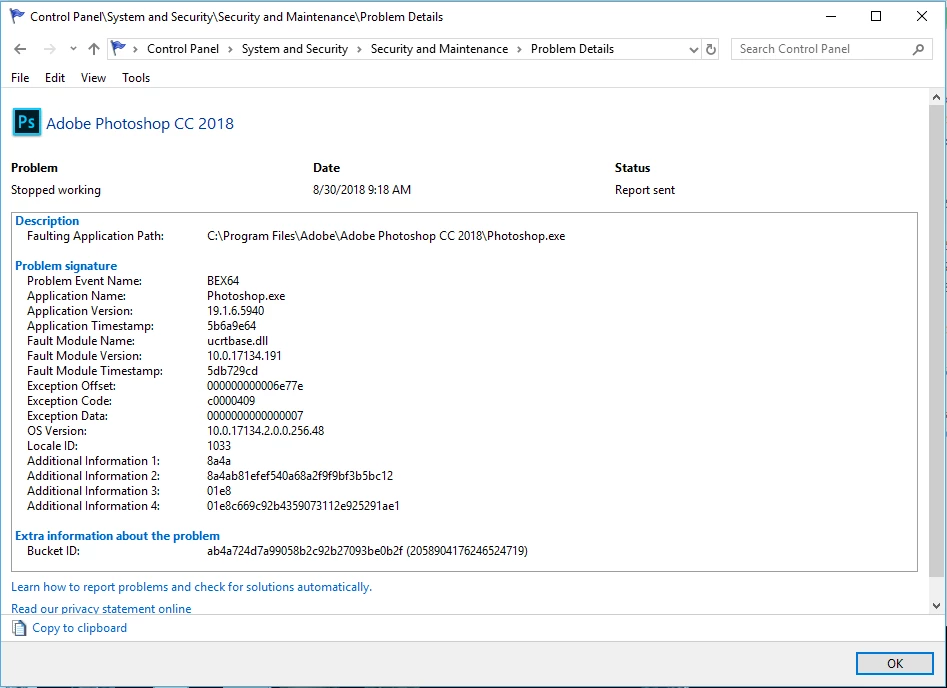
I did not see any way to view Adobe crash reports before sending them off the one I have seen online I do not know to read them.

I had the latest driver installed.

2 replies

joeh87907460
Inspiring
August 28, 2018

What I want is something like this cube and on each side a different photo, but I'd like to make it with different number of sides and height. I'd like to be able to do something different than just a cube.

JJMack
Community Expert
Community Expert
August 28, 2018

It depends on what you mean by 3d pentagon.  A Cube is the same as an extruded square  like a  cylinder is and extruded circle a  sphere is not an extruded circle like a pyramid  is not an extruded triangle. In your mind what does your 3d pentagon look like. Ball like or extruded pentagon.

JJMack
joeh87907460
Inspiring
August 28, 2018

Something like the rotating cube in the example I uploaded a few minutes ago. With different photos on each side. Not in a cube, I can do that with the cube mesh preset. I'd like to be able to do a pentagon, hexagon, triangle etc.

joeh87907460
Inspiring
August 28, 2018

I did not there are image and 3D model on the web.  I'm sure some 3D models Photoshop will be able to open.  However I do no know much about 3D models an model file type or they all relate in Photoshop.   OBJ, DAE and other file seem to include some other file type for surface materials  and other things.  I would have no idea  of which type of model file supported by Photoshop would be best for editing the 3d model surfaces and insert image onto them.  I also do not know in you can add meshes to Photoshop Preset meshes the seem to be DAE files. Are All DAE file jus 3d Meshes  I would not know but I would not think they are for in Photoshop Presets materials  I see files "Default.p3m" and "MaterialPreview.dae"

You can edit a DAE file with a text editor it an XML file with all sort of stuff including geometry for the 3d object.

I just download a couple of free dodecahedron DAE file they both  has geometry foe a solid object not for eact of the dodecahedron face surfaces.


Thank you for the reply.

I tried editing one of the dae files. I wasn't able to make it work. Not really sure what to edit in it. I'll keep searching more for DAE files and models.

I had previously not searched for DAE files. Searching for those seem to be yielding more results. Thanks for the tip in the different direction.