Participating Frequently
December 20, 2021
Answered

How can I expand the selection

  • December 20, 2021
  • 3 replies
  • 2012 views

how can i expand the selection so automatically snap the upper left corner of the canvas, i need this to batch multiple files of different dimensions.

example:
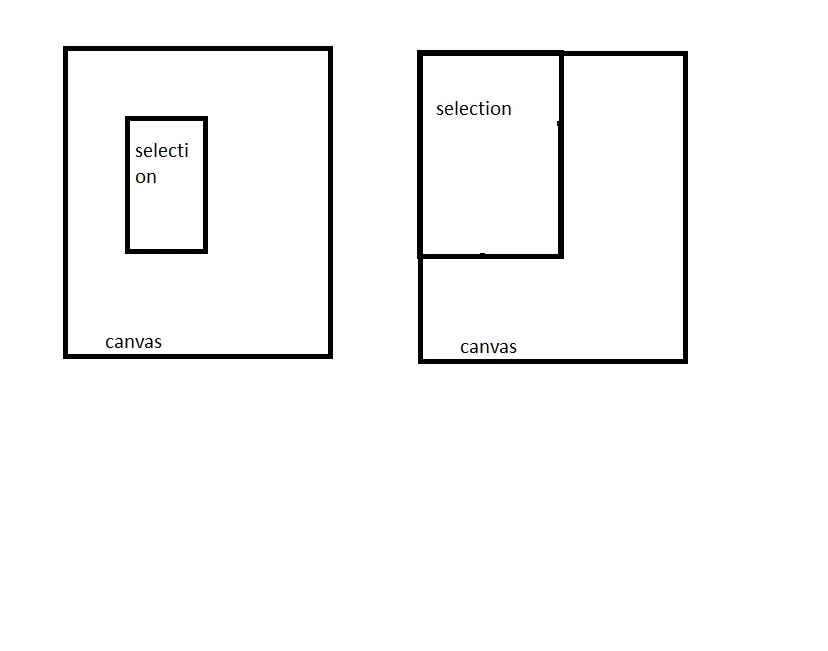
This topic has been closed for replies.
Correct answer Kukurykus
sTT = stringIDToTypeID;
dsc2 = new ActionDescriptor()
bnds = activeDocument.selection.bounds
slctn = {top: 0, left: 0, bottom: bnds[3], right: bnds[2]};
(ref = new ActionReference()).putProperty(sTT('channel'), sTT('selection'));
(dsc1 = new ActionDescriptor()).putReference(sTT('null'), ref); for(i in slctn)
	dsc2.putUnitDouble(sTT(i), sTT('pixelsUnit'), slctn[i])
dsc1.putObject(sTT('to'), sTT('rectangle'), dsc2)
executeAction(sTT('set'), dsc1);

3 replies

Stephen Marsh
Community Expert
Community Expert
December 20, 2021

A script is the most flexible way to do this.


It should be possible to do in an action as well, however one may need to get creative. I'll see what I can hack together, even though the script from Kukurykus being the best option, at least an action would be self contained/stand alone if you were using this within a larger action or multiple users without requiring the installation of a "helper script".


EDIT:


The key is setting the transform reference point to the lower right corner and then "massively overshooting" the transform to "negative values" past the upper left canvas corner to account for all expected size differences. It also appears that the quickmask hack has some importance as well.

Kukurykus
Legend
December 20, 2021

I have problem to reproduce your action. Can you show it somehow else?

Stephen Marsh
Community Expert
Community Expert
December 20, 2021

Sure for me, the biggest issue was seeing the wood for the trees:


Here is a download link:

https://www.dropbox.com/s/gvadqo2krz79e59/Resize%20Rectangular%20Selection%20to%20Zero%20Point.atn?dl=0


NOTE: Original action link replaced due to a careless error in original action!


Kukurykus
KukurykusCorrect answer
Legend
December 20, 2021
sTT = stringIDToTypeID;
dsc2 = new ActionDescriptor()
bnds = activeDocument.selection.bounds
slctn = {top: 0, left: 0, bottom: bnds[3], right: bnds[2]};
(ref = new ActionReference()).putProperty(sTT('channel'), sTT('selection'));
(dsc1 = new ActionDescriptor()).putReference(sTT('null'), ref); for(i in slctn)
	dsc2.putUnitDouble(sTT(i), sTT('pixelsUnit'), slctn[i])
dsc1.putObject(sTT('to'), sTT('rectangle'), dsc2)
executeAction(sTT('set'), dsc1);
Participating Frequently
December 20, 2021


Can I save this text as .jsx and just load it into photoshop as a script? or how do i run that script?

Kukurykus
Legend
December 27, 2021

If the rulers zero point/origin point is not set to the upper left, then one may need to incorporate the folllowing script to reset the rulers to the upper left before the previous code:


// Rulers - Reset Origin to Upper Left.jsx

/*
// NOTES: Resets the "zero point" rulers origin point to the upper left.
// PLACEHOLDER: 
*/

///////////////////////////////////////////////////////////////////////////////

/* https://feedback.photoshop.com/conversations/photoshop/photoshop-ability-to-ruler-origin-by-script/5f5f45bb4b561a3d425c7b32 */

// Version 2016.11.18
// Show how to get and set the ruler origin point for the current document
// Values are in pixels shifted 16 bits
// some constants to make it more readable

const classProperty = app.stringIDToTypeID("property");
const krulerOriginHStr = app.stringIDToTypeID("rulerOriginH");
const krulerOriginVStr = app.stringIDToTypeID("rulerOriginV");
const classDocument = app.stringIDToTypeID("document");
const typeOrdinal = app.stringIDToTypeID("ordinal");
const enumTarget = app.stringIDToTypeID("targetEnum");
const typeNULL = app.stringIDToTypeID("null");
const keyTo = app.stringIDToTypeID("to");
const eventSet = app.stringIDToTypeID("set");

// get the current values
GetRulerOrigin().toSource();

// set them to zero, negative numbers work as well
SetRulerOrigin(0, 0);

function GetRulerOrigin() {
    var ro = {};

    ro.horizontal = GetInfo(classDocument, krulerOriginHStr) >> 16;
    ro.vertical = GetInfo(classDocument, krulerOriginVStr) >> 16;

    return ro;
}

function SetRulerOrigin(horiz, vert) {
    var desc = new ActionDescriptor();
    var ref = new ActionReference();
    ref.putProperty(classProperty, krulerOriginHStr);
    ref.putEnumerated(classDocument, typeOrdinal, enumTarget);
    desc.putReference(typeNULL, ref);
    desc.putInteger(keyTo, horiz << 16);
    executeAction(eventSet, desc, DialogModes.NO);

    var desc = new ActionDescriptor();
    var ref = new ActionReference();
    ref.putProperty(classProperty, krulerOriginVStr);
    ref.putEnumerated(classDocument, typeOrdinal, enumTarget);
    desc.putReference(typeNULL, ref);
    desc.putInteger(keyTo, vert << 16);
    executeAction(eventSet, desc, DialogModes.NO);
}

///////////////////////////////////////////////////////////////////////////////
// Function: GetInfo
// Usage: Get information from Photoshop
// Input: desiredClass, classApplication, classLayer, etc.
//        desiredKey, optional specific key to get instead of everything
//                    this is recommended as all keys is an expensive call
// Return: ActionDescriptor or single value depending on what is asked for
///////////////////////////////////////////////////////////////////////////////
function GetInfo(desiredClass, desiredKey) {
    var reference = new ActionReference();
    if (typeof desiredKey != "undefined") {
        reference.putProperty(stringIDToTypeID("property"), desiredKey);
    }
    reference.putEnumerated(desiredClass, stringIDToTypeID("ordinal"), stringIDToTypeID("targetEnum"));
    var desc = executeActionGet(reference);
    if (typeof desiredKey != "undefined") {
        return GetItemFromDescriptor(desc, desiredKey);
    }
    return desc;
}

///////////////////////////////////////////////////////////////////////////////
// Function: GetItemFromDescriptor
// Usage: Get a specific key from an ActionDescriptor
// Input: desc (ActionDescriptor), valid ActionDescriptor to pull info from
//        desiredKey (Number), key in question, use charIDToTypeID() or
//                             stringIDToTypeID()
// Return: ActionDescriptor or single value depending on what is asked for
///////////////////////////////////////////////////////////////////////////////
function GetItemFromDescriptor(desc, desiredKey) {
    if (desc.hasKey(desiredKey)) {
        var typeID = desc.getType(desiredKey);
        switch (typeID) {
            case DescValueType.BOOLEANTYPE:
                return desc.getBoolean(desiredKey);
                break;
            case DescValueType.STRINGTYPE:
                return desc.getString(desiredKey);
                break;
            case DescValueType.DOUBLETYPE:
                return desc.getDouble(desiredKey);
                break;
            case DescValueType.INTEGERTYPE:
                return desc.getInteger(desiredKey);
                break;
            case DescValueType.LARGEINTEGERTYPE:
                return desc.getLargeInteger(desiredKey);
                break;
            case DescValueType.OBJECTTYPE:
                return desc.getObjectValue(desiredKey);
                break;
            case DescValueType.UNITDOUBLE:
                var newT = desc.getUnitDoubleType(desiredKey);
                var newV = desc.getUnitDoubleValue(desiredKey);
                return new UnitValue(newV, newT);
                break;
            case DescValueType.ENUMERATEDTYPE:
                return desc.getEnumerationValue(desiredKey);
                break;
            case DescValueType.CLASSTYPE:
                return desc.getClass(desiredKey);
                break;
            case DescValueType.ALIASTYPE:
                return desc.getPath(desiredKey);
                break;
            case DescValueType.RAWTYPE:
                var tempStr = desc.getData(desiredKey);
                var rawData = new Array();
                for (var tempi = 0; tempi < tempStr.length; tempi++) {
                    rawData[tempi] = tempStr.charCodeAt(tempi);
                }
                return rawData;
                break;
            case DescValueType.REFERENCETYPE:
                return desc.getReference(desiredKey);
                break;
            case DescValueType.LISTTYPE:
                return desc.getList(desiredKey);
                break;
            default:
                return;
        }
    }
    return;
}


How to set manually ruler origin to log appropriate code to ScriptListener desktop text file?

Myra Ferguson
Community Expert
Community Expert
December 20, 2021

You can record the transformation of the selection to make it extend to the top and to the left edges of the canvas.


Try doing the following:

  1. Create a new action by clicking on the Create new action icon at the bottom of the Actions panel or by going to the Actions panel menu and selecting New Action...
  2. Draw your selection
  3. Go to Select > Transform Selection and drag the edges where you want the new selection to be made
  4. Stop recording the action (after you've added any other steps that you need)
  5. Go to File > Automate > Batch and select your action, your source, your destination, and any file naming preferences
Participating Frequently
December 20, 2021

Since I have different canvas sizes, and differently positioned selections, this doesn’t work for me. If I transform the selection to the edge in one image, it does not mean that there will be a selection to the edge of the canvas in the other image.