
Participant
August 30, 2018
Answered

How can I fix? - Photoshop will no longer create panoramas properly.

  • August 30, 2018
  • 3 replies
  • 1187 views

Hello,

I am an Art Student focused on panorama making and "Small Worlds" and (until recently) Photoshop has created my panoramas perfectly by using the File>Automate>Photomerge tool in which i press "Auto" and import the images which i need. A couple days ago i installed a Photoshop update (Photoshop cc 2018) and everything was fine, but now not so much. Instead, after i press "Create" or "Okay" it takes much longer than usual and it no longer creates a panorama, instead it creates a couple merged images along the bottom and some  not merged images along the top and in the middle. (image attached). I researched this problem here in the Forums but did not see a match and also tried restarting my laptop.

If anyone has dealt with this problem or knows a solution then i would be very great-full for some help.
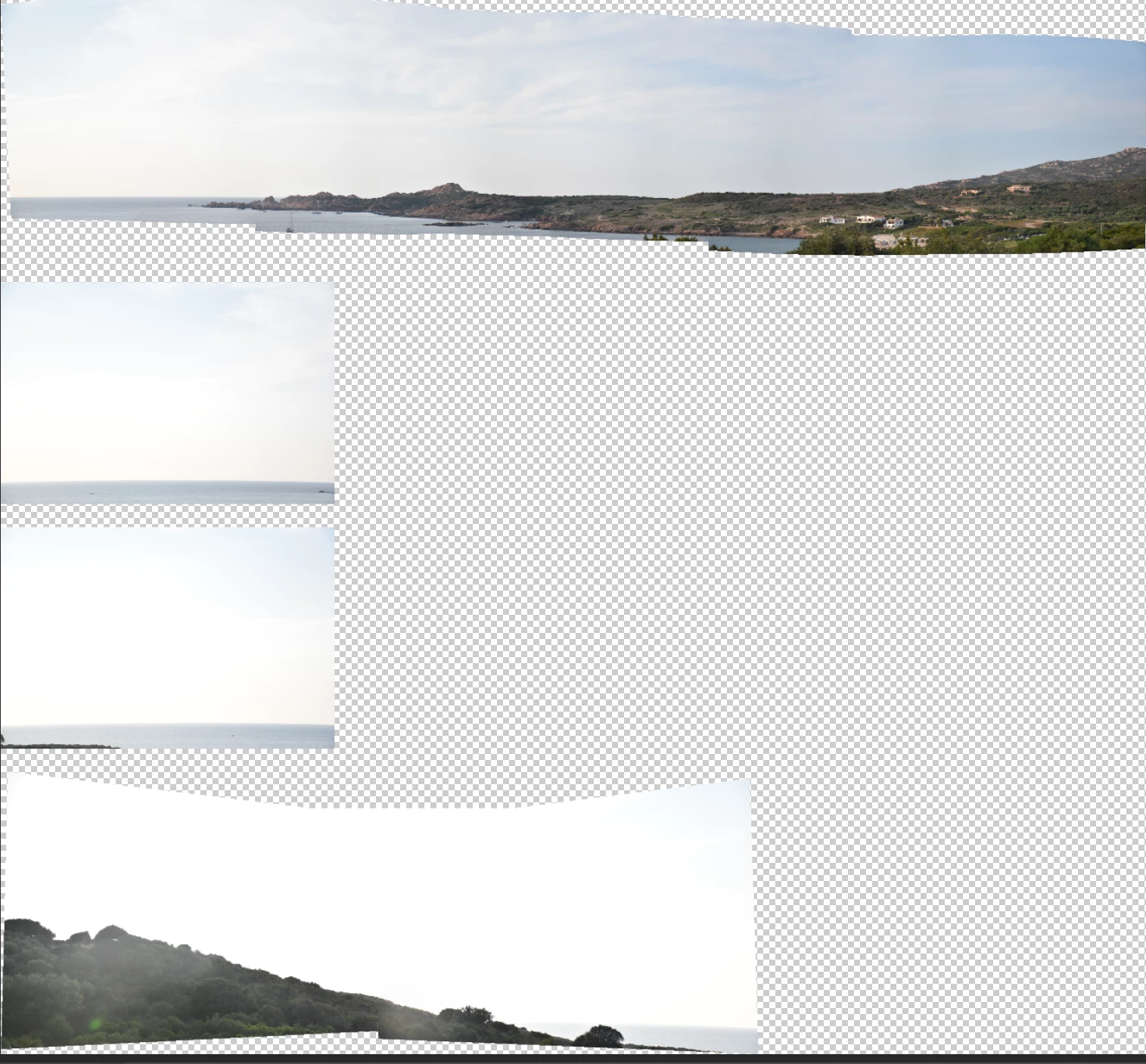
Thanks in advance,

Liza

This topic has been closed for replies.
Correct answer Bob_Hallam

It's not a PS problem, but one caused by the choice of framed subject and how they overlap.   In situations where there is no detail to connect frames it will not be possible for PS to understand that they go together in the pano.   Some times you can overlap details sometimes you can't.  In this situation try making 2 or more panos with selected frames from one side, then the other if the issue is (and I suspect it is the center where all that's available to triangulate on is the horizon.   You can manually place that later if need be after PS makes what it can from frames with detail.  

Always a good Idea to be aware of this when choosing how to frame each of the images to include in a pano.  

3 replies

Semaphoric
Community Expert
Community Expert
August 30, 2018

I've had similar problems myself, where Photomerge couldn't deal with frames that only had open water and clear skies. I ended up making two separate panoramas, and then combining them into one document, with the "problem" frames in between, and aligning them all by hand.

Liz_123Author
Participant
August 30, 2018

thank you, i will try that method out.

Hopefully will work.

Barb Binder
Community Expert
Community Expert
August 30, 2018

How much overlap do you have on the images? Images should overlap by approximately 40%. If the overlap is less, Photomerge may not be able to automatically assemble the panorama. However, keep in mind that the images shouldn’t overlap too much. If images overlap by 70% or more, Photomerge may not be able to blend the images. Try to keep the individual photos at least somewhat distinct from each other.

And what settings did you select in File > Automate > Photomerge?

~Barb

~Barb at Rocky Mountain Training
Liz_123Author
Participant
August 30, 2018

i have an overlap of about 50%, i will try to do by hand for the middle section.

thank you for your help

Bob_Hallam
Bob_HallamCorrect answer
Legend
August 30, 2018

It's not a PS problem, but one caused by the choice of framed subject and how they overlap.   In situations where there is no detail to connect frames it will not be possible for PS to understand that they go together in the pano.   Some times you can overlap details sometimes you can't.  In this situation try making 2 or more panos with selected frames from one side, then the other if the issue is (and I suspect it is the center where all that's available to triangulate on is the horizon.   You can manually place that later if need be after PS makes what it can from frames with detail.  

Always a good Idea to be aware of this when choosing how to frame each of the images to include in a pano.  

ICC programmer and developer, Photographer, artist and color management expert, Print standards and process expert.
Liz_123Author
Participant
August 30, 2018

Thank you so much, I will definitely try that method