
Known Participant
June 16, 2023
Answered

How can I have my comic book text in black only (not in 4 colors) while it's part of a 4-color image

  • June 16, 2023
  • 2 replies
  • 216 views

Hello to all !

I usually have my comic book text included in In Design, but this time, the artist has included the text in Photoshop with the drawings.

My printer ask that the black text be in black only, not in 4 colors as it is currently.

My text is on a separate layer in Photoshop.

How can I change the text layer in black only ?

Thank you very much for your assistance !

Laurent
This topic has been closed for replies.
Correct answer Stephen Marsh

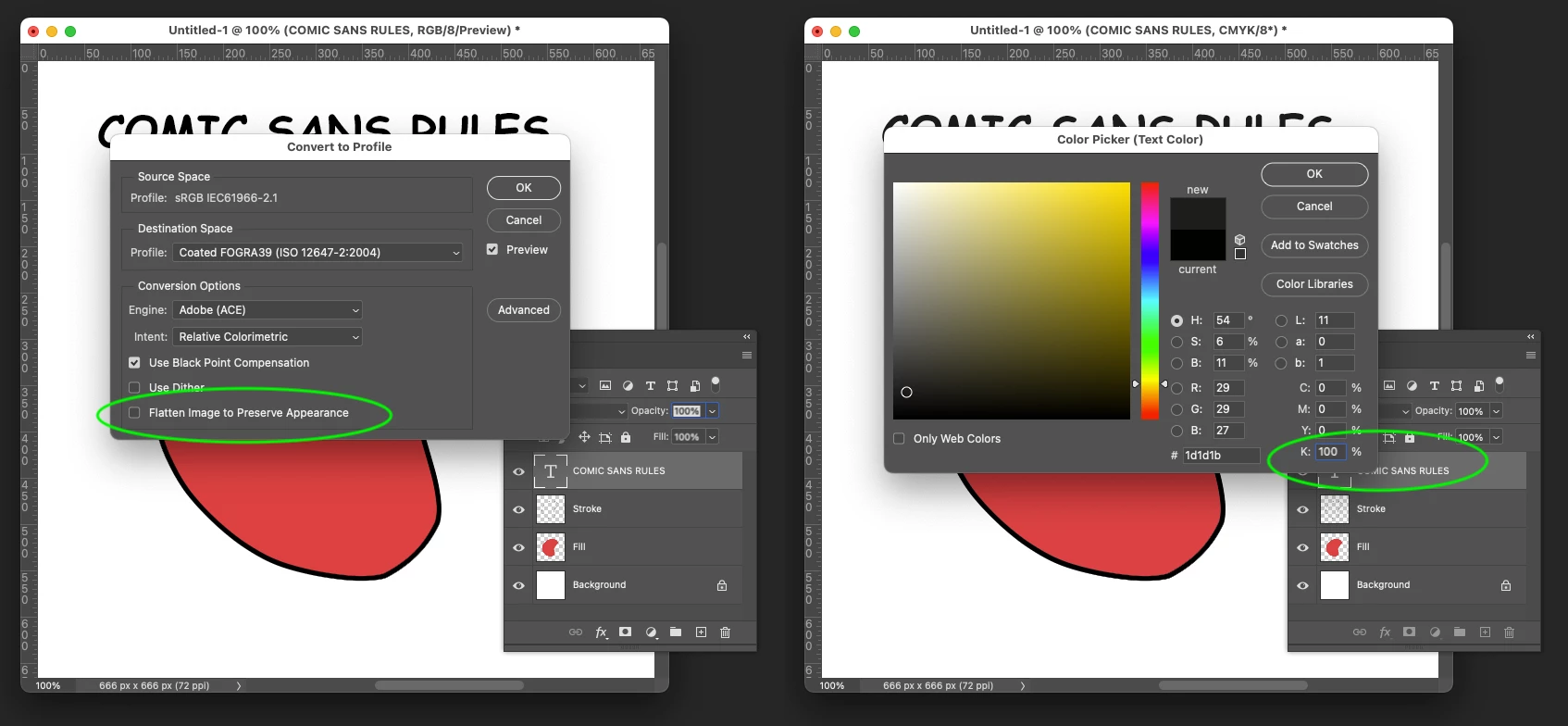
If you can convert the file without flattening, which is usually NOT the thing to do, then you will have access to the text layer in CMYK and can easily change it to 0cmy100k:


If the image appearance is adversely affected by changing to CMYK without flattening, then you can of course dupe the file and remove the text layer, convert a flattened copy and then layer the text layer from the RGB over the CMYK conversion and convert the live text to 0cmy100k.


Other alternatives, while you have a live text layer, you can load this as a 1px expanded selection and then save the selection as an alpha channel, then convert flattened to CMYK, then load the selection from the channel and use channel mixer or curves to make the selected pixels of the text into 0cmy100k.


2 replies

Stephen Marsh
Community Expert
Stephen MarshCommunity ExpertCorrect answer
Community Expert
June 16, 2023

If you can convert the file without flattening, which is usually NOT the thing to do, then you will have access to the text layer in CMYK and can easily change it to 0cmy100k:


If the image appearance is adversely affected by changing to CMYK without flattening, then you can of course dupe the file and remove the text layer, convert a flattened copy and then layer the text layer from the RGB over the CMYK conversion and convert the live text to 0cmy100k.


Other alternatives, while you have a live text layer, you can load this as a 1px expanded selection and then save the selection as an alpha channel, then convert flattened to CMYK, then load the selection from the channel and use channel mixer or curves to make the selected pixels of the text into 0cmy100k.


Laurent29Author
Known Participant
June 16, 2023

Thank you !

Trevor.Dennis
Community Expert
Community Expert
June 16, 2023

Hi Laurent.


Your printer is using CMYK which uses True, or Rich black.  Check out the link below and have a look round for CMYK True Black, but you really need someone who has real expertise in the area.  I am sure you'll get a better answer soon, but it might also be a good idea to talk some more to your printer.  


https://www.clashgraphics.com/printing-tips/printing-true-rich-black-and-when-to-use-it/