
September 19, 2011
Answered

How can I make dashed line borders using actions or script?

  • September 19, 2011
  • 3 replies
  • 1032 views

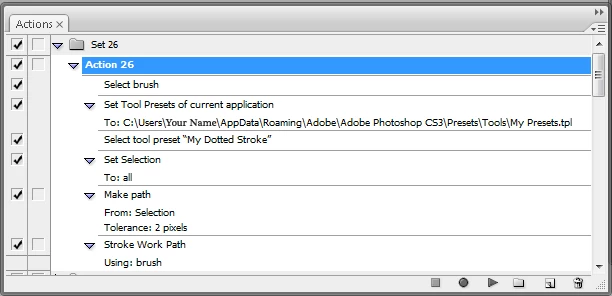
Is it possible to make a border that is dashed? I tried to make an action that will:

1. Select all (Cmd/Ctrl+A)

2. Convert Selection to Path

3. Stroke Path using Brush

The problem was the brush: I will need to change my brush every time I will use the action so that I will get the dashed line.
This topic has been closed for replies.
Correct answer

If the action is just for your use, then you can use a tool preset to set the brush before stroking the path. You just need to set the brush with the desired settings, save a

tool preset and save the preset. In the action record the loading of the tool presets and the selection of the tool preset for your brush.

MTSTUNER

3 replies

Correct answer
September 20, 2011

If the action is just for your use, then you can use a tool preset to set the brush before stroking the path. You just need to set the brush with the desired settings, save a

tool preset and save the preset. In the action record the loading of the tool presets and the selection of the tool preset for your brush.

MTSTUNER

September 22, 2011

Thanks! That's exactly what I needed!

c.pfaffenbichler
Community Expert
Community Expert
September 20, 2011

Could you post a screenshot or mock-up to show exactly what kind of dashed line you are looking for?

JJMack
Community Expert
Community Expert
September 19, 2011

A brush has a width and if you strote a selection or brush stroke a path made from a seletion your dealing with a area most likely more then one pixel wide so it will show on you image. You may be able to select the brush you want buy using a brush preset. I don't know for brush strokes can not ne recorded in actions other the using stroke path. So I tend not to use or even think about brushes when makeing Actions and scripts.  An other option you have is to define a pattern and select an area like a frame or frame side and fill the area with a pattern.   I have used that method for framming images in actions. examples: And I did just test an action will record the selection of a brust preset.

http://mouseprints.net/old/dpr/Examples/FramingFrames.jpg

http://mouseprints.net/old/dpr/Examples/LastExample.jpg

JJMack