
ahmad_alwakil
Participant
November 23, 2018
Answered

how can i make the Photoshop suitable with my galaxy book?

  • November 23, 2018
  • 1 reply
  • 1405 views

i install the Photoshop cs 5 on my galaxy book 12 inch , but the Photoshop is not compatible with the screen size , every thing is very small ( tool bar ) , how can i make the tool is bigger and compatible with my screen device ?
This topic has been closed for replies.
Correct answer

Hi

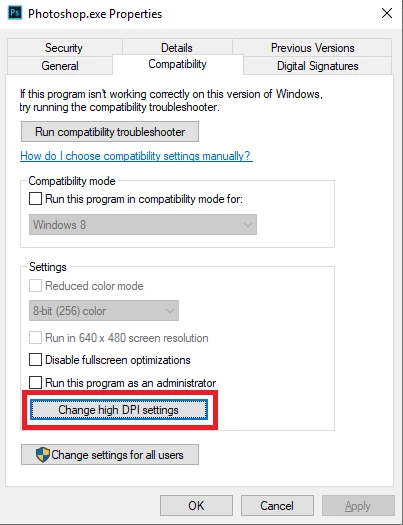
Try this, on either the Photoshop shortcut or Photoshop.exe right click and select properties > compatibility and then select this option

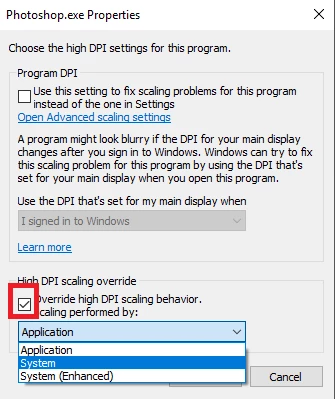
Then put a check mark here and select System from the drop down menu

1 reply

Correct answer
November 23, 2018

Hi

Try this, on either the Photoshop shortcut or Photoshop.exe right click and select properties > compatibility and then select this option

Then put a check mark here and select System from the drop down menu

ahmad_alwakil
Participant
November 23, 2018

thaaaaaaaank you very much , it's work !!

November 23, 2018

You're welcome