Participant
September 7, 2018
Question

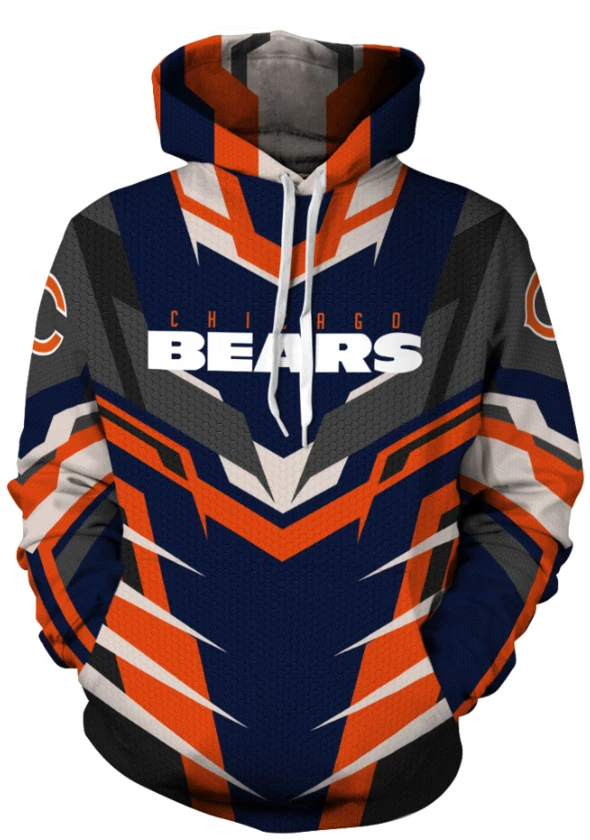
How can I quickly do these shapes/designs in Photoshop?

  • September 7, 2018
  • 5 replies
  • 592 views

I am trying to replicate pattern designs like these for a hoodie, I'm not the greatest at photoshop but here is how I was able to replicate another one like this (but different design)

I enabled grid and used polygon lasso tool to draw each symmetrical shape, then I would fill it in with the color i wanted. It's tedious, is there a better way to make crazy types of shapes like these without manually having to draw them in photoshop and making sure everything is always symmetrical etc..?

Huge thanks!

    This topic has been closed for replies.

    5 replies

    Myra Ferguson
    Community Expert
    Community Expert
    September 8, 2018

    If you're wanting to add symmetrical effects to an image, you could try using the Paint Symmetry feature New features summary | January 2018 and October 2017 releases of Photoshop CC​, which works with the Brush, Pencil, and Eraser tools. If you're wanting to create your own designs, you might want to look into using Illustrator for creating fashion flats. You could also do a combination of the two. Use Illustrator to create the shapes, import that into Photoshop, then adjust the design depending on what the base image is (probably it would be best to start with an image of a white garment and use the multiply blend mode to apply the design).

    davescm
    Community Expert
    Community Expert
    September 8, 2018

    Hi

    You are going to have to make the shapes and patterns in whatever software you choose. You can make one side and transform a copy so that the design is symetrical.

    You need to address the way the pattern is applied to the folds though. On the sleeves the pattern is not following the creases and folds.

    There are a few ways to address that :

    1. Bend, warp and split the pattern to make it fit the image.

    2. Use a displacement map to automatically bend the pattern

    3. Get a 3D model of the coat (or make one in a 3D app) and apply the pattern in 3D as a texture

    Dave

    lambiloon
    Community Expert
    Community Expert
    September 8, 2018

    shapes can be done using pen tool but better choice is ofcourse adobe illustrator

    Ali Sajjad / Graphic Design Trainer / Freelancer / Adobe Certified Professional
    JJMack
    Community Expert
    Community Expert
    September 8, 2018

    If you want to do you own design AI would be better than Photoshop for that job.  If you want to create a template mockup for Photoshop where you can insert you design into the mock.  There are many t-shirt type mockup template on the web for use with Photoshop. Some are even free.

    JJMack
    ScooterD76
    Legend
    September 7, 2018

    This looks like a better job for illustrator, but you would have to draw the shapes out either way

    You can do one side then mirror the other side