joeh87907460
Inspiring
February 28, 2019
Answered

How can I speed up simple 3D rendering in Photoshop CC 2019?

  • February 28, 2019
  • 3 replies
  • 21979 views

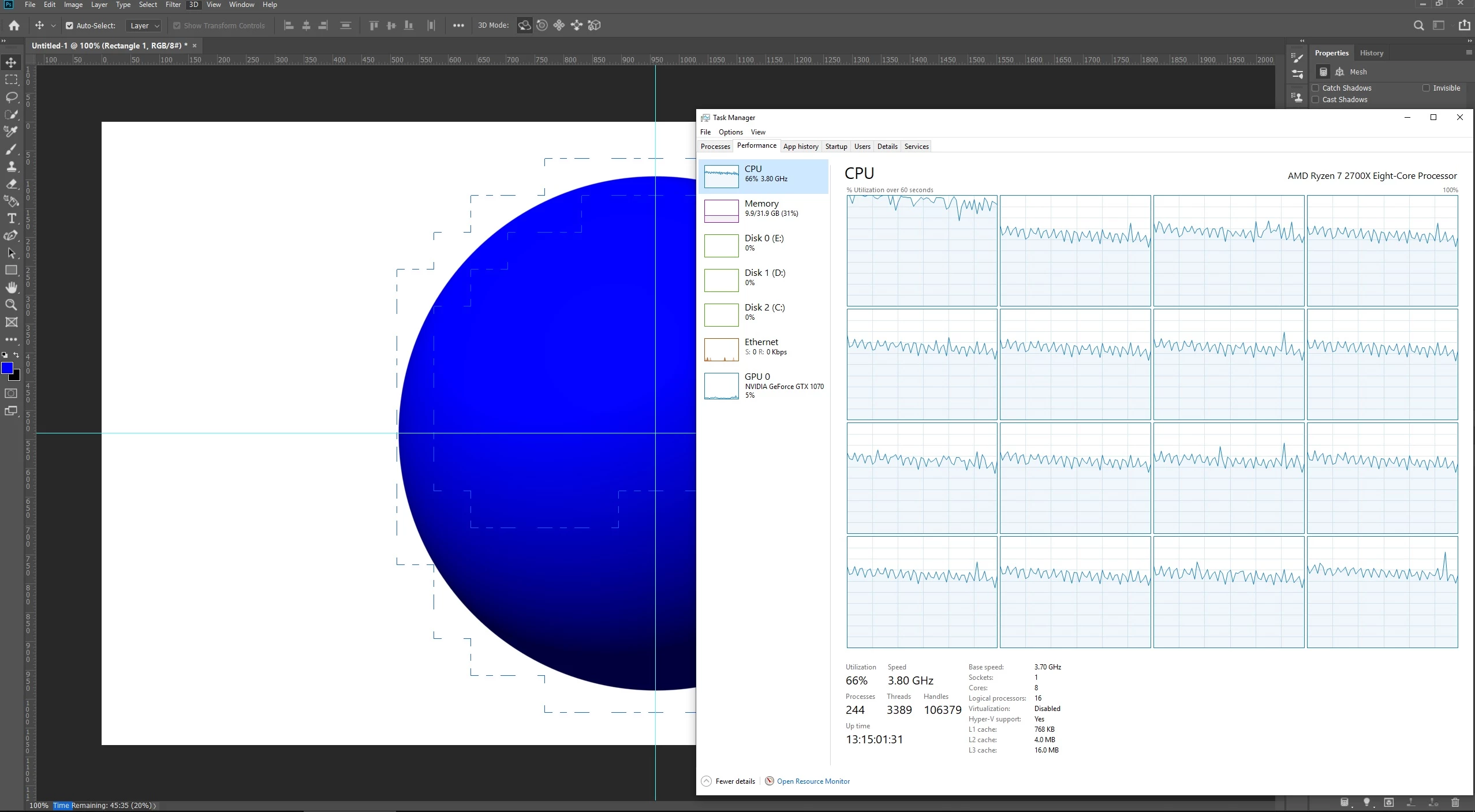
Is there any way to speed up 3D rendering for simple objects in Photoshop? I'm trying to render a simple sphere and it's right now it's at 20% and still has over 45 minutes to go. This is ridiculously slow! The GTX 1070 graphics card with 8GB of memory is hardly even being used even though it is set to be used in preferences.
This topic has been closed for replies.
Correct answer davescm

Hi

A few points

1. Final rendering in Photoshop is done on the CPU not the GPU. Only the preview uses the GPU.

2. In many cases, such as that sphere - you don't need to render the entire background - just any areas that are affected by the image e.g. the object and any shadows. So you can select a smaller area for the render then composite the render with a separate background in Photoshop 2D.

3. You don't have to wait for the render to be 100% complete. Once the noise is reduced to acceptable levels - hit escape and stop it.

Dave

3 replies

marliton
Community Expert
Community Expert
April 17, 2019

Maybe Dimension is a better 3D option than Photoshop.

Marlon Ceballos
joeh87907460
Inspiring
April 17, 2019

That dimension is not much good for anything. You can't rotate any object on a timeline in it like you can photoshop. All it will render out is a flat picture, you can't do any animation with it at all.

rayek.elfin
Legend
February 28, 2019

Photoshop's 3d raytracer is utterly and completely behind the times in both quality and speed. It is slow, slow, slow. It hasn't received any meaningful updates since it was first introduced, and it shows.

Instead, either use Dimensions CC, or use a 3d application like Blender (which is free) of which its Cycles renderer supports full GPU accelerated rendering, en renders a sphere like that in a matter of seconds at a higher quality.

Don't bother with Photoshop's ancient and outdated 3d rendering. Not worth it in my opinion.

PS the upcoming 2.8 Blender's new (almost) realtime Eevee render engine renders a sphere like that in realtime, and again at high quality.

davescm
Community Expert
Community Expert
February 28, 2019

Eevee is impressive in the quality vs speed trade off. I still prefer Cycles for realism though.

Dave

rayek.elfin
Legend
February 28, 2019

Yes, I do too. Eevee is great for animation, though. And clients often don't see the difference between the two in terms of quality. (I am not talking large projects here, of course.)

Michael Bullo
Community Expert
Community Expert
February 28, 2019

Is it necessary to render the whole scene? If you only need to preview an area you can have Photoshop render only that area by first selecting it.

joeh87907460
Inspiring
February 28, 2019

All I want to render in it is the blue sphere, not preview it, but render it out, background and all.

Participant
April 17, 2019

Hi

If you want confirmation perhaps you will take it directly from Adobe software engineer Chris Cox. This was referenced to CC2015 but the 3D core has not changed since

Re: What does Photoshop CC 2015 use for 3D rendering? CPU or graphics card

Dave


Three year old confirmation isn't really confirmation. It's also hard to explain away the photo and video proof I have of both GeForce GPU's ramping up ONLY after beginning a render with nothing else running. They may not be pegged at 100% utilization, but they jump from 0% to very measurable usage. The Radeon card in PC1 does nothing as far as utilization is concerned.

If it were only CPU's doing all the work, the i7 6700 in PC1 should be at least 25% faster than the i7 2600k in PC2, but it's 75% slower in spite of being multiple generations newer, using DDR4 Memory over DDR3 and PCIe 3.0 over PCIe 2.0.