Shangara Singh
Inspiring
August 29, 2025
Answered

How can I stop layers accidentally deselecting when an empty space is clicked in the Layers panel?

  • August 29, 2025
  • 1 reply
  • 288 views

How can I stop layers accidentally deselecting when an empty space is clicked in the Layers panel?

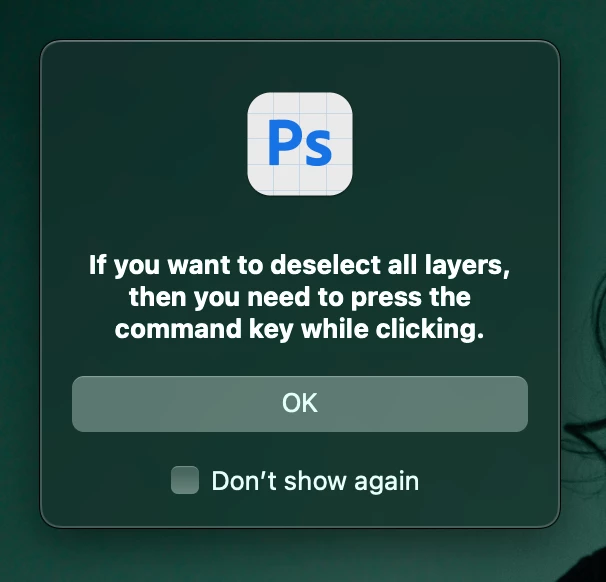
I came across this screenshot in a feature request but cannot enable it (I have reset all warning dialog boxes in Settings).


It should really be a panel option but Adobe never listen to users, so gave up long ago trying to show it how Photoshop interface should work! 


TIA.

Correct answer Conrad_C

I’m like melissapiccone, I use layer deselection to my advantage.


One reason it doesn’t bother me is that this is not just a Layers panel behavior. “Deselect on click in empty area” happens in all list panels in Photoshop: Actions, Gradients, Colors, Patterns… Not only that, this behavior is how most list panels in many applications have worked, for more than 30 years. The Layers panels in InDesign and Illustrator work this way too. It’s based on the “click in an empty area to deselect” behavior that some people first saw in applications like Adobe Illustrator in the late 1980s.


So there have been a lot of people over the decades who have an ingrained knowledge that clicking in an empty area deselects, and if they don’t want to deselect things, avoid clicking in an empty area.


Because of all that, if this is to be a feature request, I don’t think it should be about the Layers panel alone. At the very least, it would have to be an application-wide preference in Photoshop, affecting all list panels consistently. But so many users have such a long memory of being able to deselect by clicking in an empty area that if it was disabled, it would also make Photoshop panels inconsistent with over 35 years of object selection and list panel behavior in many applications, Adobe and non-Adobe.

1 reply

Sameer K
Community Manager
Community Manager
August 29, 2025

Hey, @Shangara Singh. The screenshot is probably from a Beta build of Photoshop in 2023. 


This is one of those situations where what you want adds additional friction (clicks) for another user group. Here is a conversation that discusses not having this dialog: https://adobe.ly/3HXivUL;


I hope you understand. Thanks!

Sameer K
(Type '@' and type my name to mention me when you reply)

Shangara Singh
Inspiring
September 2, 2025

@Sameer K  Thanks. No, I don't understand, hence post. When there is friction, you don't side with one group against another, you remove the cause, reason why behaviour needs a preference. Accidental clicks deselect layers. Example,  adding a mask and missing icon by a pixel or two, etc., etc.


The link you posted is invalid.  If it's to a feature request, I read it before posting. BTW, been using Photoshop for 30 odd years, so not a newbie.

Shangara SINGH.
Conrad_C
Community Expert
Conrad_CCommunity ExpertCorrect answer
Community Expert
September 4, 2025

I’m like melissapiccone, I use layer deselection to my advantage.


One reason it doesn’t bother me is that this is not just a Layers panel behavior. “Deselect on click in empty area” happens in all list panels in Photoshop: Actions, Gradients, Colors, Patterns… Not only that, this behavior is how most list panels in many applications have worked, for more than 30 years. The Layers panels in InDesign and Illustrator work this way too. It’s based on the “click in an empty area to deselect” behavior that some people first saw in applications like Adobe Illustrator in the late 1980s.


So there have been a lot of people over the decades who have an ingrained knowledge that clicking in an empty area deselects, and if they don’t want to deselect things, avoid clicking in an empty area.


Because of all that, if this is to be a feature request, I don’t think it should be about the Layers panel alone. At the very least, it would have to be an application-wide preference in Photoshop, affecting all list panels consistently. But so many users have such a long memory of being able to deselect by clicking in an empty area that if it was disabled, it would also make Photoshop panels inconsistent with over 35 years of object selection and list panel behavior in many applications, Adobe and non-Adobe.