
Known Participant
April 5, 2019
Answered

How can I stop PS from loading frames backwards?

  • April 5, 2019
  • 2 replies
  • 2224 views

The frames for the GIF I am creating are labeled untitled-1 and it goes 1 - 12. It shows on the Layers they are in order. I click "Create new layer for each new frame" so they go to the timeline, but it's always backwards and I have to spend time rearranging them. Something that takes a very long time if the GIF has a hundred frames. How do I stop this from happening?
    This topic has been closed for replies.
    Correct answer JJMack

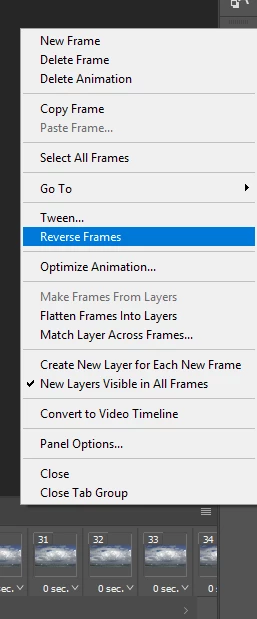
    Why do you not use reverse frames fron the frams animation fly-out menu?

    2 replies

    JJMack
    Community Expert
    JJMackCommunity ExpertCorrect answer
    Community Expert
    April 5, 2019

    Why do you not use reverse frames fron the frams animation fly-out menu?

    JJMack
    Known Participant
    April 10, 2019

    Because I didn't know about it. As much as I do know about Photoshop, I feel I still have about 75% of it to learn.

    Thank you

    Sahil.Chawla
    Adobe Employee
    Adobe Employee
    April 5, 2019

    Hi Justin,

    I'm not sure If I understand the issue correctly, if you have 12 layers on the layers panel and you click "Create frame animation", then the animation will start only with 1 frame and you have to create new frames on the timeline.

    Could you please share a screenshot with us?

    Regards,
    Sahil