

Snöiller Fitzroy
Participating Frequently
July 23, 2022
Answered

How can i turn off "pressing ctrl or alt selects the menu at the top of the screen" in CS4?

  • July 23, 2022
  • 3 replies
  • 7194 views

I'm not marking this as a bug because I actually need help and I'm on an old version, but this is C L E A R L Y an extremely severe critical glitch. I need to do pixel-perfect moving like, literally all the time, it's basically half of the work with the projects I do. There's just one problem. If I press CTRL and press the DOWN arrow, the stupid app open menus at the top of the screen then only moves the layer one pixel down, and if I keep pressing the down arrow, it just cycles menu options. THIS IS OBVIOSULY NOT WHAT I'M TRYING TO DO, AND IS CLEARLY A GLITCH.


How do I turn that off?
Correct answer Jeff Arola

Yes windows users, specifically photoshop users, as it pertains to this forum, have been complaining about the Alt key issue for as long as i can remember, however, it seems adobe has actually done some work in photoshop to try to mitigate the "Alt" key problem in later versions of photoshop.


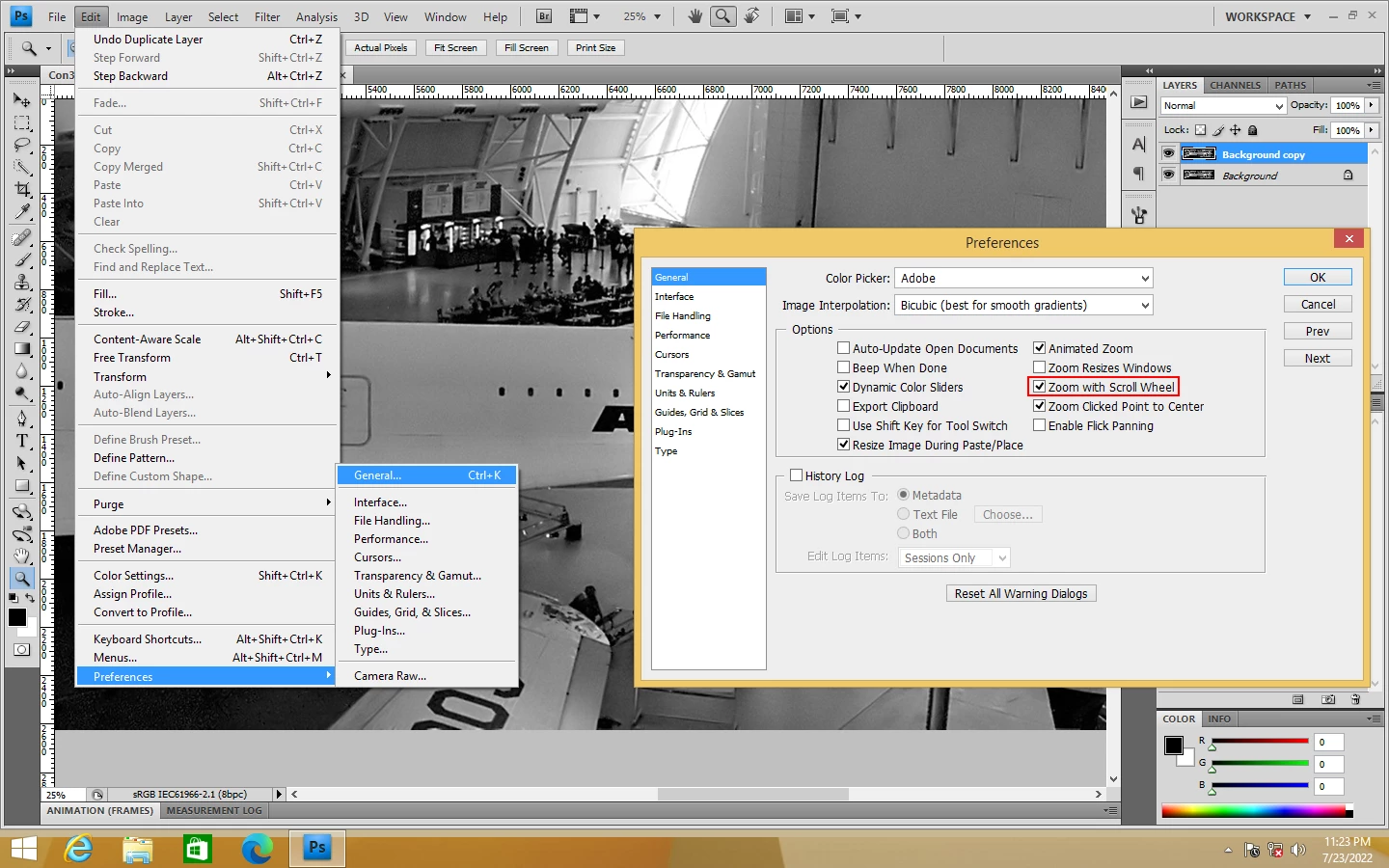
Anyway, that doesn't really help you if you don't plan to upgrade from cs4, but i can offer a suggestion of rather than using the Alt key when you zoom your photo, you go to Edit>Preferences>General and check Zoom with Scroll Wheel so you don't have to press the Alt key when using the mouse wheel to zoom.


3 replies

Jeff Arola
Community Expert
Jeff ArolaCommunity ExpertCorrect answer
Community Expert
July 24, 2022

Yes windows users, specifically photoshop users, as it pertains to this forum, have been complaining about the Alt key issue for as long as i can remember, however, it seems adobe has actually done some work in photoshop to try to mitigate the "Alt" key problem in later versions of photoshop.


Anyway, that doesn't really help you if you don't plan to upgrade from cs4, but i can offer a suggestion of rather than using the Alt key when you zoom your photo, you go to Edit>Preferences>General and check Zoom with Scroll Wheel so you don't have to press the Alt key when using the mouse wheel to zoom.


Bojan Živković11378569
Community Expert
Community Expert
July 23, 2022

On Windows it is function of Alt key to allow selection of menu items using letters on keyboard. When pressing Ctrl with some (any) tool active app should switch to Move tool temporary. If Move tool is active Ctrl should turn on/off Auto Select in the Options bar. That is behaviour for a long time backward including CS4 if I can remember correctly. Perhaps your keyboard is some other language then English or similar issue?


If you need to move some object precisely, why you are holding Ctrl key? To switch temporary to Move tool to be able to use nudging functionality or something else? If you activate Move tool only arrow keys should be enough to do what you want.

Snöiller Fitzroy
Participating Frequently
July 23, 2022

Why would I ever use the move tool if pressing CTRL while using a Selection tool does the same thing? Honestly I think Move just shouldn't exist because that'd be a huge workflow break to have to manually go over and click on something just to move a layer like two pixels down.


I'm using a standard US-EN QWERTY board. What  does any of this have to do with disabling a glitch to make moving more consistent?

jane-e
Community Expert
Community Expert
July 23, 2022


@Snöiller Fitzroy wrote:

How do I turn that off?


When you press and release the Alt key in Microsoft Windows, it activates the menus. It's not just Photoshop. When Windows first came out, PCs didn't come with a mouse and everything had to be done with a keyboard. I started using Windows with version 2.0.


The Control key does not activate the menus. As was said, it is a shortcut for the Move tool. You may be pressing the wrong key if you think Control is activating your menus — either that or something may be flaky with your keyboard?


Macs, btw, don't have the Alt (Option) keyboard shortcut to activate a menu because they have always had a graphical user interface (GUI) and have always come with a mouse.


I hope this helps,


Jane


Jeff Arola
Community Expert
Community Expert
July 23, 2022

What version of windows are you using?


Are you moving paths, shapes or pixel layers?

Snöiller Fitzroy
Participating Frequently
July 23, 2022

I'm not sure of the specific version number, but I'm on Win10 and it updated like 5 days ago for me. I'm trying to move actual content (what you would call "pixel layers")