
Answered
How can I Warp a rectangular Smart Object into a simple ovoid ellipse, like a mapmakers' gore?
I have a custom flat map I wish to convert to mapmakers' "gores" — these pointy ovoid ellipses.
I've already broken up my map into a dozen equally-sized Smart Objects, but have found the Warp mode's vector tools to be wanting. I could easily figure this out in Illustrator, but need some help from the experts here. I'm truly at a loss. Ideally the fewer points (4 should suffice to describe it) the better.
Sample photo shows 12 gores: 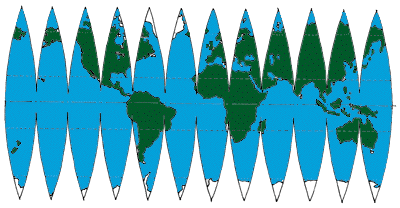
Recap: Take rectangular information (e.g. 1/12 of a world map) and Warp into 12 ovoid ellipses. Go! (thx)
 AdChoices