
Participant
December 8, 2024
Answered

How Come Numbers are now so SMALL?

  • December 8, 2024
  • 3 replies
  • 835 views

If you don't see what is wrong with the above, take another look.  The numbers are now coming up SMALL.  This is supposed to be an improved update???  I want my normal sized numbers back.  How do I achieve this?


Thanks,


Cliff.
This topic has been closed for replies.
Correct answer Per Berntsen

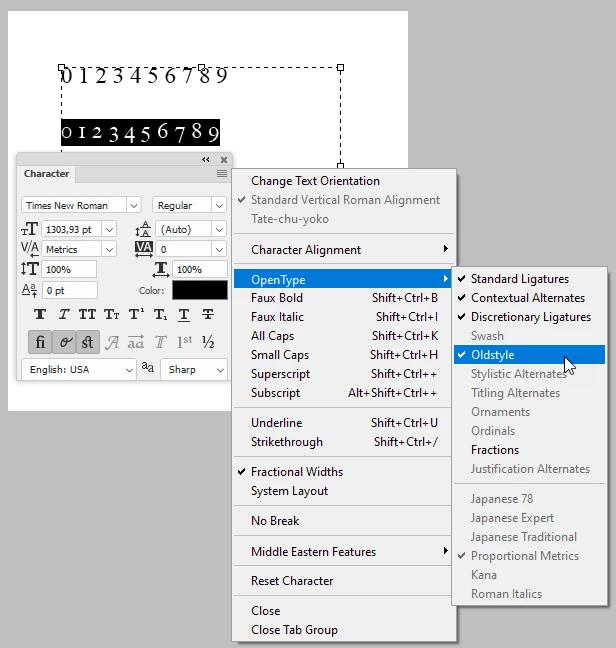
You are using oldstyle figures (numbers), an Open Type feature. Turn them off in the Character panel menu. (top right corner)

Oldstyle figures are commonly used for extended text – they blend in nicely with the letters, and don't stand out like regular (Lining) figures do.


3 replies

Per Berntsen
Community Expert
Per BerntsenCommunity ExpertCorrect answer
Community Expert
December 8, 2024

You are using oldstyle figures (numbers), an Open Type feature. Turn them off in the Character panel menu. (top right corner)

Oldstyle figures are commonly used for extended text – they blend in nicely with the letters, and don't stand out like regular (Lining) figures do.


davescm
Community Expert
Community Expert
December 8, 2024

Well spotted @Per Berntsen . I've changed this thread from 'Bugs' to 'Discussions'

Dave

Cliff43JAuthor
Participant
December 8, 2024

Yeah, I know.  The size works fine for the letters as you can see, but the numbers are all coming out smaller.  This has never happened to me before the latest update.  It's an Adobe [removed by moderator], IMO.  There is something inherently wrong with the software update.  I need to know know how to bypass or correct the Adobe [removed by moderator].

D Fosse
Community Expert
Community Expert
December 8, 2024

Photoshop doesn't work with sizes. It works with pixels only.


When a size is needed, either for printing, or for calculating font sizes, the ppi number is used. This number is a formula for translating pixels to physical sizes: pixels per inch. It means exactly what it says.


Font sizes are given as points, which is an old, physical size unit from the days of lead typesetting. A point is 1/72 inch. To use that in Photoshop, it needs to be translated to pixels. So again, the ppi number is used.


In short - text size depends on the ppi number you have assigned to the file.