
Known Participant
December 21, 2017
Answered

How do extend a photo within a design?

  • December 21, 2017
  • 3 replies
  • 2022 views

A photo I am using isn't big enough for the space on my design and I would like to extend it by producing an 'organic' background (not increase its size) to fill the white section - can anyone help with this? I don't want to increase the canvas size, just the photo. Here is the section I want to increase.

This topic has been closed for replies.
Correct answer Barb Binder

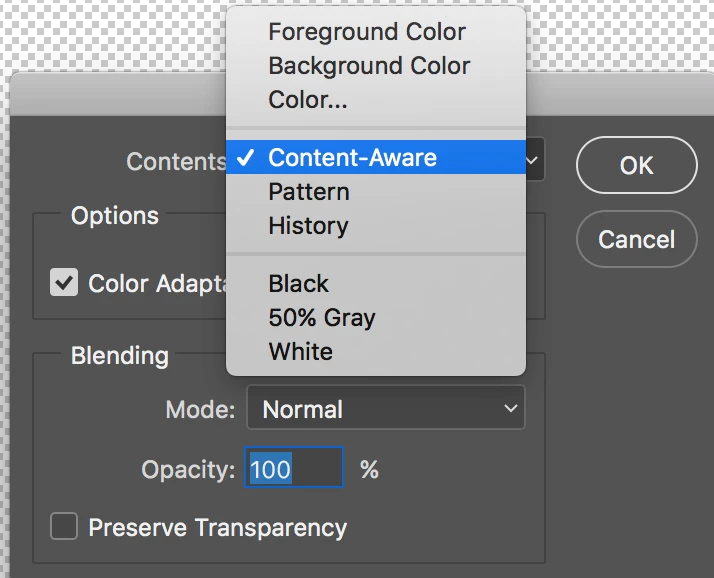
Where do I find Content Aware Fill in the menu?


Edit > Fill > Content Aware

3 replies

Trevor.Dennis
Community Expert
Community Expert
December 22, 2017

That's not a particularly easy image to extend no matter what method you use.  Does it have to be that picture?

If yes, then I think what I would do is select the picture area and copy it to a new layer, and then use Free Transform (Ctrl t) to stretch it

Before

After

Conrad_C
Community Expert
Community Expert
December 22, 2017

Along these lines, it might be worth trying Content-Aware Scale, which I don't think has been mentioned yet. (No, I don't mean Content-Aware Fill, this is different.) Content-Aware Scale could help minimize the visible distortion from stretching an image.

Content-aware scaling in Photoshop (Photoshop User Guide)

Derek Cross
Community Expert
Community Expert
December 21, 2017

I suggest you start with a simpler method first and when you're able to do that look at other, more complex, techniques.

rosalyncAuthor
Known Participant
December 21, 2017

I concur Derek!

Derek Cross
Community Expert
Community Expert
December 21, 2017

Good luck with the class, but please feel free to return to this friendly forum with any particular questions that may occur in the future. Contributors like BarbBinder really know their Photoshop stuff!

Derek Cross
Community Expert
Community Expert
December 21, 2017

One way, you can cut out the area you want to fill, then enlarge that by using Image > Image Size. You can loose a bit of the image on the sides and stretch it a bit to fill. Also have a look at Content Aware Fill.

rosalyncAuthor
Known Participant
December 21, 2017

Hi Derek, Thanks for your reply. It was more about filling in the empty white section with an extension of the background from the photo. I know this can be done when simply working on a canvas but I wanted to know how to do it with an individual photo within a canvas (rather than changing the image size). I am new to photoshop (! ) - where would I find Content Aware Fill?

Derek Cross
Community Expert
Community Expert
December 21, 2017

I think that should have been Content Aware Fill!