
Participant
November 20, 2017
質問

How do I achieve this style of digital painting in photoshop ?

  • November 20, 2017
  • 返信数 2.
  • 1474 ビュー

Hello,

I have been using photoshop CC (2017) for colouring drawings. I am trying to get a look similar to a traditional ink airbrush.

How can I recreate the look/effect of the attached photo?

many thanks in advance for any help
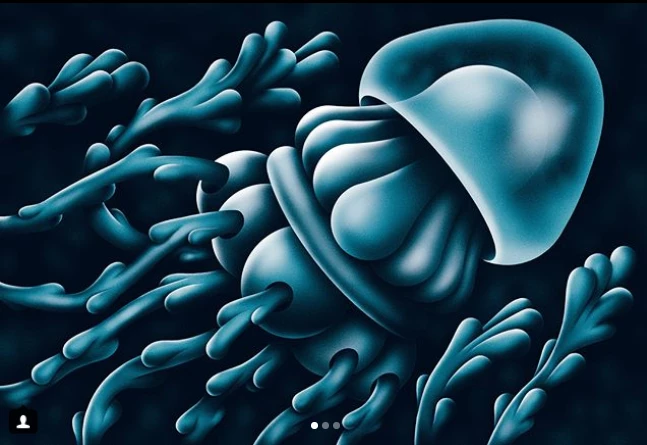
このトピックへの返信は締め切られました。

返信数 2

davescm
Community Expert
Community Expert
November 20, 2017

Hi

I would do that with shapes.

Create the shapes with the pen tool.

Add a layer above each shape and clip it to the shape (Alt-Click on border between the two layers in the layers panel so a down arrow appears). This prevents the paint from going outside the shape borders.

Paint the shading

Use a mask on the outer shape and paint lightly wth a soft black brush to make it semi transparent

Add some highlights with a soft brush

Dave

PECourtejoie
Community Expert
Community Expert
November 20, 2017

Excellent answer and tips. I'd also add some noise, or dithering.

davescm
Community Expert
Community Expert
November 20, 2017

Good point on the noise PECourtejoie .

digital_answer_seeker Make the image in 16 bit mode and that way you can add the noise for effect (rather than to cover up banding which you will get with smooth gradients in 8 bit)

Dave

c.pfaffenbichler
Community Expert
Community Expert
November 20, 2017

I would recommend Vector Masks on Groups and filling the Groups with Solid Colour Layers with the appropriate Layer Masks (or plain Layers) .