
Participant
November 20, 2017
Question

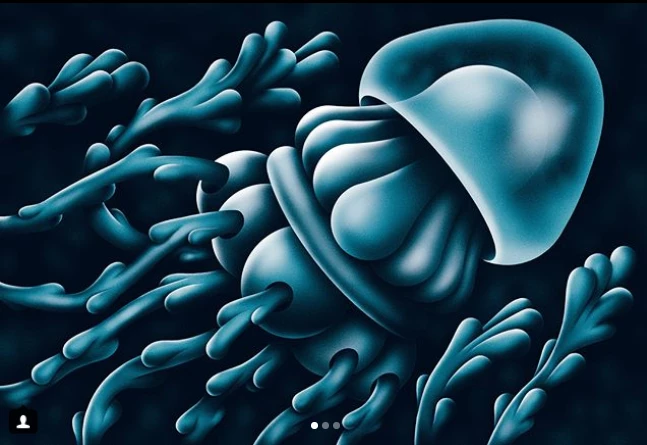
How do I achieve this style of digital painting in photoshop ?

  • November 20, 2017
  • 2 replies
  • 1475 views

Hello,

I have been using photoshop CC (2017) for colouring drawings. I am trying to get a look similar to a traditional ink airbrush.

How can I recreate the look/effect of the attached photo?

many thanks in advance for any help
This topic has been closed for replies.

2 replies

davescm
Community Expert
Community Expert
November 20, 2017

Hi

I would do that with shapes.

Create the shapes with the pen tool.

Add a layer above each shape and clip it to the shape (Alt-Click on border between the two layers in the layers panel so a down arrow appears). This prevents the paint from going outside the shape borders.

Paint the shading

Use a mask on the outer shape and paint lightly wth a soft black brush to make it semi transparent

Add some highlights with a soft brush

Dave

PECourtejoie
Community Expert
Community Expert
November 20, 2017

Excellent answer and tips. I'd also add some noise, or dithering.

cmgap
Community Expert
Community Expert
November 23, 2017

Hi

I just used a soft round brush in my example above.

You can add texture as part of brush settings or add noise and grain later using filter add noise or with the camera raw filter

Try out different brushes - if you are using the latest release of CC you can also download Kyle Webster brushes (in the Brushes panel go to options at the top right and click on "get more brushes".

Dave


Clear how-to Dave. Thank you!

c.pfaffenbichler
Community Expert
Community Expert
November 20, 2017

I would recommend Vector Masks on Groups and filling the Groups with Solid Colour Layers with the appropriate Layer Masks (or plain Layers) .