
Participating Frequently
March 8, 2018
Question

How do I add shading?

  • March 8, 2018
  • 3 replies
  • 1876 views

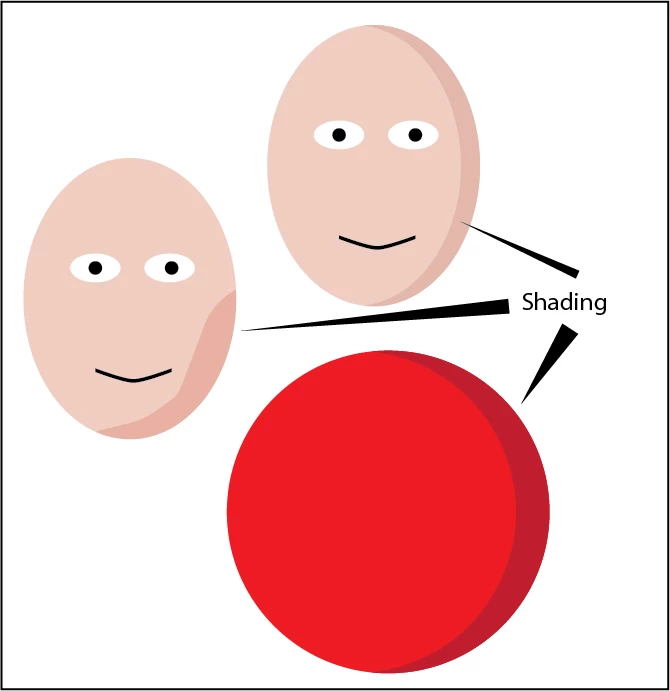
I know this is probably easy for many but as a newbie, I do not even know what to search under to find the answer. I find adding shading in Illustrator very easy but at am at a complete and utter loss to figure out how to do this in Photoshop. i've spent about 4 hours trying to figure this out. Below is what I did in illustrator....but how in photoshop? A youtube would be helpful, explanation, whatever. How can it be so difficult?
    This topic has been closed for replies.

    3 replies

    macpawel
    Participating Frequently
    March 8, 2018

    Just use Lasso Tool (L) and simply select area you want to be shadow and use eg. Burn Tool (O) to darker it or just fill (Edit >Fill - F5) it with a little bit darker color.

    in some cases you can also use Eliptical Marque (M) to select rounded shape

    pawel

    March 8, 2018

    You could try using a clipping mask

    Participating Frequently
    March 8, 2018

    Ah...clipping mask. That looks like it would work. I will look that up on youtube to see how that's done.

    March 8, 2018

    Just create a shape with the Shape Tool and choose a colour of choice and then hit CTRL + J to make a copy of the layer, double click on the copied layers thumbnail and just choose a lighter colour and then right click on that layer and choose Create Clipping Mask

    Then just select the move tool and move it to the desired position

    You can also use the same method but use the Pen Tool set to Shape to draw the other shape

    Derek Cross
    Community Expert
    Community Expert
    March 8, 2018

    I don't think this would be called shading (or drop shadow) in Photoshop, to do this you might make a selection and fill it with a darker colour.