

Ayemac
Participant
June 20, 2024
Beantwortet

How Do I Align & Crop Multiple Photos

  • June 20, 2024
  • 1 Antwort
  • 548 Ansichten

I have several action shots that I want to align and crop so that they match up evenly. I've found a way to "sort of" do this in PS with File\Scripts\Load Files into Stack. The only problem with that is that it creates layers, and I want to keep these as separate images.


I can take the laborious way of manually deselecting visibility and saving each "layer" as its own photo, but surely there's an easier way to accomplish this. 


Not critical, but I'd also like to slightly blur the background in one, fell swoop as well. I plan on doing this in LR (not Classic), but I will have to do them one at a time - again, time consuming. Anything here would be appreciated as well.
Dieses Thema wurde für Antworten geschlossen.
Beste Antwort von Trevor.Dennis

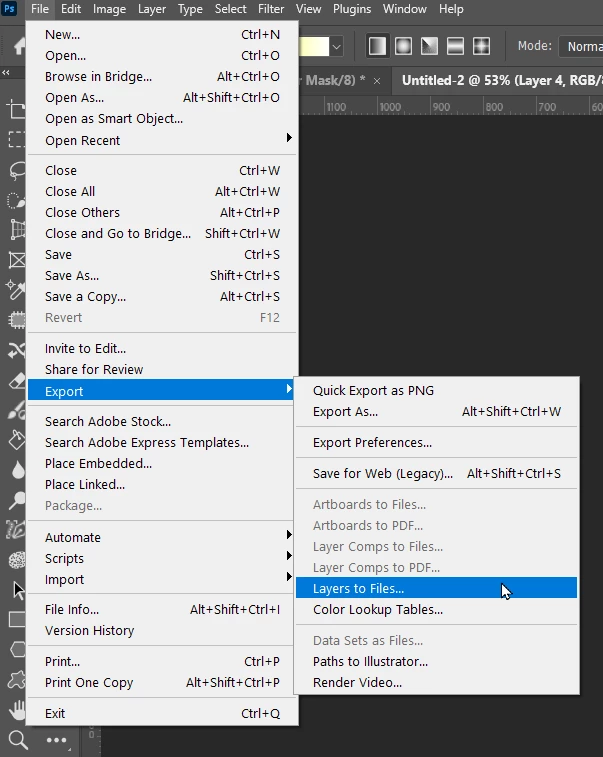
Does this help?

I am not sure if it trims the layers before exporting, but if it doesn't, use Image Processor with a short action that triums transparent pixels.


1 Antwort

Trevor.Dennis
Community Expert
Community Expert
June 20, 2024

Does this help?

I am not sure if it trims the layers before exporting, but if it doesn't, use Image Processor with a short action that triums transparent pixels.


Ayemac
AyemacAutor
Participant
June 20, 2024

Perfect! Thank you! I was able to export all to JPGs, and it's pretty much exactly what I was looking for. I had already croppped a bit ahead of time, so there were only a few images that needed adjusted. A litte generative fill can fix that!