
Known Participant
July 11, 2019
Resuelto

How do i change the foreground/background color using the swatches panel

  • July 11, 2019
  • 4 respuestas
  • 870 visualizaciones

Please view the following video to address my questions.

Loom | Free Screen & Video Recording Software

As you can see what is happening in the video when I select a color in the swatches panel, the foreground/background color changes to a different color than what I select in the swatches panel.

I'm using Photoshop CC 2018

Keith
Este tema ha sido cerrado para respuestas.
Mejor respuesta de

Hi

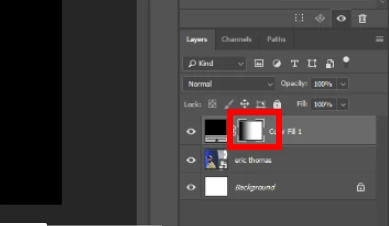
You have the layer mask selected

4 respuestas

Known Participant
July 14, 2019

Thank you all for pointing this out to me. I'm new to photoshop and I didn't realize that's what I was doing.

Mike_Gondek10189183
Community Expert
Community Expert
July 11, 2019

To get out of  mask mode, you can hit Q twice. Takes you in and out of quick mask mode, and a shortcut I use to save mouse movements.

You can also option click on a swatch to choose background color.

Chuck Uebele
Community Expert
Community Expert
July 11, 2019

You have your mask selected, which is only grayscale. Select the actual layer.

Respuesta
July 11, 2019

Hi

You have the layer mask selected