Known Participant
May 7, 2019
Answered

How do I check/change gray point and white point?

  • May 7, 2019
  • 1 reply
  • 569 views

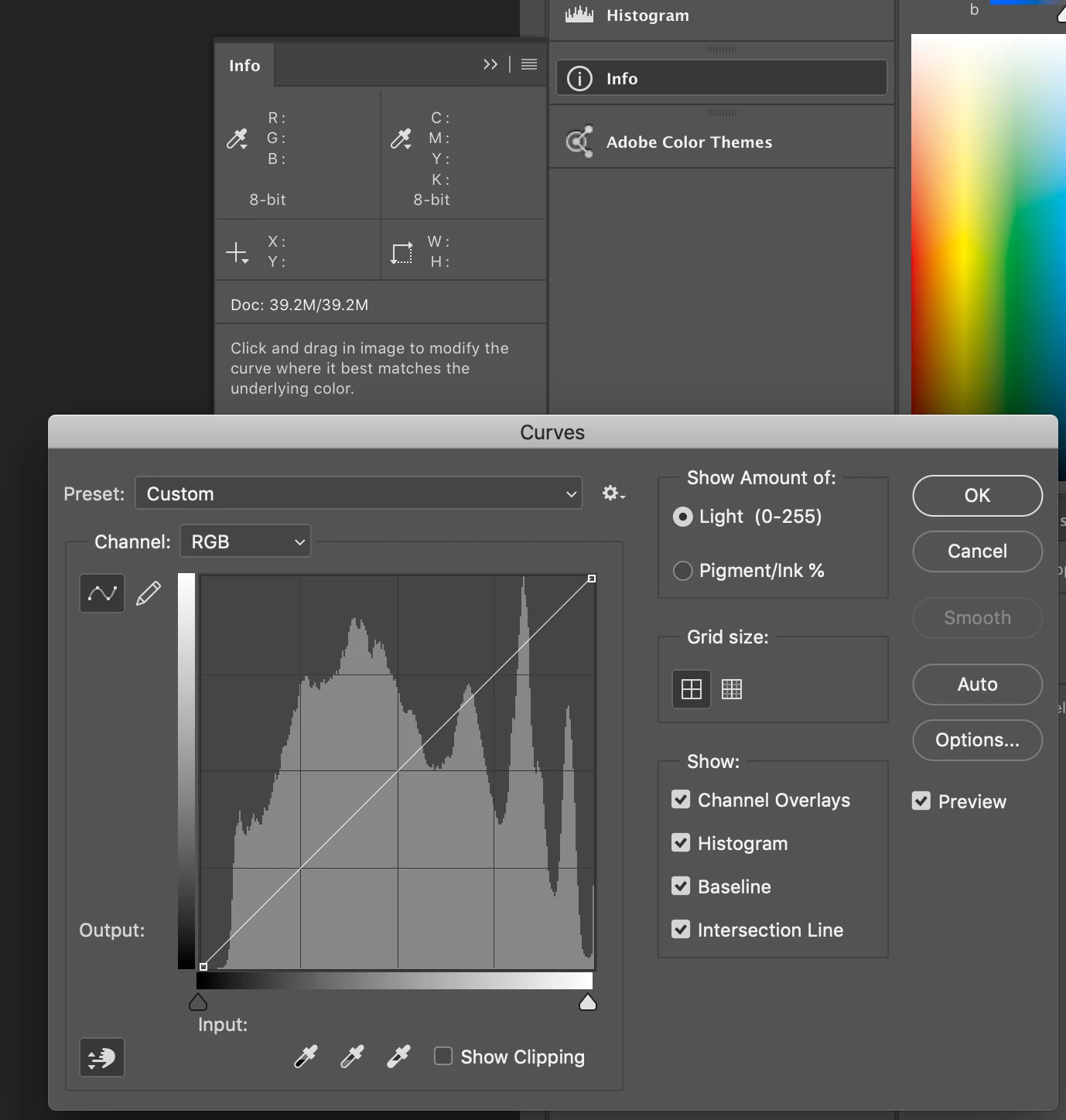
PS CC on a Mac. I am here:

I'd like to check to see what numbers are assigned to the white point and gray point. Where do I find this information? I thought it would be from the "Options" button from this panel, but that isn't it.

    This topic has been closed for replies.
    Correct answer Norman Sanders

    For the aim point settings. if that is what you have in mind, choose Curves and double click on the Highlight eyedropper. The Color Picker will pop-up. Change the values if you choose. Then ok or cancel. Repeat for the gray and the Shadow eyedropper. If you have made any changes, when you have finished and click the Curves OK you will  be asked if you would like to make the changes the new default. It's your call.

    1 reply

    Norman Sanders
    Norman SandersCorrect answer
    Legend
    May 7, 2019

    For the aim point settings. if that is what you have in mind, choose Curves and double click on the Highlight eyedropper. The Color Picker will pop-up. Change the values if you choose. Then ok or cancel. Repeat for the gray and the Shadow eyedropper. If you have made any changes, when you have finished and click the Curves OK you will  be asked if you would like to make the changes the new default. It's your call.