
Inspiring
January 22, 2020
Answered

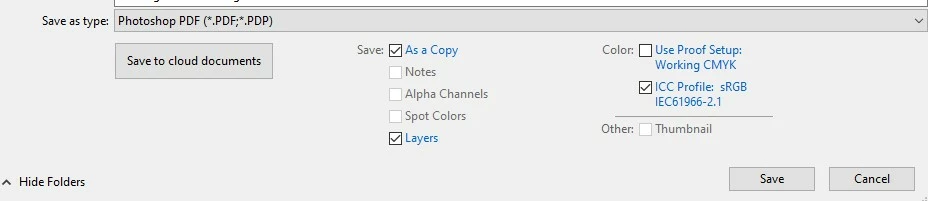
How do I disable the Save As Copy box when saving as a PDF in Photoshop 2020?

  • January 22, 2020
  • 12 replies
  • 21643 views

When saving a PDF from Photoshop CC 2020, the "Save a Copy" box is automatically checked off in the Save Window. Prior to CC 2020 I could save over an existing PDF file without generating a copy each time without the "Save a Copy" box being checked, how do I disable it?


{Thread renamed by moderator}
This topic has been closed for replies.
Correct answer Sahil.Chawla

Hi there,

That does not sound good, could you please let us know the operating system you're working with?
At my end I am ablt to check or uncheck the Save as a Copy box as shown below:


Have you tried resetting the preferences of Photoshop and see if that helps? 

https://helpx.adobe.com/photoshop/using/preferences.html


Note: Make sure that you back up all your custom presets, brushes & actions before restoring Photoshop's preferences. Migrate presets, actions, and settings


Regards,
Sahil


12 replies

Participating Frequently
April 3, 2020

I'm having this same problem on both MacOS 10.15 and Windows 10, with Photoshop CC updated to the latest on each.


Steps to reproduce:

1. Open a .jpg in Photoshop

2. Make some changes

3. Ctrl+Shift+S to "Save As..."

4. Change file format from .jpg to .PDF

5. The "As a Copy" box automatically checks itself


What should happen:

Steps 1-3...

4. Change file format from .jpg to .PDF

5. The "As a Copy" box remains unchecked unless I deliberately check it


This is not the behavior someone expects when they use a "Save As" dialog. Normally when using a "Save As" dialog, the newly saved file becomes the active file. It is not saved as a copy, keeping the original document as the active file, permitting you to make changes to an original without realizing it. 

Participant
October 31, 2021

Yes I am having the same issue - It was better before when it didn't automatically put the "copy" or it should be an option you can add or remove if needed.

CMD42187
Participating Frequently
November 1, 2021

Hey lorrenal,

They create a new feature a few months ago.

If you are in the most recent version of photoshop they have added some additional options for the "Save As" and "Save As Copy" features. If you go to Edit>Preferences>File Handling. You will see some check box options. "Do Not Append "copy" to file name when saving a copy" may be what you are looking for. I have this unchecked in my preferences.


There is also a "Enable Legacy Save As". I personally like the new "Save As" feature as it means I can save pdfs without unchecking a "Save As Copy" box. Basically you have some options in those preferences that you could experiment with and see what works best for you!

Sahil.Chawla
Adobe Employee
Sahil.ChawlaCorrect answer
Adobe Employee
January 22, 2020

Hi there,

That does not sound good, could you please let us know the operating system you're working with?
At my end I am ablt to check or uncheck the Save as a Copy box as shown below:


Have you tried resetting the preferences of Photoshop and see if that helps? 

https://helpx.adobe.com/photoshop/using/preferences.html


Note: Make sure that you back up all your custom presets, brushes & actions before restoring Photoshop's preferences. Migrate presets, actions, and settings


Regards,
Sahil


carlartAuthor
Inspiring
January 22, 2020

Thank you for your quick reply. Following the info in your link, I created a default pref set and the problem seems to have gone away. Before this I kept unchecking the save as copy box in the PDF save window but it would keep resetting to checked.

Carl


carlartAuthor
Inspiring
January 22, 2020

BTW, I'm using Mac OS 10.15.2 Catalina