
Participant
February 21, 2018
Answered

How do i do this design?

  • February 21, 2018
  • 4 replies
  • 536 views

I am looking to design my picture to put on a t shirt, but I want it to look a certain way. I want it to look repeated, a bit like the picture I have attached. I don't know how to do this on photoshop. Can somebody advise me?
    This topic has been closed for replies.
    Correct answer Norman Sanders

    Depending upon your design, you may find the result you want this way:

    Open the file and reduce its size.

    Choose Edit > Define Pattern

    Open a new blank file 8 x10 or larger

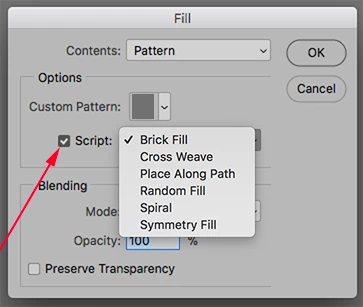
    Choose Edit > Fill > Pattern. Yours is the last in the set.

    Experiment with various Scripts and sliders within them.


    4 replies

    Norman Sanders
    Norman SandersCorrect answer
    Legend
    February 22, 2018

    Depending upon your design, you may find the result you want this way:

    Open the file and reduce its size.

    Choose Edit > Define Pattern

    Open a new blank file 8 x10 or larger

    Choose Edit > Fill > Pattern. Yours is the last in the set.

    Experiment with various Scripts and sliders within them.


    Community Expert
    February 22, 2018

    Here is a tutorial on how to create a repeated pattern in photoshop. How to create a seamless pattern in Photoshop CC - YouTube

    But if you are creating this for a t-shirt I would more likely do what Simmer1 said to do in illustrator.

    Simmer1
    Community Expert
    Community Expert
    February 22, 2018

    Hi,

    Do you have Illustrator? If so I would advise you to use it to create a repeat pattern such as this.

    Here is a good tutorial: How to Create Seamless Patterns in Illustrator - YouTube

    I hope this helps!

    Sim

    c.pfaffenbichler
    Community Expert
    Community Expert
    February 22, 2018

    Please post your image (or a lores version).

    One can create Patterns in Photoshop, but an »overlap« as in the example may take a little effort.