Inspiring
August 10, 2023
Answered

How do I edit atn file externally in PS 2023

  • August 10, 2023
  • 1 reply
  • 2691 views

Hi,

I read a few old discussions regarding this, e.g. this one but either I am doing somethign wrong or, those methods do not work in new version of PS.

I need to adit a very long atn file which no longer works in PS 2023.

How can I edit atn file externallt in PS 2023.

I guess I need a new version of the tool which exports to xml and one which imports back as atn, unless there is a newer method.


I am using latest version of PS on windows.

Thanks


Correct answer Stephen Marsh

Thank you.

Can you summerize to process of making the ATN=>XMl->ATN method and required tools in PS2023?

As mentioned on teh beginning of this thread i can't make the 'old' methoid work and since I have many sucj actions I'd rather not bother your with all of them.

In addition it will be a trial and error process to fix the ATN.


As for your second query, I believe I know what is the firts problem I encounter regarding the old actions.

The action duplicate a layer multiple times and then performs action on the copied layer.

It selects them by name.

I believe in older version of PS, when you copied a layer it would get a default 'different name'/

See here, layer are being copied:
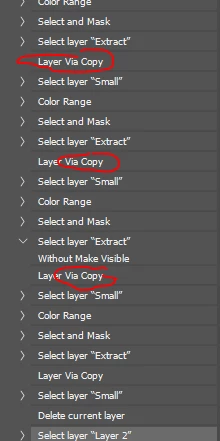
The above actions generate these layers:
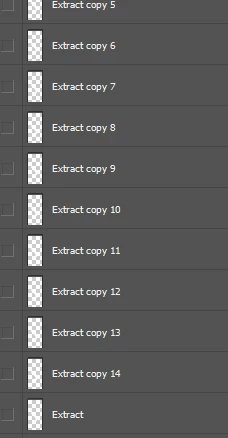
However, the action expects the copied layer to be: "layer 1", "layer 2", "layer 3" ..

As can be seen here:
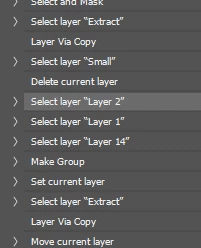
 

and this is exactly where the action fails with htis error:
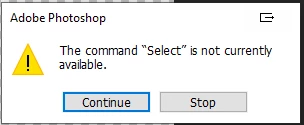
since it can't find "Layer 2". "Layer 2" is now called "Extract Copy 2"


I don't do anything special, I just downloaded the entire xtools v2.3 and unzipped it, then in the apps folder run the script:


ActionFileToXML.jsx


Then to convert back:


ActionFileFromXML.jsx


That being said, I do most of my scripting in v2021 unless I need to work with a newer feature.

1 reply

Stephen Marsh
Community Expert
Community Expert
August 10, 2023

For the most part, you are best forgetting that and just edit or re-record the steps in the Action panel.

Inspiring
August 10, 2023

I agree but this will not solve my issue. I have old actions which I once purchased and tehy stopped working.

Support for them dioes not exist, therefore I want to fix them myself and I believe I know what the problem is, only changing it in a huge number of places is not practical.

Therefor I need a way to edit the action as text and set back as action.


I found this: Converting an action to function which can be helpful.

I tested th emethod on small actions and it worked well. However on the large function which does not run i yes a system error which I ma unable to debug.
The above method provided a "Batch Play" action which is very hard to debug.

Inspiring
August 10, 2023

the one in the video is an alchemist app convert actions for use with new uxp panels If you enable developer mode in photoshop preferences, you can directly convert actions with command copy as javascript from the actions panel