
Known Participant
October 4, 2020
Pregunta

How do I find a favorite tool in an old version of Photoshop?

  • October 4, 2020
  • 3 respuestas
  • 847 visualizaciones

Hi, 

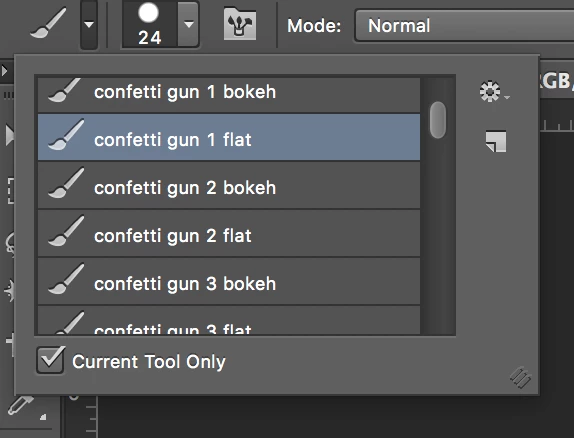
I have really been missing a tool I loved in CS6 that I don't even know if I have on my hard drive because I don't remember what it's called. All I can see is the name of the group of tools in Photoshop, but cannot find it in the CS6 Tools folder. I've tried searching my hard drive for this tool to no avail. Does anyone know how to find where it is in Adobe, how I'd figure out the name of the .tpl file? I did a screenshot of the tool name. I'm on a Mac. 

Thank you for any help.

Tina
 

Este tema ha sido cerrado para respuestas.

3 respuestas

jane-e
Community Expert
Community Expert
October 8, 2020

Hi Tina,

Looking at your screen shot, the name of the tool you are showing is called the "Brush" tool. You can see the picture in the upper left. What is also showing is the presets for the current tool (the Brush tool). The Presets for the Brush tool is what you are trying to find.


I'm trying to remember how presets worked in CS6, but I think there was a Presets Manager. Possibly the Presets can be saved from there. If that's not enough information to get you started, someone else might remember CS6 and how the Presets worked then and will step in to help.


EDIT: I found this on how to use the Preset Manager

https://www.dummies.com/software/adobe/photoshop/how-to-use-the-preset-manager-in-photoshop-cs6/


~ Jane

Known Participant
October 8, 2020

Oh bless you, Jane. I'm going to go look now and see what I can find. It's my favorite and it's been such a disappointment not to be able to find it. Will report back. Thanks again Jane!!

JJMack
Community Expert
Community Expert
October 4, 2020

Adobe CS6 Tool Presets tpl files.

JJMack
Known Participant
October 4, 2020

Hi JJ,

Thank you. I looked at your screen grab and tried installing the one that seemed most likely to be that I have in my folder (there are only three that aren't in what I'm guessing is the default you pictured), and it's not the one. Even though I access it via the tool dropdown could it be a brush? back then tools had to be installed as tools, whereas now they can be installed as brushes. Thank you!


Known Participant
October 8, 2020

Anyone, maybe an admin, have an idea how to find this tool? The screen cap shows what it's called when I'm in photoshop, but then when I look in my CS6 presets folder under Tools I don't see it. Where else could it be? I so love that tool and want to use it in my more current version of Photoshop but don't know how. 

lambiloon
Community Expert
Community Expert
October 4, 2020

Hi check the video hope it helps you method is same for Mac.....regards


https://youtu.be/7rm2Klwmv_4

Ali Sajjad / Graphic Design Trainer / Freelancer / Adobe Certified Professional
Known Participant
October 4, 2020

Thank you, Ali. This isn't the issue though. I have to find the tool before I can install it. Thank you for taking the time, though. 🙂