


- Home
- Photoshop ecosystem
- Discussions
- Re: How do I fit Photoshop on my Mac laptop. It's ...
- Re: How do I fit Photoshop on my Mac laptop. It's ...

Copy link to clipboard
Copied
How do I fit Photoshop on my Mac laptop. It's too big from my iMac 27". I can't get to bottom R corner to resize the photoshop. Do not have Windows.


 1 Correct answer


Toggle the green button in the upper-left hand corner. One click maximizes, another click reduces it to fit your screen so you can resize.
Try turning the Application Frame off and on, it usually fixes oversized workspaces.
Also check your display settings: 1024 x 768 display (1280 x 800 recommended) under Apple System Preferences > Displays.


Explore related tutorials & articles
 20
Replies
20
20
Replies
20


Copy link to clipboard
Copied
Preferences->Tools check Zoom resizes windows
Then use command- to zoom out. The window will resize to fit your image.
Copy link to clipboard
Copied
I did not find tools under preferences (CS6). Found zoom in or out but that is only for the current document working on... not the background Photoshop thing
Copy link to clipboard
Copied
Can you post a screenshot?
Copy link to clipboard
Copied
I took a photo and need to download it and then attach here. Thanks.
Copy link to clipboard
Copied
Just use command-shift-3 to take a screenshot. Then use the picture icon at the top of the post compose box to attach it.
Copy link to clipboard
Copied
Can't get Photoshop workspace to fit on laptop. Can't get to bottom R lower
corner to resize it and reset workspace for my laptop. Mac. CS6
Copy link to clipboard
Copied
I had to restart my computer to get SmartSwitch to download my photo which
then kills my keyboard....
How do I get back to where you are talking to me on the Photoshop forum?
Thanks
Copy link to clipboard
Copied
Found this. Did you get the photo I made to sh ow you??

Copy link to clipboard
Copied
This web forum does not support e-mail attachments. You must log-in to the web froum to post images directly in a web forum reply. See screenshot.
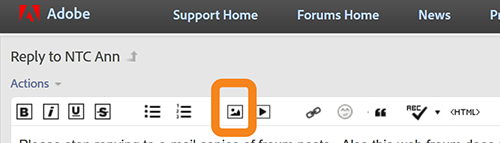
Copy link to clipboard
Copied
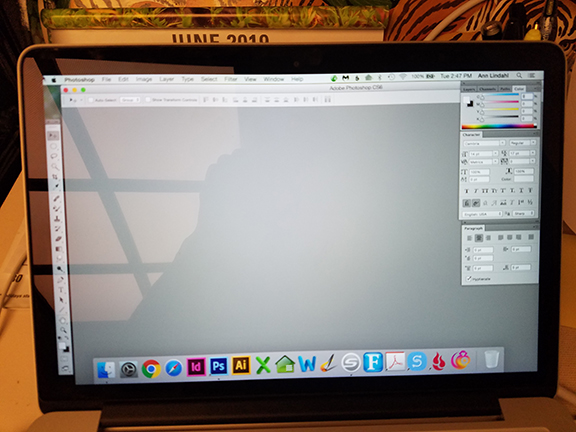 See bottom R corner.... can't get to bottom R to resize workspace down to fit my laptop.
Copy link to clipboard
Copied
And the settings on your iMac have nothing to do with how Photoshop is displayed on your MacBook.
Copy link to clipboard
Copied
How do I reset the Photoshop workspace to fit on my lap top. Can't get to bottom R lower corner to grab it to resize.
Photo attached above at about 12:19. Thanks again.
Copy link to clipboard
Copied
Hello. I put the screen shot on. Can't access the lower R corner of Photoshop to resize it to fit Laptop window.
Attached the photo. Did it show up on your end?
Copy link to clipboard
Copied
You can do a screenshot right on the computer by pressing command-shift-3 together. No need for an external camera.
That looks like the application frame, not an open image. However, I don't have CS6 installed so I can't check that. You can turn that off.
Meet the Application Frame - Photoshop CC: The Missing Manual, 2nd Edition [Book]
Copy link to clipboard
Copied
Huh??? That looks like the application frame, not an open image. You can turn that off.
I am talking about the work space... NOT an open image.... the workspace is too big for laptop screen.... we are not talking about any open image at all....
Copy link to clipboard
Copied
Toggle the green button in the upper-left hand corner. One click maximizes, another click reduces it to fit your screen so you can resize.
Try turning the Application Frame off and on, it usually fixes oversized workspaces.
Also check your display settings: 1024 x 768 display (1280 x 800 recommended) under Apple System Preferences > Displays.
Copy link to clipboard
Copied
CS6 is legacy software. You will need to adjust your Apple Display Preferences. See link below for details.
macOS Sierra: Adjust your display’s resolution
Copy link to clipboard
Copied
Did you look at the link I posted? That explains what is going on.
Copy link to clipboard
Copied
Another person told me to click the green button on top L. And that worked.
Thank you.
Copy link to clipboard
Copied
Hello. Help please! I have not been taking about my Mac preferences but Photoshop (CS6). (no I can not upgrade due to other programs on my computer. . How do I get it resized to fit on the screen. I can't get to the lower R corner to grab the corner to resize it to fit. Help please! Have an emergency up N I need to leave for and need to make sure my Photoshop is working on my laptop before I go. Thank you for help. I attached the photos and screen shot... you can see that you can't get to bottom R lower corner to drag work space up to fit lap top screen. It's on the lap top and I am trying to reach you thru my iMac... have been trying to get help please.


Find more inspiration, events, and resources on the new Adobe Community
Explore Now
 AdChoices