Participant
November 30, 2017
Answered

How do I get a gradient brush stoke that fades out as I stroke?

  • November 30, 2017
  • 1 reply
  • 31410 views

I'm new to CC. How do I get a brush stoke that fades out. I need that when I'm adding shadows etc. to a

character.

Thanks.

Curt

    This topic has been closed for replies.
    Correct answer Trevor.Dennis

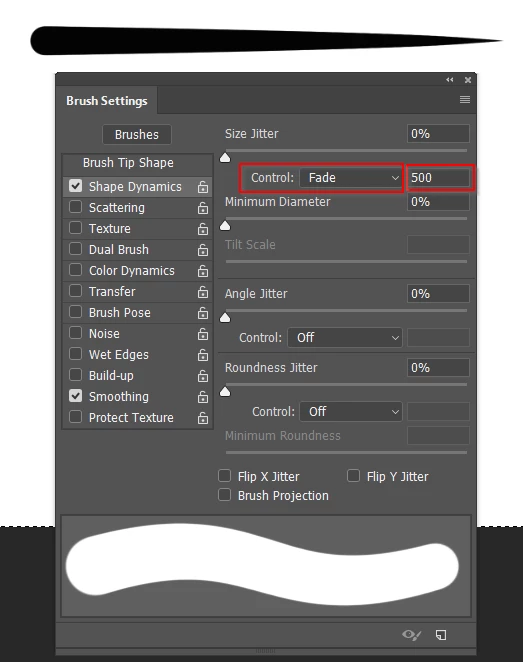
    In the brush panel under Size Jitter set the Control to Fade.  The amount depends on brush size, and brush spacing.
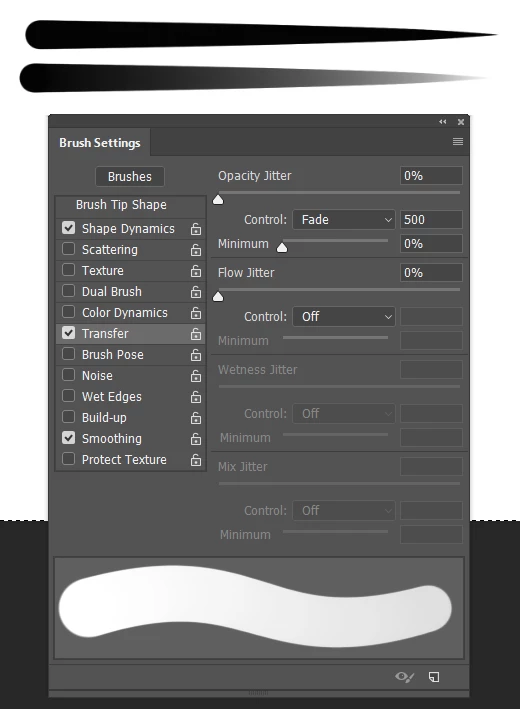
    Under Transfer, set Opacity to Fade with the same amount
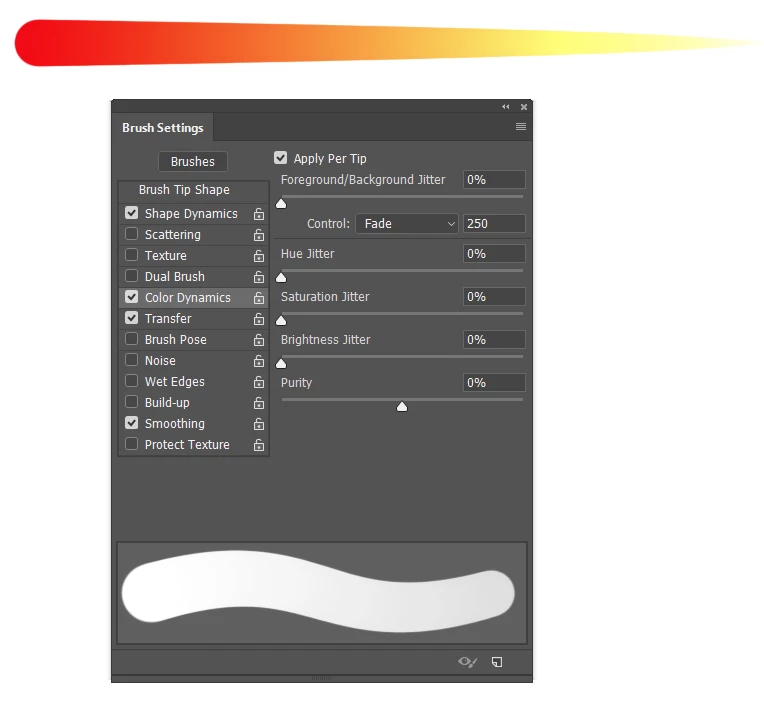
    You can add some Colour Dynamics by setting Foreground / Background to fade.  Notice that I have used to a lower value here, so that we get so solid yellow in the stroke.  If Opacity Fade was turned off, then you would not need to do this.  Have a play.  One thing I can remember tripping me up when I first started experimenting with the brush engine is that you need to leave the jitter sliders at zero.  Setting it anything else adds a random factor to the stroke.
    1 reply

    Trevor.Dennis
    Community Expert
    Trevor.DennisCommunity ExpertCorrect answer
    Community Expert
    November 30, 2017

    In the brush panel under Size Jitter set the Control to Fade.  The amount depends on brush size, and brush spacing.

    Under Transfer, set Opacity to Fade with the same amount

    You can add some Colour Dynamics by setting Foreground / Background to fade.  Notice that I have used to a lower value here, so that we get so solid yellow in the stroke.  If Opacity Fade was turned off, then you would not need to do this.  Have a play.  One thing I can remember tripping me up when I first started experimenting with the brush engine is that you need to leave the jitter sliders at zero.  Setting it anything else adds a random factor to the stroke.

    Participant
    December 1, 2017

    Thank you for your response. Unfortunately, I do not see a “size jitter option”. At the top it starts with opacity jitter, under that is flow jitter then wetness jitter and finally mix jitter.

    Your suggestions helped but the fade out of the brush narrows as it fades and I don’t see any way to alter the length of the stroke. Any thoughts on this will be much

    appreciated.

    Thank you for your help.

    Curt

    December 1, 2017

    You need to click on the Shape Dynamics