Drew Doniger
Participant
March 10, 2023
Answered

How do I get Photoshop to update smart objects automatically every time?

  • March 10, 2023
  • 2 replies
  • 1905 views

 I have encountered this problem so many times. Whenever I am working in a object (the image on the left in this example), do a lot changes, and save, it doesn't update around 50% of the time in the main file (The image on the right in this example). I have tried Layer> Smart objects,>update all modified contant, but it doesn't work for me for whatever reason. I have a workaround for when this happens, but it is not at all the best solution, so is there a way I can make smart objects always update when I save them?


 

This topic has been closed for replies.
Correct answer Trevor.Dennis

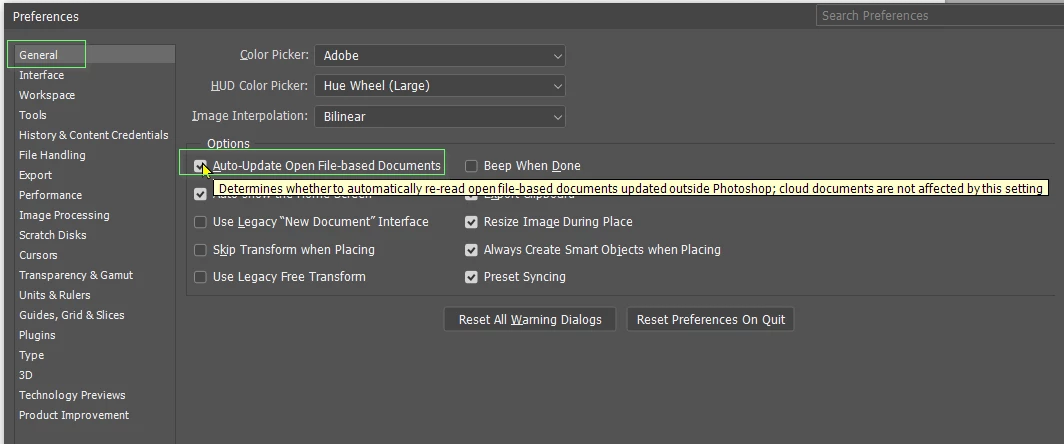
I wonder if this Preference setting might make a difference?

2 replies

Stephen Marsh
Community Expert
Community Expert
March 11, 2023

I was thinking the same as @Trevor.Dennis with the additional question – are these linked or embedded smart objects?

Drew Doniger
Participant
March 11, 2023

 they are embedded smart objects. However, I will try turning on that option, and see if that makes a difference.

Bojan Živković11378569
Community Expert
Community Expert
March 11, 2023

If you are working with embedded smart objects then they must uopdate every time you edit and save changes. Can you describe process of editing and saving edits? Assuming you are working with embedded SM:

Trevor.Dennis
Community Expert
Trevor.DennisCommunity ExpertCorrect answer
Community Expert
March 11, 2023

I wonder if this Preference setting might make a difference?

Drew Doniger
Participant
March 11, 2023

Turning on this option was definitely the solution, I don't know why it was off on default