
Ken Nielsen
Legend
November 5, 2024
Answered

How do I get tab groups to unglue from each other?

  • November 5, 2024
  • 2 replies
  • 690 views

Photroshop 2025 and all updated. I seem to have a tab behavior where I cannot keep them separated but once they are attached to each other, like the 'properties' tab I show here, it insists on opening now attached to the 'Layers and Paths' group which I want to keep floating separately. I see in the menu for the tab I can close the tab but when I perfom and operation where it needs to be open it comes bag 'glued' to the layers and paths group. How do I keep these separated now? As it is the attached group covers an area I am trying to work on so that is why I ask...
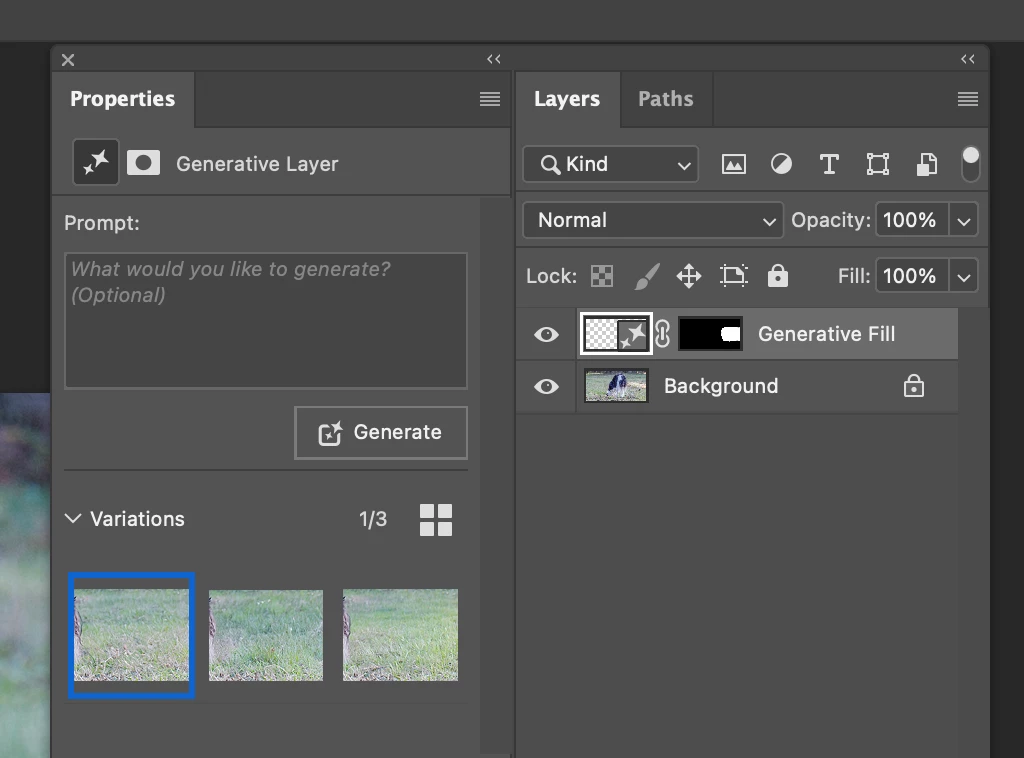


This topic has been closed for replies.
Correct answer D Fosse

Grab the tab and drag it off.


I don't know how you've organized your panels, but you can keep them floating, dock them to the side, group and ungroup, and reduce them to auto-collapsing icons. This is extremely customizable.


Worst case, if it misbehaves, reset workspace or reset preferences.

2 replies

Trevor.Dennis
Community Expert
Community Expert
November 5, 2024

Ken, it sounds like you might benefit from setting out and saving a custom workspace.  Arrange the panels by dragging and undocking, as decribed by Dag, and then go Window > Worspace > New Workspace.   You can save custom shortcuts and toolbars with a custom workspace.


-


I use the shortcuts below from a Michael Ninness workshop at MAX about ten years ago.  It's super convenient arranging windows with shortcuts.  The shortcuts highlighted in blue are not actually functional, as I have used them to trigger actions.  F5, for instance, sets and resets my most used workspace.  We are constantly moving panels to get get screen shots for this forum, so it is nice tidying things up with a single key press. 


Steps like this are ten minutes of work that will save you hours in the years to come.

Ken Nielsen
Legend
November 5, 2024

Trevor.Dennis  Very helpful and thank you. I appreciate any and all help and this is certainly a great help.

D Fosse
Community Expert
D FosseCommunity ExpertCorrect answer
Community Expert
November 5, 2024

Grab the tab and drag it off.


I don't know how you've organized your panels, but you can keep them floating, dock them to the side, group and ungroup, and reduce them to auto-collapsing icons. This is extremely customizable.


Worst case, if it misbehaves, reset workspace or reset preferences.

Ken Nielsen
Legend
November 5, 2024

"Grab a tab an drag it off" I don't know why this didn't work for me until I had to ask here and get your reply. Yes, that works! Problem solved and thank you so much for the reply.