Exit
  • Global community
    • Language:
      • Deutsch
      • English
      • Español
      • Français
      • Português
  • 日本語コミュニティ
  • 한국 커뮤니티
0

how do i import a second photo on photoshop cs6?

Community Beginner ,
Dec 06, 2016 Dec 06, 2016

I managed to import the background photo, but when i tried to open the second photo it opened in a new "window"... how do i open it in a new layer instead?

1.1K
Translate
Report
Community guidelines
Be kind and respectful, give credit to the original source of content, and search for duplicates before posting. Learn more
community guidelines

correct answers 1 Correct answer

Community Expert , Dec 06, 2016 Dec 06, 2016

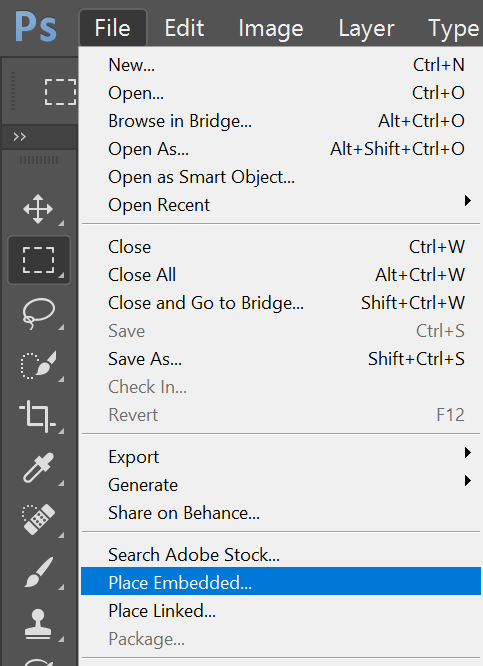
You can use, File>Place.

Below is a screen shot from PS CC2017, which has two methods of placing a file. CS6 will only say, "Place."

Translate
Adobe
Community Expert ,
Dec 06, 2016 Dec 06, 2016

You can use, File>Place.

Below is a screen shot from PS CC2017, which has two methods of placing a file. CS6 will only say, "Place."

Translate
Report
Community guidelines
Be kind and respectful, give credit to the original source of content, and search for duplicates before posting. Learn more
community guidelines
Community Beginner ,
Dec 07, 2016 Dec 07, 2016

yes yes you saved me thank you so much!!

Translate
Report
Community guidelines
Be kind and respectful, give credit to the original source of content, and search for duplicates before posting. Learn more
community guidelines
Community Expert ,
Dec 07, 2016 Dec 07, 2016
LATEST

Glad to help.

Translate
Report
Community guidelines
Be kind and respectful, give credit to the original source of content, and search for duplicates before posting. Learn more
community guidelines