Inspiring
September 24, 2021
Answered

How do I keep Move tool from moving the layer underneath the selection?

  • September 24, 2021
  • 1 reply
  • 967 views

I click on the layer I want to move, but the move tool moves

layers underneath that layer.

Please tell me what to do.  I've forgotten, and cannot fathom why

Adobe hasn't fixed this.
This topic has been closed for replies.
Correct answer Sahil.Chawla

Hi there,

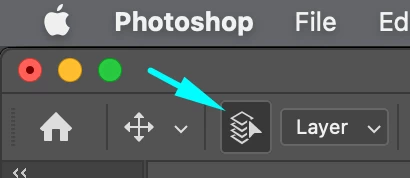
Please try turning off the Auto Select feature while the Move Tool is selected and let us know if it helps.


Regards,
Sahil

1 reply

Sahil.Chawla
Adobe Employee
Sahil.ChawlaCorrect answer
Adobe Employee
September 24, 2021

Hi there,

Please try turning off the Auto Select feature while the Move Tool is selected and let us know if it helps.


Regards,
Sahil

litefishAuthor
Inspiring
September 24, 2021

Found it!  Thanks so much!  It was in the upper far left.