
bobb95595816
Participant
June 24, 2017
Beantwortet

How do I make pencil & brush pressure sensitive; that is, more pressure = thicker lines ... & ... less pressure = thiner lines?

  • June 24, 2017
  • 1 Antwort
  • 2213 Ansichten

How do I make pencil & brush pressure sensitive: that is, more pressure=thicker lines ... & ... less pressure=thinner lines?
    Dieses Thema wurde für Antworten geschlossen.
    Beste Antwort von davescm

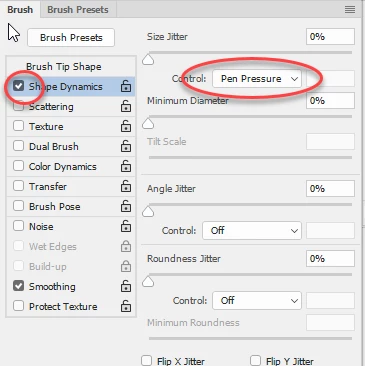
    If by thicker you mean increased brush size then go to the brush panel and under Shape Dynamics turn on size jitter Control Pen Pressure:

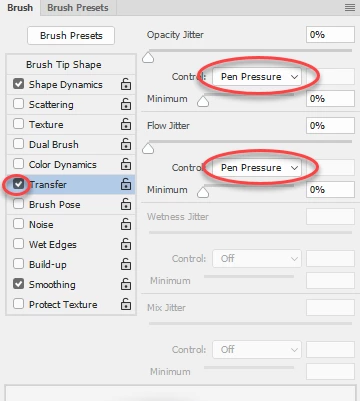
    If you meant opacity and flow then this can also be set under Transfer

    You can of course have all three

    Dave

    1 Antwort

    davescm
    Community Expert
    davescmCommunity ExpertAntwort
    Community Expert
    June 24, 2017

    If by thicker you mean increased brush size then go to the brush panel and under Shape Dynamics turn on size jitter Control Pen Pressure:

    If you meant opacity and flow then this can also be set under Transfer

    You can of course have all three

    Dave

    Participant
    September 18, 2021

    Hi I was looking for the same thing, I just want the brush thin with low pressure and thick with high pressure while maintaining 100% opacity. I have the shape dynamics set how I want them, but the transfer settings keep activiting changing the opacity, even after I lock them 'off'. Even if I set minimum opacity to 100%, it switches itself back when I draw.


    Participant
    September 18, 2021

    nevermind! I had the pressure setting icon checked on the top brush tool border thing haha