
gregd
Inspiring
August 29, 2024
Question

How do I make Photoshop remember to use the Pencil Tool when selecting a generic brush?

  • August 29, 2024
  • 3 replies
  • 825 views

Whenever I select a brush that doesn't force either the Brush Tool or Pencil Tool, it always goes to Brush Tool. How can I make it remember which of the two tools I last used?


In this demonstration, I don't understand why the Brush Tool is ever selected.
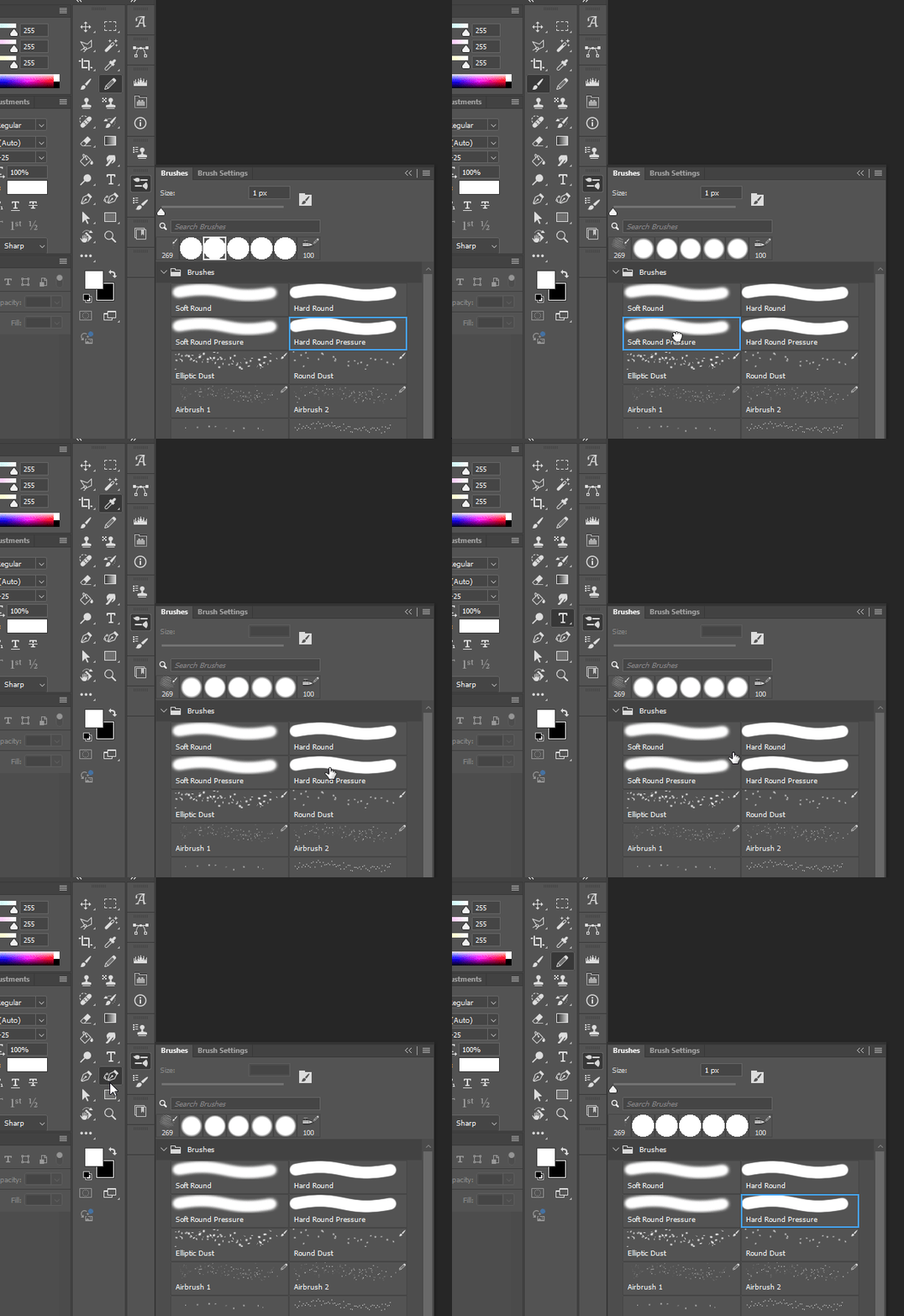


Using Photoshop 25.11.0, Windows 11 Pro.

This topic has been closed for replies.

3 replies

Participant
August 31, 2024

In Photoshop, the Pencil Tool and Brush Tool are separate tools, even though they share similar settings. If you want Photoshop to remember to use the Pencil Tool when you select a generic brush, you can follow these steps:

1. **Customize the Tool Preset:**
- Select the **Pencil Tool** from the toolbar.
- Choose the brush settings you prefer for the Pencil Tool (e.g., size, hardness).
- Go to the **Tool Presets** panel (Window > Tool Presets).
- Click the **Create New Tool Preset** button at the bottom of the Tool Presets panel.
- In the dialog that appears, give your preset a name (e.g., "Pencil Tool Preset") and make sure "Include Tool Settings" is checked.
- Click **OK**.

2. **Use the Tool Preset:**
- Now, whenever you want to use the Pencil Tool with your custom settings, you can simply select this preset from the Tool Presets panel.

3. **Switch Between Tools:**
- If you want to quickly switch between the Brush Tool and the Pencil Tool, you can use keyboard shortcuts. The default shortcuts are **B** for the Brush Tool and **Shift+B** to toggle between the Brush Tool and the Pencil Tool.
- You can also set a custom keyboard shortcut to directly select your Pencil Tool preset.

This approach ensures that when you select the Pencil Tool, it will use the settings you've defined, even if you switch to other tools and then back to the Pencil Tool.

sehr____!
Ged_Traynor
Community Expert
Community Expert
August 31, 2024

@wajehasehrish your post is AI generated

D Fosse
Community Expert
Community Expert
August 31, 2024

1. Go to Edit > Toolbar and pull the Pencil out of the Brush Tool group to give it its own spot in the toolbar.

2. Go to Edit > Keyboard shortcuts and give the Pencil tool its own shortcut separate from the Brush tool.

gregd
gregdAuthor
Inspiring
August 31, 2024

1. They already are, as you can see above.

2. This does not change behavior when selecting a brush preset.

c.pfaffenbichler
Community Expert
Community Expert
August 31, 2024

With some non-painting Tool selected when you select a Brush that has been saved without Tool Settings the Brush Tool is it. 

So I think you may want to saye a couple of Pencil-Brushes if you need to use the Tool frequently. 

gregd
gregdAuthor
Inspiring
August 31, 2024

I already have some pencil brushes saved (a couple of them are visible in my example).

Do brushes presets that don't force either Brush/Pencil not exist anymore?

c.pfaffenbichler
Community Expert
Community Expert
September 1, 2024
quote

Do brushes presets that don't force either Brush/Pencil not exist anymore?

In which Photoshop version did they exist according to your memory? 

Photoshop 2020 is the oldest version I have access to here and the behaviour appears identical to Photoshop 2024’s – with a non-painting Tool selected selecting a Brush in the Brushes Panel selects the Brush Tool.