AudiLover
Participant
December 31, 2017
Answered

How do I make this car silhouette with the body only and the paint colour?

  • December 31, 2017
  • 1 reply
  • 2690 views

Hi everyone, new user here!

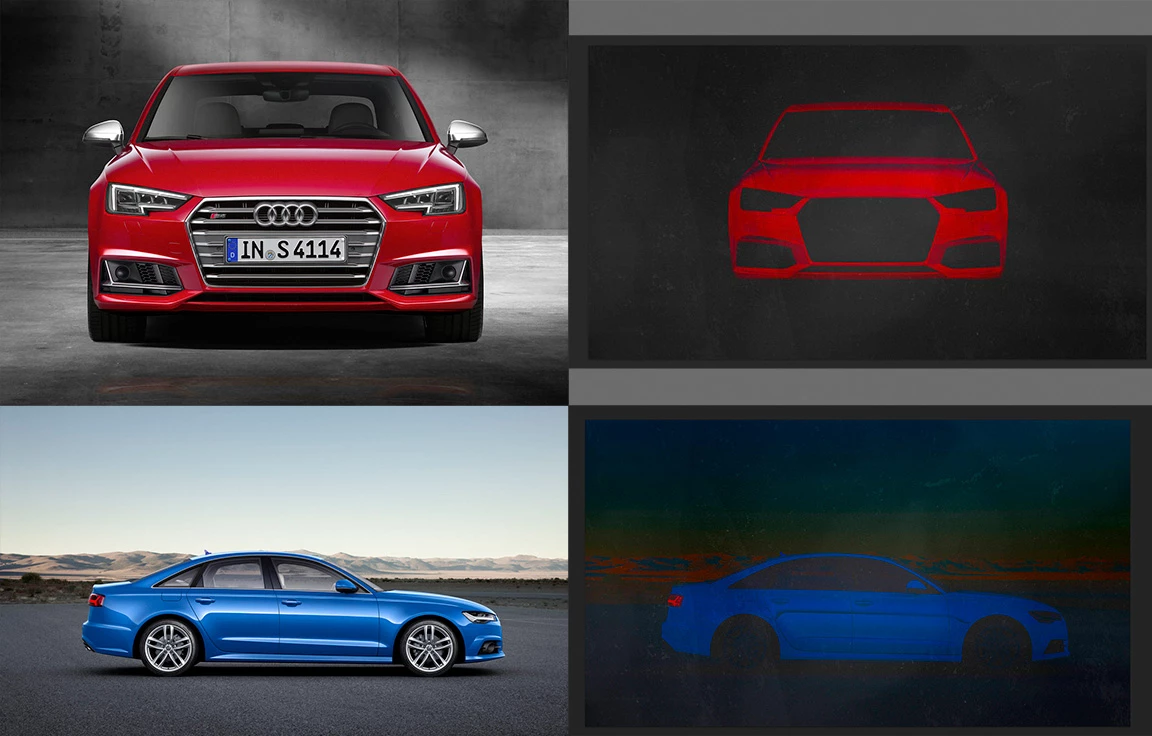
I have been playing around in Photoshop CS6 and accidentally stumbled across the 'Colour' Layer type when playing around. I was so amazed that I decided to give it a proper test run with a stock image and it worked wonders! But the thing is that I have found it only works with red in the picture. Whereas when I tried with blue it seems washed out. It doesn't stand out as much as red does but I want to make it work with other colours as well.

Now I'm not sure if I'm doing something wrong here but I can only get this trick to work with red. The blue car doesn't seem to be as vibrant as the red so I'm trying to make the blue/other colours besides red stand out a bit more.

I have a feeling it could be the chalkboard layer I have down the bottom that might be causing this but I'm going for that look. I want to retain the contour line of the vehicle as well...I don't want a flat 2D image.

Feel free to ask questions back so I can assist in finding my answer.

Red:

Stock Photo - Audi S4 | Audi MediaCenter

My Test Run - https://imgur.com/a/SccOu

Blue:

Stock Photo - Audi A6 | Audi MediaCenter

My Test Run - https://imgur.com/a/q8dhu

Any help would be appreciated!
    This topic has been closed for replies.
    Correct answer Norman Sanders

    When working in RGB mode, changes in color also affect tonal range.  As a result, the modeling and contrast can be significantly affected.

    These are your posted images:

    If you were to switch to Lab Color, where tonal scale is discrete from color, you have the opportunity to create a mask from either the  a  or the  b  channel and change the color while maintaining the contour of the cars. Then return to RGB.

    On an additional layer, inverting the mask will allow you to put the car in a black background easily.

    Hint: When you post an image, use this handy Forum device.

    1 reply

    Norman Sanders
    Norman SandersCorrect answer
    Legend
    December 31, 2017

    When working in RGB mode, changes in color also affect tonal range.  As a result, the modeling and contrast can be significantly affected.

    These are your posted images:

    If you were to switch to Lab Color, where tonal scale is discrete from color, you have the opportunity to create a mask from either the  a  or the  b  channel and change the color while maintaining the contour of the cars. Then return to RGB.

    On an additional layer, inverting the mask will allow you to put the car in a black background easily.

    Hint: When you post an image, use this handy Forum device.

    Silkrooster
    Legend
    December 31, 2017

    Or copy/paste image when sharing to the forum. Either way is fine and I believe more people would respond.