
Participant
October 11, 2019
Answered

How do I MEASURE a height/width ratio?

  • October 11, 2019
  • 3 replies
  • 2446 views

So you know that dumb program for losers called GIMP that doesn't even cost a million dollars? Well, it DOES have this one little nifty wherein if I measure a rectangle, it actually AUTOMATICALLY, without the error-prone process of setting tiny four-figure numbers into an off-app calculator, MEAURES THE ASPECT RATIO!

Check it out:

 

That doesn't happen in PS. But what I'm wondering is if there is ANY way to simply draw OR EVEN select a rectangle for the purposes of measureing a ratio automatically in this way. That's, right I said MEAsURING. Not to crop an image or layer to a specific aspect ratio, not to draw a fill of a predetermined size, or warp an image to a certain dimension, not to rasturbate an object expansion, simply to make a rectangle and KNOW WHAT IT IS AUTOMATICALLY. This would be extremely useful for my purposes. 

Internet is coming up blank.   Any suggestions?
This topic has been closed for replies.
Correct answer Chuck Uebele

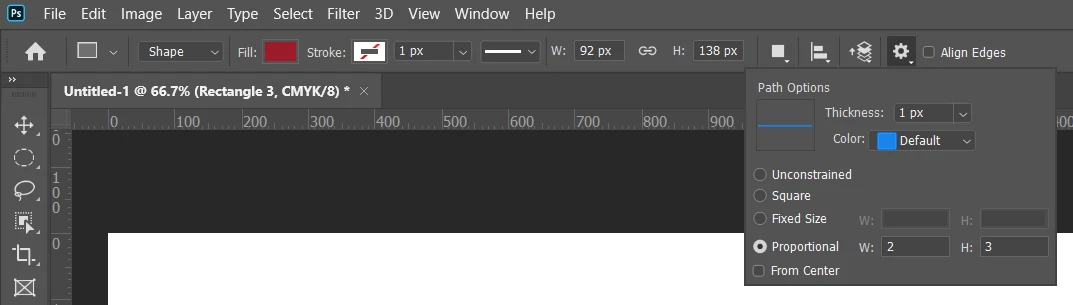
If you actually want to draw a shape to a know aspect ratio, then use the path options in the menu bar.

If you want to measure the aspect ratio, you can use this script that just reduces one of the ratio values to 1.

#target photoshop;
var doc = activeDocument;
var lBounds = doc.activeLayer.bounds
var hor = lBounds[2]-lBounds[0];
var vert = lBounds[3]-lBounds[1];
var max = Math.max(hor,vert)
var min = Math.min(hor,vert)

if(hor>vert){alert(max/min + ':' + min/min)}
else {alert(min/min +':' +max/min)};

3 replies

Stephen Marsh
Community Expert
Community Expert
October 12, 2019

From my previous explorations of aspect ratio, there are at least three different ways to express the ratio. Take the following 1920x1080 canvas:


However, it is not always that easy, different input can create some "interesting" output:


Dimensions: 153 x 92 pixels

Aspect Ratio:

1.66:1 / 3.32:2 / 6.64:4 (Basic)

153:92 (GCD)

5:3 (Farey)

16:9 (Adobe Bridge)

gener7
Community Expert
Community Expert
October 12, 2019

I checked your blog, Stephen and I see you had to pull the code for your Document Info script. Can you post it here?

Stephen Marsh
Community Expert
Community Expert
October 12, 2019

Sure, I’ll update this placeholder:


#target photoshop
//stackoverflow.com/questions/1186414/whats-the-algorithm-to-calculate-aspect-ratio-i-need-an-output-like-43-169
var savedRuler = app.preferences.rulerUnits;        
app.preferences.rulerUnits = Units.PIXELS;
function gcd(a, b) {
    return (b == 0) ? a : gcd(b, a % b);
}
var w = app.activeDocument.width.toString().replace(' px', '');
var h = app.activeDocument.height.toString().replace(' px', '');
var r = gcd(w, h);
var mp = w * h / 1000000
var pix = w * h
var ppiRes = app.activeDocument.resolution;
var ppcmRes = ppiRes/2.54
var ratio = w / h
var docName = app.activeDocument.name;
var wMetric = w / 72 * 2.54
var hMetric = h / 72 * 2.54
var wInches = w / 72
var hInches = h / 72
/////////////////////////////////////////////////////////////////////
    var doc = app.activeDocument    
    var w = doc.width.toString().replace(' px', '');
    var h = doc.height.toString().replace(' px', ''); 
        
    function aspect_ratio(val, lim) {

    var lower = [0, 1];
    var upper = [1, 0];

    while (true) {
        var mediant = [lower[0] + upper[0], lower[1] + upper[1]];

        if (val * mediant[1] > mediant[0]) {
            if (lim < mediant[1]) {
                return upper;
            }
            lower = mediant;
        } else if (val * mediant[1] == mediant[0]) {
            if (lim >= mediant[1]) {
                return mediant;
            }
            if (lower[1] < upper[1]) {
                return lower;
            }
            return upper;
        } else {
            if (lim < mediant[1]) {
                return lower;
            }
            upper = mediant;
        }
    }
}
/////////////////////////////////////////////////////////////////////
app.preferences.rulerUnits = savedRuler;
alert('Document Info' + '\n' + 'Document Name: ' + docName + '\n' + 'Dimensions: ' + w + ' x ' + h + ' pixels' + '\n' + 'Dimensions: '  + Math.round(wMetric * 100) / 100 + ' x ' + Math.round(hMetric * 100) / 100 + ' cm / ' + Math.round(wInches * 1000) / 1000 + ' x ' + Math.round(hInches * 1000) / 1000 + ' inches' + '\n' + 'Resolution: ' + Math.round(ppiRes * 10) / 10 + ' ppi / ' + Math.round(ppcmRes * 1000) / 1000 + ' ppcm' + '\n' + 'Megapixel Value: ' + Math.round(mp * 10) / 10 + ' MP' + ' (' + pix + ' pixels)' + '\n' + 'Aspect Ratio:' + '\n' + ratio.toFixed(2) + ':1' + ' / ' + ratio.toFixed(2) * 2 + ':2 / ' + ratio.toFixed(2) * 4 + ':4' + ' (Basic)' + '\n' + w / r + ':' + h / r + ' (GCD)' + '\n' + aspect_ratio(w / h, 50).toString().replace(',', ':') + ' (Farey)');


Chuck Uebele
Community Expert
Community Expert
October 11, 2019

Did you read the second part of my post where the script will measure for you and display the results, so that all you have to do is copy them?


Chuck Uebele
Community Expert
Chuck UebeleCommunity ExpertCorrect answer
Community Expert
October 11, 2019

If you actually want to draw a shape to a know aspect ratio, then use the path options in the menu bar.

If you want to measure the aspect ratio, you can use this script that just reduces one of the ratio values to 1.

#target photoshop;
var doc = activeDocument;
var lBounds = doc.activeLayer.bounds
var hor = lBounds[2]-lBounds[0];
var vert = lBounds[3]-lBounds[1];
var max = Math.max(hor,vert)
var min = Math.min(hor,vert)

if(hor>vert){alert(max/min + ':' + min/min)}
else {alert(min/min +':' +max/min)};
Known Participant
November 10, 2023

This doesn't work for me. im using PS 2023