
Participant
April 4, 2018
Answered

How do I permenently hide extras

  • April 4, 2018
  • 3 replies
  • 674 views

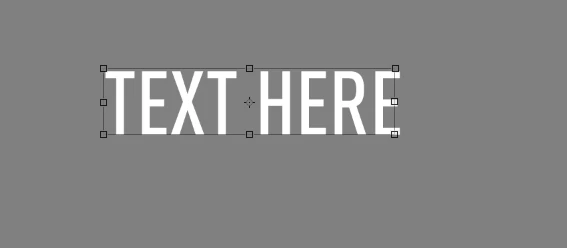
I don't ever want to see this bounding box unless I hit command-T to transform an element, but lately this box keeps reappearing every time I click on an element, no matter how many times I hit Hide Extras.

Is this possible, or am I stuck hitting Control-Command-H every time I click on a layer?
    This topic has been closed for replies.
    Correct answer Barb Binder

    Did you check Show Transform Controls by accident? If so, just uncheck it.

    ~Barb

    3 replies

    Participant
    February 13, 2023

    Just use 

    Ctrl + '

    Participant
    April 4, 2018

    Thank you, didn't know about that.

    Barb Binder
    Community Expert
    Community Expert
    April 4, 2018

    You are in good company, Aaron. Not many people know everything about Photoshop, myself included!

    ~Barb

    ~Barb at Rocky Mountain Training
    Barb Binder
    Community Expert
    Barb BinderCommunity ExpertCorrect answer
    Community Expert
    April 4, 2018

    Did you check Show Transform Controls by accident? If so, just uncheck it.

    ~Barb

    ~Barb at Rocky Mountain Training
    Participant
    April 21, 2020

    Thanks Barb, this has been driving me up the wall for the past 45 mins.
