
Participating Frequently
July 20, 2018
Answered

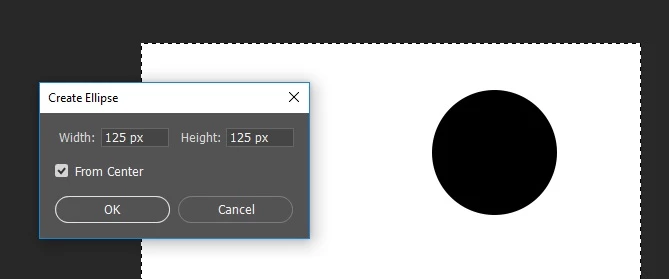
How do I prevent the "Create Ellipse" popup from appearing?

  • July 20, 2018
  • 3 replies
  • 2677 views

Hi,

  Whenever I'm trying to create an ellipse in Photoshop CC I get a popup window titled "Create Ellipse" that asks for the Width and Height of the ellipse and has a From Center checkbox.  This is new behavior for Photoshop which didn't exist in CS5.  It's really annoying when I want to put down 50 circles of the same size.  How can this popup be disabled?

Thanks,

Dave

    This topic has been closed for replies.
    Correct answer Semaphoric

    I agree, the default 100 pixel circle is very annoying. Try this in the Shape tool options, in the little cogwheel drop down, select "Fixed Size", and enter the size in the appropriate fields. Then, Click and drag ever so slightly (all in one step). This will create your shape at the proper size. Unfortunately, you will need to position it again, due to the Drag step.

    3 replies

    Bojan Živković11378569
    Community Expert
    Community Expert
    July 21, 2018

    My $0.02. If you want 50 circles at the same dimensions then you can draw a single ellipse and to duplicate it using Ctrl/Cmd + J or use the Move tool to click on shape then drag while holding Alt/opt key what will create a duplicate in the layers panel.

    JJMack
    Community Expert
    Community Expert
    July 21, 2018

    The would mean creating a new layer  first to create the first circle in so the 50 Crtl+J would work if you do not want 50 shape layers.

    JJMack
    Participating Frequently
    July 21, 2018

    I was actually looking for one circle per layer.  I have an action designed later to count the layers and quantify the circles. 

    Thanks!

    D.A.R
    Legend
    July 20, 2018

    dentenberg  wrote

    It's really annoying when I want to put down 50 circles of the same size.

    Since it takes the same dimensions as the last entry it could actually be the fastest method to lay down 50 circles.

    Click + Enter. Repeat

    Participating Frequently
    July 21, 2018

    Thanks for your reply.  Are you saying that there's no way to turn it off?  This is different behavior than was in CS5.

    Semaphoric
    Community Expert
    Community Expert
    July 21, 2018

    dentenberg  wrote

    Thanks for your reply.  Are you saying that there's no way to turn it off?  This is different behavior than was in CS5.

    To my knowledge no. I can only go as far back as CS6 and this behavior was present.

    How were you creating the circles in CS5? What happened when you just clicked on the canvas?


    I have CS4. If I have Fixed Size selected in the Geometry Options drop down, clicking on the image creates an ellipse that size - no additional dialog pops up, and Ellipse Tool shows up in the History panel.

    If I select Unconstrained, a click does nothing - nothing is drawn, and nothing appears in the History panel.

    JJMack
    Community Expert
    Community Expert
    July 20, 2018

    Click hold and drag out the ellipse you want? If you just click and release you will get the ellipse dialog.

    JJMack
    Participating Frequently
    July 21, 2018

    Thanks for your reply JJ, but this unfortunately won't work.  I need to be able to put down circles of a specified size.  Is there no way to turn this "feature" off?

    JJMack
    Community Expert
    Community Expert
    July 21, 2018

    Then you need some some UI a Script or the dialog you need to set the size and aspect ratio you want some way. ie Drag or Ellipse Dialog or script dialog.

    JJMack