
Mr. Mendelli
Known Participant
September 22, 2018
Answered

How do I record a script in an action script?

  • September 22, 2018
  • 1 reply
  • 3560 views

I made a custom script for Photoshop CS6 with the ExtendScript toolkit and I need to include it's execution into a custom action script. While recording my action script, I execute the script that I made, but it's never added during the record process. Is it possible to add a .jsx script into a recorded action script?
This topic has been closed for replies.
Correct answer Bojan Živković11378569

I am not sure what exactly you want. Can you post some screenshot or to provide more informations because I think you are using interchangeably words action script.

My guess to solve problem:

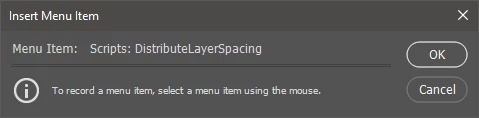
  • From Actions panel menu choose Insert Menu Item.
  • While dialog is open navigate to script which you want to call from File > Scripts (I guess) > script name (click on it)
  • When you see script name in Insert Menu Item dialog click OK to record that step.

1 reply

Bojan Živković11378569
Community Expert
Community Expert
September 22, 2018

I am not sure what exactly you want. Can you post some screenshot or to provide more informations because I think you are using interchangeably words action script.

My guess to solve problem:

  • From Actions panel menu choose Insert Menu Item.
  • While dialog is open navigate to script which you want to call from File > Scripts (I guess) > script name (click on it)
  • When you see script name in Insert Menu Item dialog click OK to record that step.

Mr. Mendelli
Known Participant
September 22, 2018

Apologies, I wasn't sure how to word my question. Using your method worded as I need, thank you.

JJMack
Community Expert
Community Expert
September 22, 2018

You do not need to use Insert menu item.  In Fact you most likely should not use it.  Particularly  if it a Plug-in script.  The Scripts need to be part of the recording process not inserted as a script step.

You can record using  an action  It will record as a script step.   However if you want the setting you use in the script dialog while recording the script step.  The Script need to be a Photoshop Plug_in Script.  Adobe added Plug-in support into ScriptingSupport in CS3.   For and example of a Plug-in script you can look ate Adobe's "Fit Image.jsx" in  Photoshop's Presets\Scripts folder.  Basically the Script records the settings you use recording the step into the Action Step and when the action is  played the Step Passed the settings to the Plug-in script and the script bypasses displaying its dialog.  You can of course turn on the step dialog in the Action.   If you do the Script will display its dialog when the step is played and the recorded setting will be shown in the dialog.  You can interactively change the settings or use settings displayed.

JJMack