Participant
February 4, 2017
Answered

How do I remove the background in photoshop 17

  • February 4, 2017
  • 4 replies
  • 1478 views

I have ZERO experience with Photoshop. I cannot even find the elusive "magic wand" with which I am told I can remove the background from a picture. HELP! How do I remove a background?

    This topic has been closed for replies.
    Correct answer rs68255699

    On your workpalet, the 4rth icon is the quick selection tool. With right klick on the triangle in the bottom right corner you'll get some sub tools.. There is where the magic wand tool is hiding.
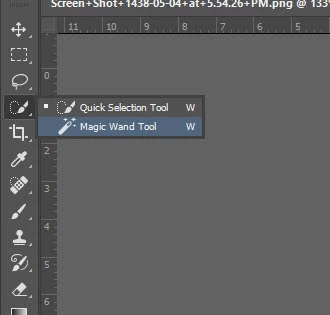
    But maybe you'll better work with the background eraser tool, found behind the 11 th icon.

    I would rather work with masks, but as a beginner this is a fine way to exercise.

    Bewaren

    4 replies

    Participant
    February 9, 2017

    Hi, I'm a complete beginner but I was able to remove annoying background from a selfie I took. Using the tutorials available on Adobe for beginners so go to the support/learning page to watch them they are very helpful. They teach all the basics.

    Regards Anne

    KShinabery212
    Community Expert
    Community Expert
    February 8, 2017

    It also really depends on the background and what you want to remain.  Some backgrounds are super easy to remove while others are a little more difficult.

    Can you share the image that you want to remove the background from.  Then we can give you an easy solution for that particular picture.

    Let's connect on LinkedIn. https://www.linkedin.com/in/kshinabery/
    Derek Cross
    Community Expert
    Community Expert
    February 5, 2017

    If you want to become efficient (and enjoy) using Photoshop you need some training. Personal training is probably the best, but the most expensive. There are some excellent books available, such as the Classroom in a Book series and the Quickstart Guides. The online video training from PuralSight.com and Lynda.com are also very good (you can get a 10-day free trial with Lynda.com). And of course, you can always ask specific questions on this friendly forum.

    There are various ways of removing the background from an image, the approach used will depend on the type of image and your skills. If you post a screenshot of your image on this forum, contributors may be able to suggest the best approach with that particular image.

    rs68255699
    rs68255699Correct answer
    Inspiring
    February 5, 2017

    On your workpalet, the 4rth icon is the quick selection tool. With right klick on the triangle in the bottom right corner you'll get some sub tools.. There is where the magic wand tool is hiding.

    But maybe you'll better work with the background eraser tool, found behind the 11 th icon.

    I would rather work with masks, but as a beginner this is a fine way to exercise.

    Bewaren