
Inspiring
November 27, 2017
Question

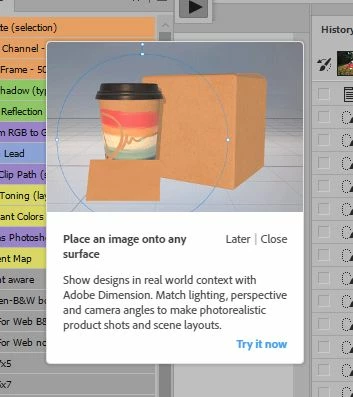
How do I remove this very annoying thing?

  • November 27, 2017
  • 5 replies
  • 2330 views

With the latest version of Photoshop came these annoying pictures.  How do I get rid of this one?  It keeps coming up and covers my actions and usually my pallets (or whatever the term de jure is) at the most inopportune moment.
    This topic has been closed for replies.

    5 replies

    Terri Stevens
    Legend
    April 17, 2018

    Why not just install Dimension, it will probably send the ad away for good. Dimension is a lot better than you think for adding 3D objects to 2D images. I don't use it much, but it seems to me to have a lot of the features of a 3D app except for the modelling tools, but scores highly by reducing the complexity of 3D.

    Participant
    April 17, 2018

    I have Adobe Dimension installed. This alert still comes up every single time I free transform any layer.

    cmgap
    Community Expert
    Community Expert
    April 18, 2018

    I had a similar issue and when I clicked on the link the popup stopped showing up. For awhile I would try to ignore it but clicking through made it go away.

    julianf95398649
    Participant
    December 7, 2017

    Rich toool tips has been turned off since installing, never had the "learn" panel open, ever. Get this EVERY TIME i free transform a  layer.

    I cannot stress quite how utterly infuriating this is, especially as i am a 3D designer and artist and i would NEVER use that toy for 3D

    Participant
    April 17, 2018

    Same here. So annoying and no way to disable it!

    Known Participant
    December 1, 2017

    Adobe, fix this.

    We are paying customers. We don't want advertisement while working.

    i_am_jimAuthor
    Inspiring
    December 1, 2017

    another thread with the same problem Disable Popups for Adobe Dimension

    . Windows 10 -- Premiere Elements 2018 -- Photoshop CC
    i_am_jimAuthor
    Inspiring
    December 4, 2017

    Still no solution?

    . Windows 10 -- Premiere Elements 2018 -- Photoshop CC
    Semaphoric
    Community Expert
    Community Expert
    November 28, 2017

    In Edit > Preferences > Tools, un-check "Use Rich Tooltips".

    i_am_jimAuthor
    Inspiring
    November 28, 2017

    I turned Rich Tool Tips off a while ago.

    . Windows 10 -- Premiere Elements 2018 -- Photoshop CC
    cmgap
    Community Expert
    Community Expert
    November 28, 2017

    Have you quit Photoshop and reopened it?

    michelew83603738
    Community Expert
    Community Expert
    November 28, 2017

    Do you have the new Learn Panel open? Check under Windows Menu

    i_am_jimAuthor
    Inspiring
    November 28, 2017

    If you mean is the Learn panel checked, no.

    . Windows 10 -- Premiere Elements 2018 -- Photoshop CC