Participant
June 28, 2022
Answered

How do i save a .png file bigger then 2gb ?

  • June 28, 2022
  • 10 replies
  • 5243 views

I can't save a .png file bigger then 2gb cause i get this message : 
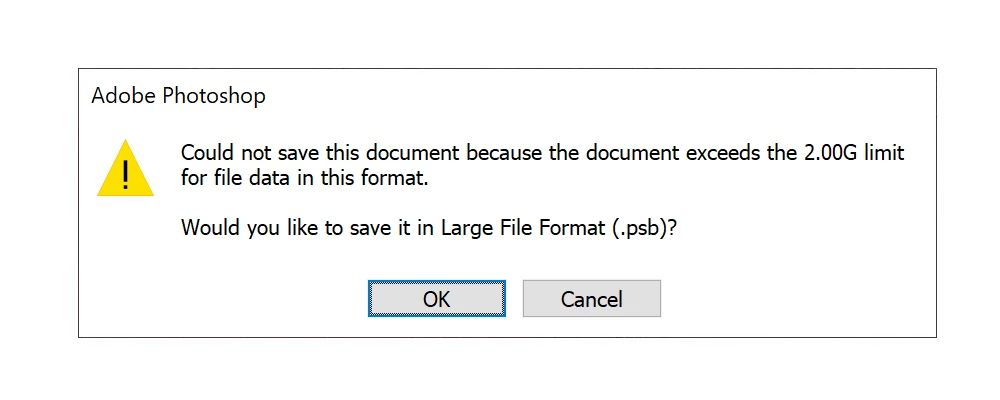
I have the latest Ps 23.4.1.

This topic has been closed for replies.
Correct answer Simona250411553eb7

Finaly was able tyo to it! Only with File > Export > Quick save as PNG

10 replies

Simona250411553eb7AuthorCorrect answer
Participant
June 30, 2022

Finaly was able tyo to it! Only with File > Export > Quick save as PNG

@mj
Community Expert
Community Expert
June 30, 2022

Thanks for letting us know @Simona250411553eb7 

A unique requirement indeeed.

Glad you got sorted.

Best

mj

Earth Oliver
Legend
June 29, 2022

@marliton FYI-There's a sneaky spammer in this thread. The Frank249 user is adding spam links to their quote text...

mglush
Community Expert
Community Expert
June 29, 2022

If it has to be in a .png format, have you considered slicing yor file into smaller sizes to be able to export it?

Michelle

marliton
Community Expert
Community Expert
June 28, 2022

Hi. Do you get the same error with the different options for export?

  • File > Export > Export as...
  • File > Export > Save for web...
  • File  > Save a copy...


Marlon Ceballos
Chris 486
Community Expert
Community Expert
June 28, 2022

What the window is showing you is that your working file in photoshop is larger than 2gb to save. This will require you to save the file in tff or PSB format to continue working in it if you close photoshop. You can still try to export your file to png using the export function under the file menu. Save your file first as that action may crash photoshop.


PNG file format has no upper limit to it's file size, but photoshop may have trouble even exporting as that is not what the PNG file format was created for. Files getting that large that require fidelity are normally turned to vector formats. Hearing someone is using 40gb png files sounds suspect to me. I could be wrong and I don't know your use case or work. Creating a 40mb files can be a huge task for photoshop as your source file can already be multiple gigs before compresion.

Chris 486
Community Expert
Community Expert
June 28, 2022

Another thing that will help is to send us screen shots of your image size panel


and a screenshot of your working file so we can get an idea of how the export may function to png.


Chris 486
Community Expert
Community Expert
June 28, 2022

Hi Simona,


What program are you trying to export this to?

Participant
June 28, 2022

it's a custom made software, not relevant to the problem at hand


Legend
June 28, 2022

It's possible for a PNG to be larger than 2GB, but it looks as if Photoshop won't make them; Adobe probably take the view that PNG is for web graphics so the limit is impossibly large.


If it's less than 4GB you might look for a TIFF to PNG converter, and save as TIFF.

The chances of finding a PSB to PNG converter is very small.

Participant
June 28, 2022

Someone told me that they use +40gb png files in PS, they dont get this limit. The problem is with the map making software that ONLY works with .png files

Earth Oliver
Legend
June 28, 2022

did you ask them how exactly they save 40GB png using Ps?

Participant
June 28, 2022

Derek and Mylenium, i need such a large .png file for a software that makes maps, and it only uses .png files

Mylenium
Legend
June 28, 2022

I concur with @Derek Cross 2GB is insanely large for a PNG. That itself implies that you may not even want/ need a PNG but rather a TIFF, as it seems you're trying to exchange print data or a large panorama image for further use by someone else, not a file that actually needs to be used on the web.


Mylenium

Derek Cross
Community Expert
Community Expert
June 28, 2022

As a matter of curiosity, why do you need such a large image?


Participant
October 11, 2024

maybe its for a poster

Stephen Marsh
Community Expert
Community Expert
October 11, 2024
quote

maybe its for a poster


By @1lillian_5793


It was stated as being for custom map software.