Participant
November 10, 2019
Answered

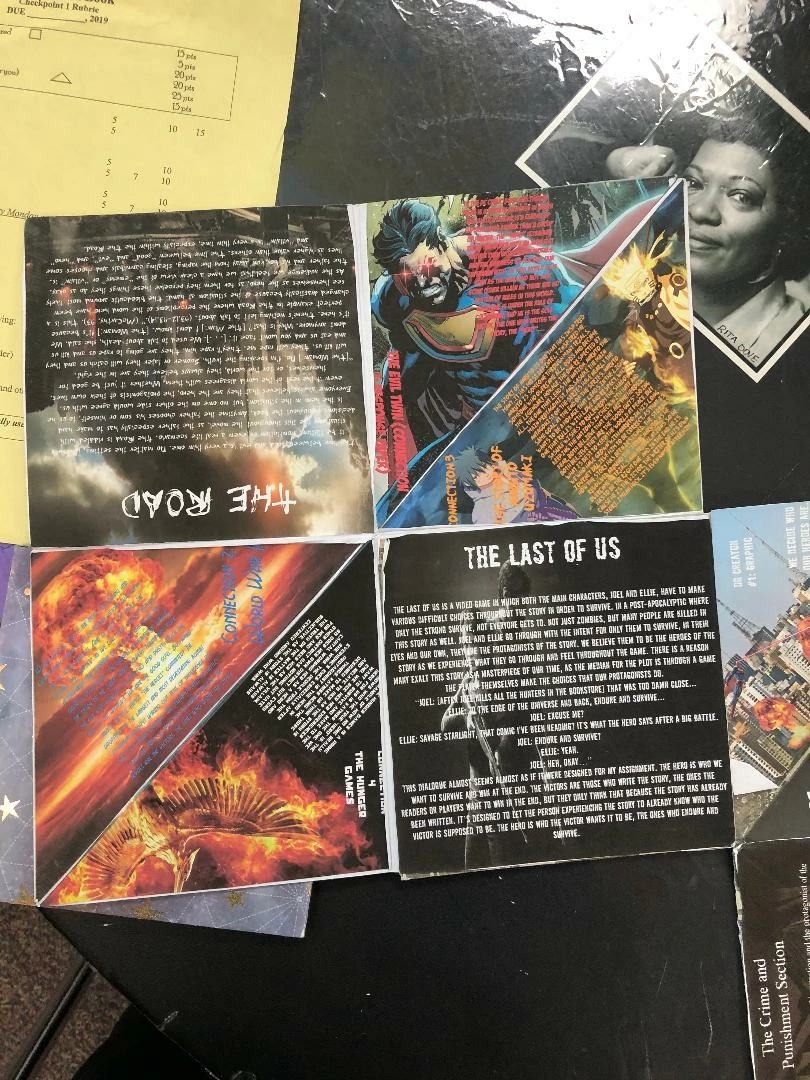
How do I scale the triangles to the size in the photo?
  • November 10, 2019
  • 2 replies
  • 974 views


How do I fit the image inside the triangle and squares? Can someone inform me on how to get this exact size? Thank you

This topic has been closed for replies.
Correct answer lambiloon

Clipping Mask in Photoshop CC


https://youtu.be/-j0mzTSTQKs


Clipping Mask in Indesign CC

https://youtu.be/HadMT1HeKIQ

2 replies

jane-e
Community Expert
Community Expert
November 10, 2019

“Can someone inform me on how to get this exact size?”


Hi

If you look closely, the creator was not exact at all. The spacing between the triangles on the right sided page is thin on the left, moving to thicker on the right. It appears to have been pasted onto the paper, which would account for the uneven spacing and the fact that the upper right corner of the triangle is spilling off the edge of the page.


That being said, if I were doing this layout with text at various angles, I would use InDesign. For the super hero image: Draw a graphic frame that fills the page, delete the anchor point in lower right to create the triangle, then place the image into the frame. Select the image itself and rotate it.


Repeat for the other triangles, drawing a page-size frame and deleting one anchor point.


~ Jane 

Participant
November 10, 2019

How would I insert the text into the triangle after that? 

lambiloon
Community Expert
lambiloonCommunity ExpertCorrect answer
Community Expert
November 10, 2019

Clipping Mask in Photoshop CC


https://youtu.be/-j0mzTSTQKs


Clipping Mask in Indesign CC

https://youtu.be/HadMT1HeKIQ

Ali Sajjad / Graphic Design Trainer / Freelancer / Adobe Certified Professional
lambiloon
Community Expert
Community Expert
November 10, 2019

Hi its very easy now in Photoshop use pen tool to make triangle or polygon shape tool , then use clipping mask to fit picture in any shape or triangle.


Regards

Ali Sajjad / Graphic Design Trainer / Freelancer / Adobe Certified Professional
Participant
November 10, 2019

I tried that but I can't seem to get the exact size present in the photo. And when I do it my photo that I want to insert in the triangle is too small. How do I fix that?

lambiloon
Community Expert
Community Expert
November 10, 2019

First thing is Photohop or Indesign works little different way , if you are using photoshop and did clipping mask then after it scale down your image to get which you want , while indesign has other options like auto fit the frame.


Regards

Ali Sajjad / Graphic Design Trainer / Freelancer / Adobe Certified Professional