
Participant
October 9, 2023
Question

How do I select psjs script in Photoshop?

  • October 9, 2023
  • 2 replies
  • 652 views

I tried this:“Select the script to be executed from Photoshop’s File menu -> Scripts -> Browse”

but there are only these can be found:
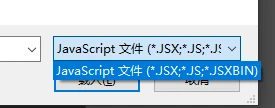
 

So I can't select psjs to run on PS. 

 I‘m wondering why and how to fix it?

(My English is terrible,hope my discription is accurate enough.)


My PS version: 23.2.1 

windows 10

This topic has been closed for replies.

2 replies

Stephen Marsh
Community Expert
Community Expert
November 3, 2023

AFAIK, File > Scripts > Browse is only for legacy JavaScript/ExtendScript - not UXP (I don't do UXP).


EDIT: You must be running PS version 23.5 or higher to use Browse:

https://developer.adobe.com/photoshop/uxp/2022/ps_reference/media/uxpscripting/

JoshLawrence
Participant
November 4, 2023

Stephen, thanks for your insight.


I was wondering if File > Scripts > Browse is not intended for UXP scripts I'm wondering how should one properly access a UXP script through the Ps App?


Thanks,

Josh

Stephen Marsh
Community Expert
Community Expert
November 4, 2023

@JoshLawrence – It is, but you must be running PS version 23.5 or higher to use Browse!


https://developer.adobe.com/photoshop/uxp/2022/ps_reference/media/uxpscripting/

c.pfaffenbichler
Community Expert
Community Expert
October 10, 2023

What is psjs? Why do you think Photoshop could run it? 


ESTK Photoshop Scripts can be AppleScript, Visual Basic and JavaScript. 

JoshLawrence
Participant
November 3, 2023

Hello @c.pfaffenbichler,


I'm fairly new to Photoshop development myself but I've read some online documentation and come to understand that psjs is the suggested file extension for photoshop UXP scripts with reasoning for the extension at this link (How it works (adobe.com)). My understanding is AppleScript, VBA and ECMA3 JS support are no longer developed upon by Photoshop as UXP aims to be their new supported extensibility platform (Photoshop APIs for developers and scripters (adobe.com)). 


Back to the OPs question @lyc32805817ycto ,

I've followed your procedure to try to replicate the issue on my device by selecting: 'File > Scripts > Browse' and this is the default selection for my file explorer:


I'm running Windows 11, PS Version 25.1.0. I would suggest trying again after updating your Photoshop version.


Sorry I couldn't provide more helpful feedback,

Josh