


- Home
- Photoshop ecosystem
- Discussions
- Re: How do I set up photoshop to work with a touch...
- Re: How do I set up photoshop to work with a touch...
How do I set up photoshop to work with a touch screen?

Copy link to clipboard
Copied
Hi,
I just bought a 15.6" Asus Q500A touchscreen laptop with Windows 8. I downloaded photoshop and the 'touch app plug-ins' through the Adobe Application Manager for creative cloud. When I open a file in PS and select the brush(or any other) tool if I use the touch screen to drag it accross the canvas nothing happens. It still works with my mouse though.
How can I get this to work properly?



Explore related tutorials & articles
 91
Replies
91
91
Replies
91


Copy link to clipboard
Copied
That does not surprise me. As I wrote Photoshop does not support Touch. It has supports for graphic tablets pens with wintab device drivers. It has support for mice and keyboards. No where do I see touch support documented in Photoshop manual. Here is a link to Photoshop manual search it for touch, http://helpx.adobe.com/pdf/photoshop_reference.pdf The closest thing I found to touch support is the following:
=================================================================================================
Use the Rotate View tool
You use the Rotate View tool to rotate the canvas non-destructively; it does not transform the image. Rotating the canvas can be useful for any
number of reasons, including facilitating easier painting or drawing. (OpenGL is required.)
You can also use rotate gestures on MacBook computers with multi-touch trackpads.
1. In the toolbox, select the Rotate View tool . (If the tool isn’t visible, hold down the Hand tool.)
2. Do any of the following:
Drag in the image. A compass will indicate north in the image, regardless of the current canvas angle.
In the options bar, enter degrees in the Rotation Angle field. Click or drag the circular Set Angle of Rotation control.
3. To restore the canvas to the original angle, click Reset View.
For a video on the Rotate View tool and other workspace tips, see www.adobe.com/go/lrvid4001_ps. (Discussion of the Rotate View tool begins at the 5:10 mark.)
Disable trackpad gestures (Mac OS)
If you have a MacBook computer with a multi-touch trackpad, you can use the trackpad to flick, rotate, or zoom images. This functionality can
greatly increase your efficiency, but you can disable it if inadvertent changes occur.
1. Choose Photoshop > Preferences > Interface (Mac OS).
2. In the General section, deselect Enable Gestures
=====================================================================================================
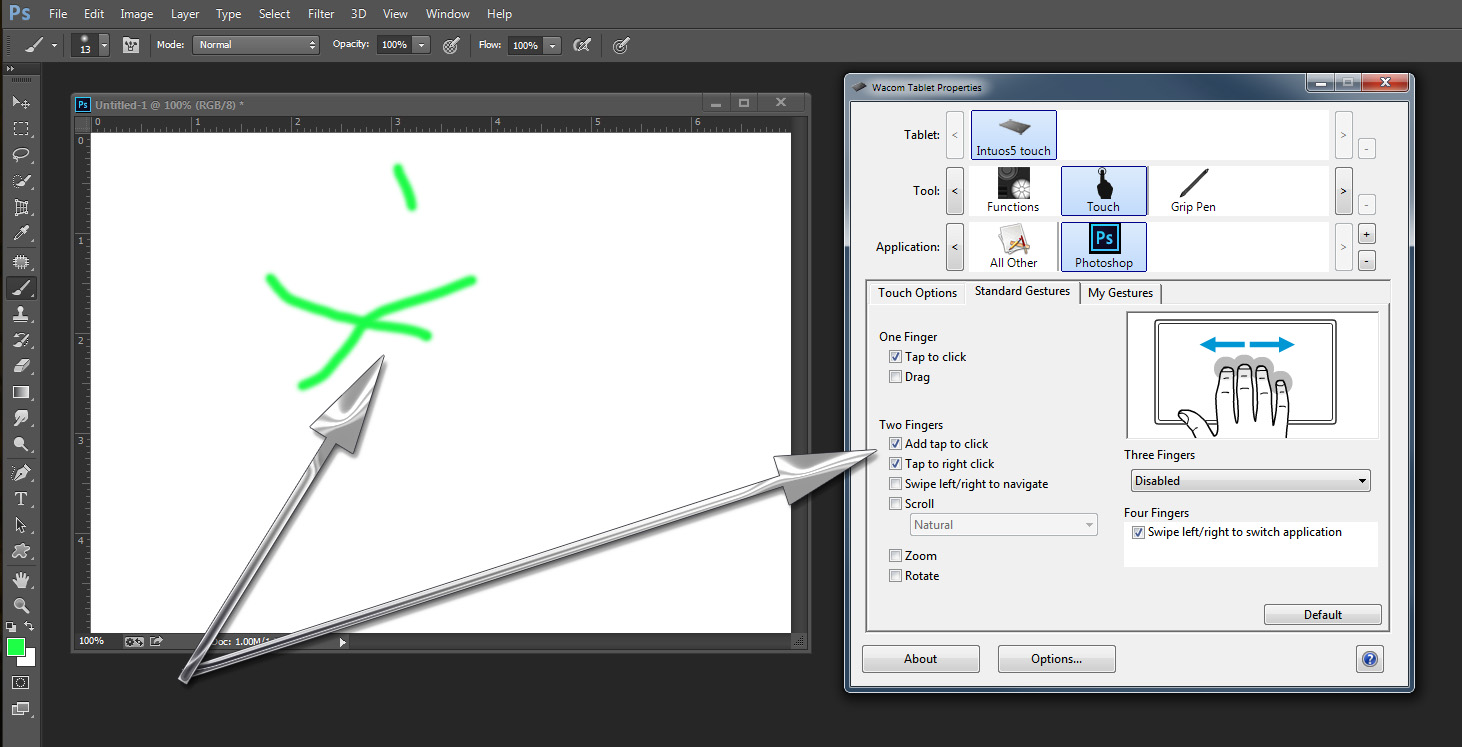
My Wacom Intuos 5 Touch device driver has some touch support for some Photoshop features. I do not try to finger paint I use the Wacom pen for that. I also do not get the strange finger paint in Photoshop when I use my finger to move the mouse cursor with the Wacom Intuos 5 touch support. Starting outside an image window or inside one,
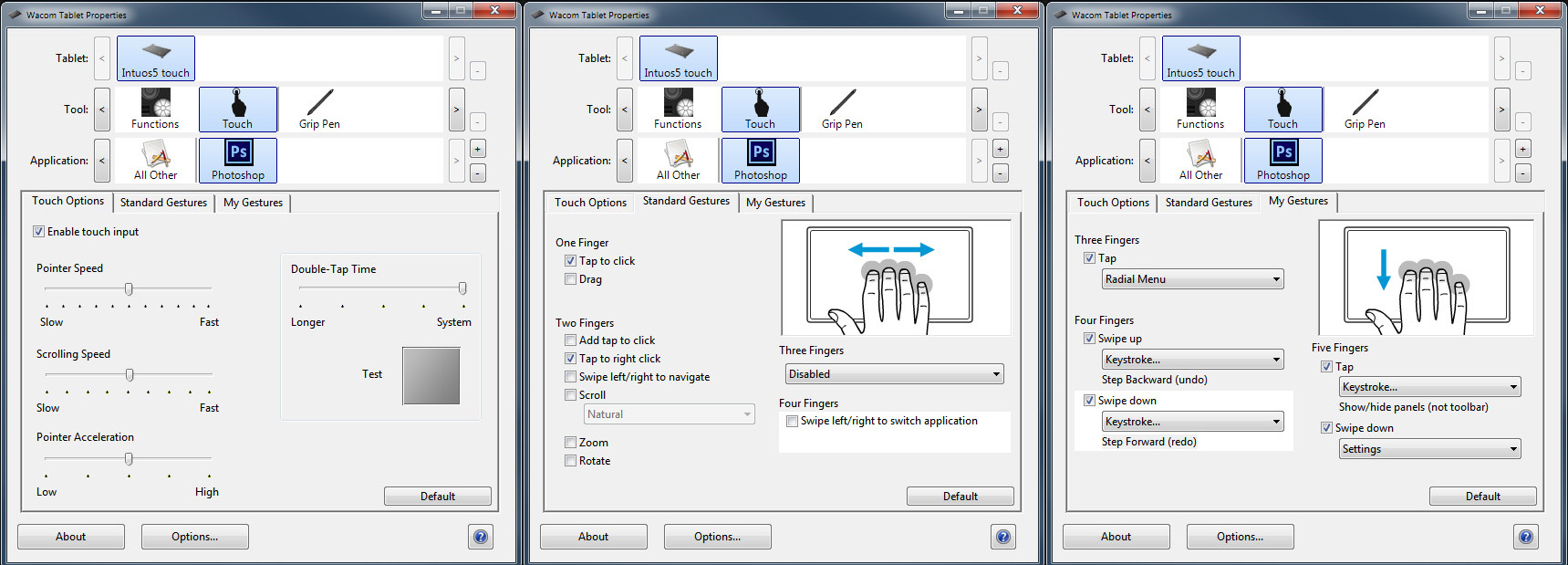
However if I add two finger support add tap to click I can finger paint and also use other tools. However I'm not into finger paint so I do not configure Touch support that way for Photoshop.

Copy link to clipboard
Copied
Thank you JJMack, it looks I will have to wait for a new PS release to take advantage of my highres touch screen.

Copy link to clipboard
Copied
Has Adobe helped you with your issue? I have a stylus that I want to use in Photoshop so I can draw art.

Copy link to clipboard
Copied
I haven't been here of a long time but as I just purchased on of the new Dell model laptops with the Multitouch screen and find that though I did not know it had this type of screen in the first place I now think this could be a strong point for many uses. Especially for users who create art and want a hand drawn look. I do not know if this is something Adobe should create or Wacom but my gut feeling is that it should be a combination of Adobe, Wacom, Microsoft and Apple i think once they get this together they can offer a consumer version and a pro version.
Though Wacom at first might not like it I think in the end they will be selling more pens and drivers and Microsoft will have many consumers going to them for this feature though Apple might be slow to adapt they might do best for the pro market.
I think in the one case the complete group would make the best options available to the user and that will leave the user free to choose. That will make this kind of standard and reinvigorate the market.
Tablets are fine but because they are limiting they are generally used not as a computer replacement as once thought they would be.
So touch screen as an easel is probably the way to go.
Painting and drawing is the coolest of both professionals and hobbyist.
So I am make this as a feature request! Do it Adobe it will be great. Full featured stuff.
Copy link to clipboard
Copied
Ok one more thought the stylus can come in various forms like pens and brushes and even pallet knives.
Copy link to clipboard
Copied
Touch screens are not sensitive to pressure and they can be multi touch where multiple point can be sense 5 10 points Photoshop supports touch gestures not finger painting. You can paint with some application via touch support and stylus that is a supstitute for you finger.
Some screens are both touch a touch screen and are also a digital tablet with Pen support the display or other device drivers turn off touch support when the pen come in close proximity with the displays surface. Like Microsoft surface and Wacom mobile studio type machines. These may support additional devices like Microsoft Dial and Wacom Button device I forget its name. Wacom also has an Art pen that supports rotation as well a tilt abd pressure and has an Air Brush looking device. Stylus are a substitute for a finger touch thet are not difital devices.
Some Pens require power like Microsft Pens and Apple pen Wacom pens do not require power.

Copy link to clipboard
Copied
> I'm going to have to give up and just wait for Adobe to get their act together.
If you are expecting Photoshop's developers to align the product with common users needs, you have a long wait ahead.
The simple fact is, when it comes to straightforward functionality like printing or mouse/touch, what is easy for a crude tool like Paint is too difficult for Photoshop. Baffled as to why.
Copy link to clipboard
Copied
Some straightforward functions are difficult to implement requiring time and money. Nothing is free.

Copy link to clipboard
Copied
Photoshop is FAR from free. If Adobe chooses not to keep it updated to take advantage of new technologies, people will eventually find alternatives. Touch screen technology is ubiquitous on Windows computers these days. Photoshop should work seamlessly with it, it's a premium product.
Copy link to clipboard
Copied
I am sure many have found they do not need Photoshop and have found an alternative the fill their needs. Other like myself can not find a single alternative. For we have developed plug-in and scripts for Photoshop. Just like I only by Canon Cameras bodies for I have thousands invested in Canon EF L lens.
Please if you do not need Photoshop find an alternative that suits you needs. Look at GIMP it Free, Photoshop Elements, Affinity Photo, Photoline and others are cheap. None have all of the Features found in Photoshop.

Copy link to clipboard
Copied
I am currently trying to set up pen input on Sharp LL-S201A (2013 premium product) to work with Photoshop (2017 premium product) on Win 10 Pro (premium product).
It does not work so far. Microsoft default driver treat the pen as very thin finger, Sharp does not provide drivers for Win 10 and Photoshop is snobbish about finger painting. So all three components are working but not together,
To add insult to injury, FreshPaint (free paint software from Microsoft and surprisingly good one) supports finger painting without any additional set up. It also does scaling, multi-touch etc. and it is way more precise than mouse paint in Photoshop.
And all this smart talk about "sensitive interface" and "insufficient precision" is just a lot of excuses. Poor excuses.
Copy link to clipboard
Copied
Photoshop supports touch gestures it does not support finger painting. You may be able to Finger Paint if you use touch support like a Mouse. The thing is fingers do not have features like click buttons or pressure sensitivity that your multi touch display senses. You may be able to set up button click areas like touch pads have for mouse buttons. Also remember a Touch stylus is just a finger substitute they also do not have buttons and pressure sensitivity.
Digital Tablet pen support includes a tip cursor, buttons, presure sensitivity and tilt. Some pens support rotation as well. Photoshop's brush engine support digital pens and mice not fingers. Fingers lack features that are required for communicating with Photoshop Brush engine.
Copy link to clipboard
Copied
>Fingers lack features that are required for communicating with Photoshop
Brush engine.
Baloney. Fingers have exactly the same features as the mice that have been
on computers Photoshop v01.
Copy link to clipboard
Copied
Will you please post a picture of your fingers that have those button features. Are they implants? How do they communicate with your computer. How many buttons a wheel does it have tilt left and right?

Copy link to clipboard
Copied
Have you been living under a rock? There are things you know that people nowadays call "touch screens" and that things have the same input characteristics as click-and-drag on the mouse. All you need to draw in Photoshop is one mouse button. The same should be for touchscreens and fingers, period.
But seriously ADOBE. Make it experimental, make it optional, I don't care. All the other drawing apps support that. Why do you have to go against the grain and piss everybody on the way?
Copy link to clipboard
Copied
I have written many time you can paint with you finger using your finger as a mouse you need use something to supply the Mouse buttons like keyboard keys or touch pad buttons or mouse buttons.
I am sure Adobe could add a finger paint mode to Photoshop. However I for one would not like to see that. Photoshop has more than enough junk as it is. More junk is not needed. There are many free application users can use to finger paint with. Adobe even supply some for Android and IOS tablets that integrate with Creative cloud workflow's. I would rather see Adobe fix some of the bugs in Photoshop.
Copy link to clipboard
Copied
This is less about drawing with your finger and more about retouching photos with your finger which is way more convenient than doing it with a touch pad or mouse and you can't do that on mobile devices. I'm sorry, but PS is the de facto industry standard for retouching so we can't just "go to other apps". Touch input isn't junk. You wouldn't even notice it if you're not actively trying to use it. Besides even Adobe Illustrator supports it!
Copy link to clipboard
Copied
Adobe Photoshop has some standard touch gesture support and some touch device's drivers have additional touch features that can be customized to be used with Photoshop features. I never wrote that touch is junk. It is my opinion that finger painting is for children. Photoshop is not suitable for children is also an opinion I have.
Copy link to clipboard
Copied
"I am sure Adobe could add a finger paint mode to Photoshop. However I for one would not like to see that. Photoshop has more than enough junk as it is. More junk is not needed."
You implied, but ok, whatever. Don't use it then, it is not a reason enough to stop the improvement for so many other people. Also you're ignoring the existence of fine tip capacitive styluses. Many computer OEMs are still hesitant about including pen support, sometimes touch screen is the best you can get for the money. And please don't say anything about the precision or lack of pressure sensitivity, we know, but it's not like you get that on a touch pad or mouse. So unless PS wanna be some exclusive club for elites, touch should be supported.
Copy link to clipboard
Copied
thecoolkid69 wrote:
you're ignoring the existence of fine tip capacitive styluses.
No I choose to use a Wacom pen instead of fingers and styluses

Copy link to clipboard
Copied
You implied, but ok, whatever. Don't use it then, it is not a reason enough to stop the improvement for so many other people. Also you're ignoring the existence of fine tip capacitive styluses. Many computer OEMs are still hesitant about including pen support, sometimes touch screen is the best you can get for the money. And please don't say anything about the precision or lack of pressure sensitivity, we know, but it's not like you get that on a touch pad or mouse. So unless PS wanna be some exclusive club for elites, touch should be supported.
This is exactly the point. Instead of demeaning it by calling it "finger painting", try to understand the use case. Many times retouching in Photoshop is using the various tools (clont, magic, etc) or doing masks. Much more intuitive to use the touch screen with either a finger or stylus than the God-awful touchpad or stick that most Windows machines have.
We realize you'll never get the precision or pressure sensitivity of the Wacom devices but that's fine for the nature of the work - it's not needed there anyway.
But since the touch supports the click event when you press on the screen, functionally it's the same as the mouse and it's crazy that Adobe won't add this support, especially given that there are very few digitizer PC's out there but many, many touchscreen models to choose from. I know this because I've been searching for a 2 in 1 and the models are: Surface, Surface Book, HP Spectre 15t, some Dell model, and a few ThinkPads. The Surface and HP are last year's CPU's and the Thinkpads are nice but light on specs.
Adobe already does this sort of interface in the Lightroom App so it's not like there is no precedence for them to add this functionality. Stubbornness, yes, but since we're paying monthly for this stuff, they should be adding features we want and judging by the comments here and across the web, this is a common request!
Copy link to clipboard
Copied
itguy08 wrote:
But since the touch supports the click event when you press on the screen, functionally it's the same as the mouse and it's crazy that Adobe won't add this support,
Stop Adobe does support that for some touch devices however, from what I see touch support varies between devices . When I do the touch click with the brush tool selected I get a dot of paint at least I do with touch support in my intuos pro. When I move my finger and click again you will get an other dot of paint move again hold and shift key and click again I will get a straight painted line that is how mouse clicking works that how my touch support works. What you can do with a Mouse that you and not do with your finger or stylus is hold the click and paint. Here I did this with my finger using touch on my intuos pro tablet. To drew the straight line I had to hold the keyboard Shift key. To draw the freehand line I had to press and hold my mouse left button with my other hand. With two hands you can draw with you finger or a stylus if you can add the left click and hold. If you can not Adobe would need to add a finger paint type feature for Windows support touch gestures that does not include a click and hold feature.
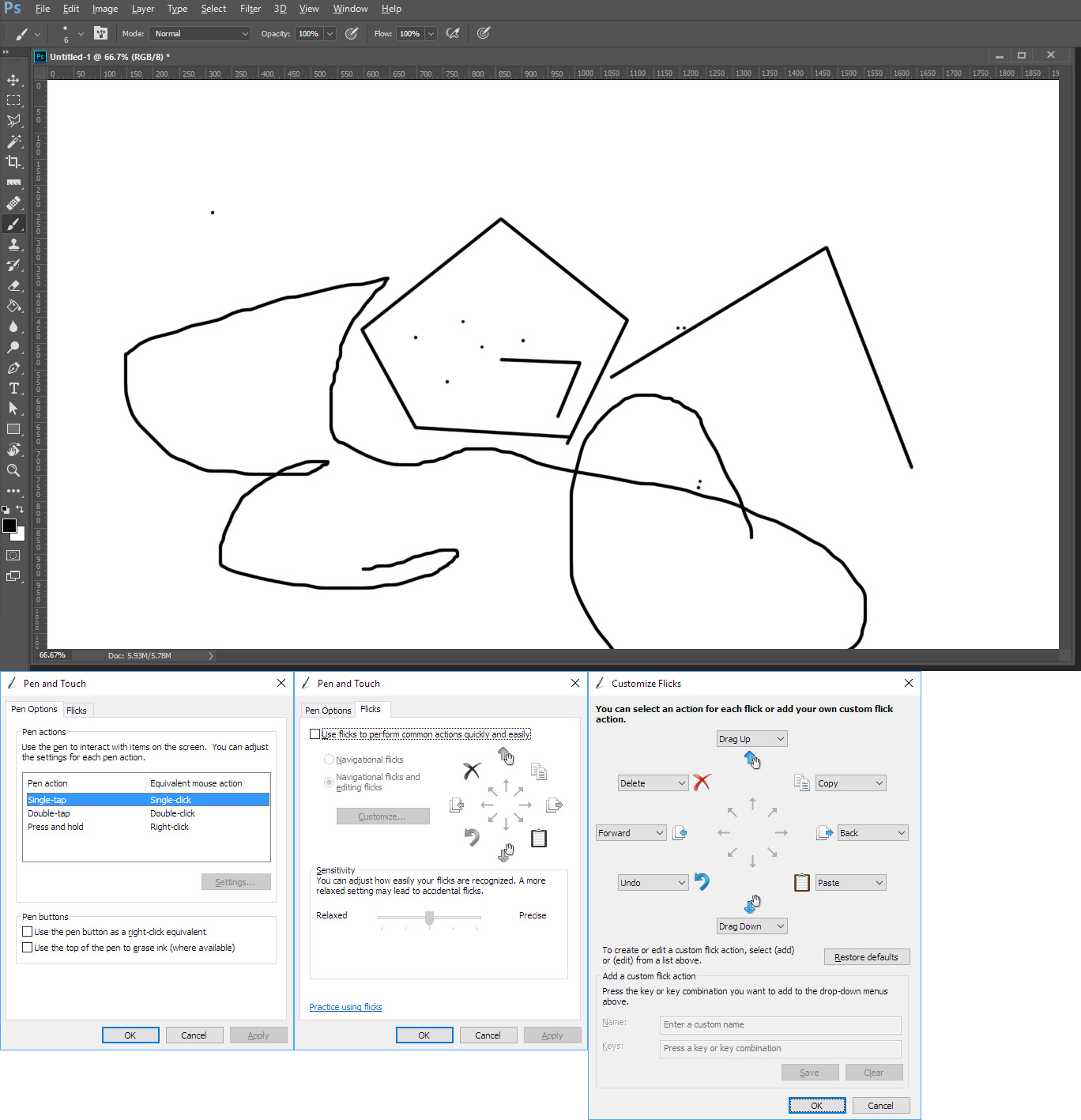
Since your tablet or laptop with touch support is running Windows to be able to run Photoshop. You may able to add a mouse click and hold if the display touch feature is like a touch pad. In that case perhaps someone will add a Bluetooth button to a stylus that will enable a click and hold. IMO Adobe will most likely not add a finger painting feature to touch support since windows does no has a click and hold.
However, on my Surface Pro 3 that has a Pen not a stylus. I can paint with touch using its touch pad however, with its display touch support I can not touch paint its touch support is not like touch pad touch support or the Intuos touch support. It may be a Touch Display Device driver thing. I can select items in Photoshop's UI and use touch gestures in Photoshop image windows. I can not get a paint brush cursor with my finger on the touch screen nor get any tools cursor on an image. I can only do that with the surface pro touch pad support or Intuos tablet support.
If laptop with touch screen have the same type of Display touch support as Microsoft Touch Display Device driver on my Surface Pro 3 Adobe would need to add Code for touch screen support. Touch support seems to very between touch devices. The Surface Pro 3 display has both multi-touch support and digital pen support. Meatloaf sang 2 out of 3 not bad adding the Surface Pro 3 Pen 3 out of 4 is better.
IMO a cheap tablet with apps designed for use with touch is a much better option. When in come right down to it Photshop's UI is not touch friendly. You will find with Photoshop you need your keyboard and will want a mouse or pen that has a cursor that can be positioned first then used. With fingers and stylus there are just too many accidental touches that need to be undone.
Copy link to clipboard
Copied
I appreciate the thorough response and I blame a lot of the confusion on Microsoft. As far as I know there are 2 basic touch styles in Windows - the digitizer and touch. Digitizers work like Wacoms where there is a pen and requires a digitizer pad and is capable of precise position and transfers pressure. Then there is the capacitive touchscreen where all that is needed is a finger. It's not as precise (but close enough) and doesn't support pressure. The Surfaces and a handful of other Windows laptops support the pen while all touchscreens support the capacitive touch screen.
The touchscreen does generate a "mouse click" when you press on the screen - it's how Windows knows to trigger a dialog box, etc when you touch on the screen. It works really well. Not as precise as a Wacom but darn near close enough after calibration. I think it may use click and hold as many other apps allow you to "draw" by touch. Even MS Paint will let you draw with touch. Lightroom has a "touch mode" that will allow you to interact with just touch.
I was able to draw this in paint with my finger:

It's not perfect but sure could be good enough for basic retouching. And this was in the paint program that comes with Windows. Surely Adobe could figure it out for Photoshop. There is already this button for pressure:

Give another option for touch or go like Lightroom and offer a touch mode where the controls are accessible via touch.
Adobe knows how to do this - Lightroom on the PC is very friendly to touch and you can do a lot of these things via touch in that application. IIRC Photoshop Express also supports touch!
I think part of the issue may be that Adobe doesn't get the use case and that many don't need or want the precision of a Wacom-type interface. I think if they put their engineers on it, they could have it added in less than a month and would make PS immensely more useful to a growing majority of photographers.
What is the best way to get in touch (no pun intended) with Adobe?
Copy link to clipboard
Copied
Adobe has a web site for Photoshop feedback where you can submit ideas and report bug etc. to Adobe. Over the years I have been using Photoshop I have reported the Photoshop bugs that have bitten me though Adobe acknowledged these bugs. Adobe has only fixed some of them some bugs remain in Photoshop release after release. Personally I would rather Adobe fix the bugs in Photoshop then add more code that may contain additional bugs. The web site you should be using is Photoshop Family Customer Community good luck.
Copy link to clipboard
Copied
I have written many time you can paint with you finger using your finger as a mouse you need use something to supply the Mouse buttons like keyboard keys or touch pad buttons or mouse buttons.
This is not funny. Most painting programs have adopted touchscreen interfaces and are quite usable. Look on Autodesk Sketchbook for example. Actually touch screen support became a standard feature almost immediately and poor support of it in Photoshop is quite noticeable.
The problem is, as I told before, Microsoft treatment of single screen press in touch mode (right moused button and hold). There is no easy way to change in in Win10, and other paint programs simply treat right click event over painting area differently. Without buttons on fingers, and users are ready to accept this limitation.
This definitely is not highest priority for Photoshop software team but not even experimental support since 2013? Come on, they are not so poor on resources 


Find more inspiration, events, and resources on the new Adobe Community
Explore Now
 AdChoices