Participant
March 23, 2020
Question

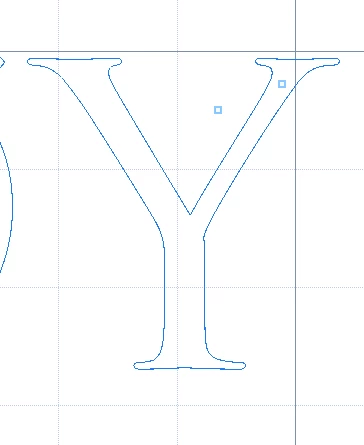
How do I shape this letter?

  • March 23, 2020
  • 1 reply
  • 519 views

Hello! 


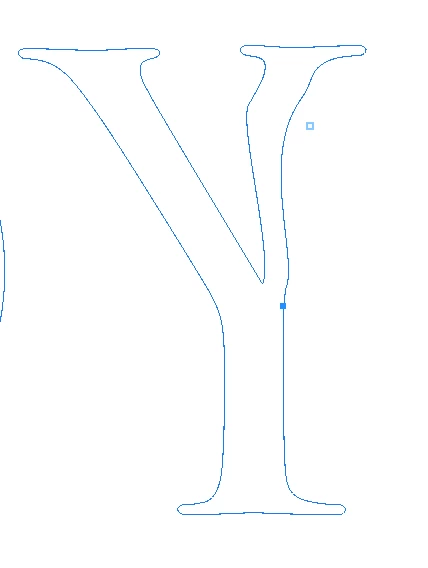
Im struggeling to get the shape of the letter "Y" as I want. Im trying to use the pen-tool, but Im not quite familiar with it yet. Seen a couple of tutorials, but they´re most about drawing shapes and how to make a straight line. 

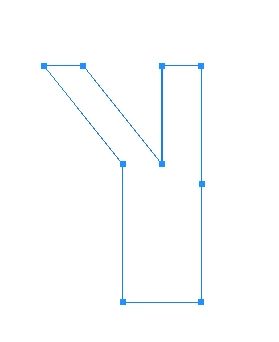
I want the right wall of the "V"(the top of the "Y") to be straight in line with the foot of the "Y", something like the drawing I tried to make. How do I go on to do so? 

Thanks for any replies! 

(Picture of the "Y" Im editing, a picture of me trying, and a picture og the result Im after) 


This topic has been closed for replies.

1 reply

S_Gans
Community Expert
Community Expert
March 23, 2020

I'm not sure why, but your Y doesn't have NEARLY enough points on it. Did you create the Y and then choose Type>Convert to Shape? 
Otherwise, please tell us how you made this.

Adobe Community Expert / Adobe Certified Instructor
Ludvig86Author
Participant
March 24, 2020

Thanks for the reply! 

The letter is just from a text. This is what I get without making any changes to it. 


This is what I made from adding the letter "E" and erase the parts I didn´t want. But it doesn´t seem...."professional".....?Or is it ok to do it like this?