Just lost another 3 hours of work - 1 wrong key stroke and all my work seems to disappear forever and I am left to start from scratch over and over and over. Iam easily on 7 times with this one. I follow the " experts " step by step instruction butt if I make one wrong clcik , it all vanishes. With most soft ware you must explicity tell the machine to delete the files - I do not know what happens here - they just vanish along with memory and HD space. I cannot undo errors with CTRL Z , becaus eit works for 1 key stroke and seems to loop so error is unrecoverable, amking any error permanent so I have to start the same thing over and over again.
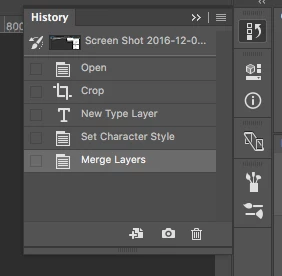
If you are working in Photoshop and you have your history panel open and you delete layers or do anything else then you can immediately go back by just returning to the history panel.
If you are loosing hours of work in a single click then your entire workflow is flawed. I've been using Photoshop since there was Photoshop and I've never lost anything that I didn't want saved because I follow a standard workflow. You just have to pay attention and learn how to use the software.
Sorry to be so harsh but following the experts instructions and suddenly having many layers vanish because of a wrong click tells me you are not following an expert and you don't know what you are doing. Work doesn't vanish, you have to delete layers or merge layers or do some other action. All of those actions are recorded in the history panel. You can set the number of steps you want to save, you can save out various versions. There is no "Danger Will Robinson" button that you can click anywhere that will delete things that you cannot either go back using the Edit Menu - Step backward option or the history panel to recover.
Here's the history Panel. Learn how to use it.


 AdChoices