
Participant
March 29, 2013
Answered

How do I switch from Frames to Timeline in Animation panel?

  • March 29, 2013
  • 2 replies
  • 35947 views

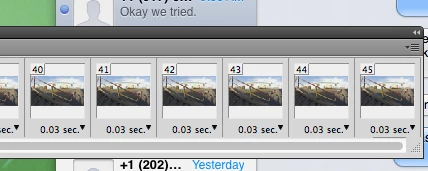
I am using Adobe Photoshop CS5.1 and I am trying to switch from Frames to Timeline in the Animation Panel. I have read in other forums that there should be a menu in the bottom right corner of the panel, but none is appearing in my panel. (Screenshot attached)

Thanks in advance for your help.
    This topic has been closed for replies.
    Correct answer c.pfaffenbichler

    I do not think so. I think I just have regular Photoshop CS5 Version 12.1 x32

    Is switching between Frame/Timeline only an option in Photoshop Extended?


    Quote from the Help:

    Timeline mode controls (Photoshop Extended)

    In timeline mode, the Animation panel includes the following features and controls:

    So it would appear that, yes, you would need Photoshop Extended to use timeline animation.

    2 replies

    Participant
    March 22, 2018

    Click on this guy at the left bottom of the timeline:

    or on timeline,

    menu > Delete Timeline

    it will bring you back to the choice between timeline or frames.

    c.pfaffenbichler
    Community Expert
    Community Expert
    March 29, 2013

    Have you tried the pop up menu (the triangle and lines-icon on the right near the top)? »Convert to Video Timeline« should be the item.

    justone76Author
    Participant
    March 29, 2013

    Thanks for your reply. I have tried that and it is not an item in the menu. Here is the screenshot of the menu that appears:

    justone76Author
    Participant
    March 29, 2013

    Do you have Photoshop Extended?


    I do not think so. I think I just have regular Photoshop CS5 Version 12.1 x32

    Is switching between Frame/Timeline only an option in Photoshop Extended?